Navixy IoT Logic API
Introduction
Navixy IoT Logic is a no-code/low-code tool that enables seamless IoT data processing and integration. Its API provides programmatic access to create, manage, and optimize data flows between IoT devices and destination systems without requiring extensive development resources.
Purpose and core capabilities
Navixy IoT Logic functions as a data flow manager that:
Receives information from devices connected to the platform
Decodes and converts data in real-time
Sends processed data to other platforms and services
Enables building complex flows with nodes responsible for specific data processing tasks
Standardizes telematics data through the Navixy Generic Protocol
The IoT Logic API allows developers and system integrators to programmatically implement these capabilities, making it effective for organizations that need to:
Work efficiently with decoded device data
Apply flexible data transformation to match specific business needs
Monitor and troubleshoot data streams
Create consistent data flows across multiple devices and protocols
Key concepts
Navixy IoT Logic operates based on two fundamental components that work together to process device data:
Flow
A Flow is the foundation for all data logic in the product. It defines how data moves through stages of reception, enrichment, and transmission. Each flow consists of connected nodes that determine what happens to the data at each processing stage.
Key characteristics of flows:
Flows can be enabled or disabled to control data processing
Every flow requires at least one data source and one output endpoint
Each device can only be assigned to one flow at a time
Flows process data in real-time as it arrives from devices
Nodes
Nodes are the functional elements of a flow, with each node handling a specific stage of the data lifecycle. Common node types include:
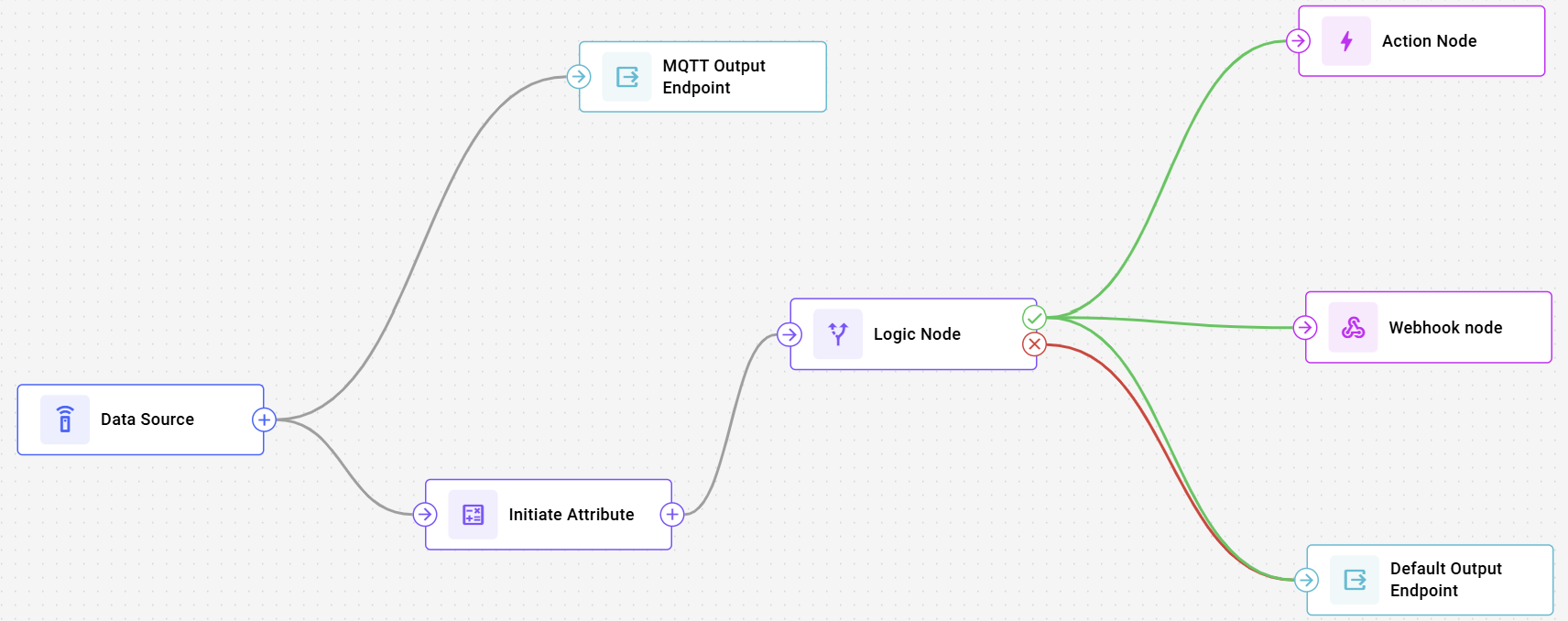
Data Source node: selects which devices send data into the flow
Initiate Attribute node: transforms and enriches data using Navixy IoT Logic Expression Language
Logic node: routes data based on conditions
Webhook node: sends HTTP POST requests to your external endpoint
Device action node: sends commands to devices
Output Endpoint node: transmits data using the Navixy Generic Protocol. This node can be configured to use different endpoint types:
Default endpoint: Pre-configured destination for sending data to the Navixy platform
MQTT endpoint: Configurable connection for sending data to third-party systems and services
Nodes are connected through transitions (edges) that define the path data follows through the flow.
Data flow architecture
The following screenshot from IoT Logic UI illustrates the basic architecture of a flow in IoT Logic:

This represents a simple linear flow where:
The Data Source node collects telemetry from selected devices
The Initiate Attribute node processes and enriches this data
The Default Output Endpoint node delivers the transformed data to its destination - Navixy platform
More complex architectures can be created by:
Adding multiple data source nodes to process different device types
Chaining multiple attribute nodes for multi-stage data processing
Including several output endpoints to deliver data to multiple destinations outside Navixy simultaneously
Quick start for IoT Logic API
To ensure a clear picture of the basic IoT Logic API capabilities, let's create your first flow.
The following example demonstrates how to create a complete flow with 4 nodes that sends data to Navixy. This flow will:
Collect data from specified devices
Detect a speed violation with
speed > 90Trigger a device action (
send_gprs_command) on violationSend messages to Navixy via
output_default
Step 1: Authentication
First, authenticate to obtain a session token. To do it, send a POST request to the user authentication endpoint {baseURL}/v2/user/auth providing your account's login and password as parameters:
Response (example):
Copy the hash value from the response.
For more details on how to authenticate your requests, see Authentication.
Step 2: Create a complete flow with nodes and connections
Create a flow with all nodes and connections in a single request:
Use either the session hash from Step 1 or an API key in the Authorization header.
Response (example):
Parameters explained
Flow entity: The main container defining a complete data processing pipeline
title: Names your flow for easier identificationenabled: When true, flow begins processing data immediately after creation
Nodes: Functional components that each handle a specific step in data processing. See Nodes for full node schemas and options.
Node 1 (
data_source): Entry point for device telemetry.source_ids: Which devices feed messages into this flow.
Node 2 (
logic): Branching decision based on a boolean expression.condition: "speed > 90"routes each message to THEN or ELSE.
Node 3 (
action): Executes device commands on the THEN branch.actions[].type: "send_gprs_command"sends the command to the triggering device (by default).
Node 4 (
output_endpoint): Terminates the flow and defines the destination.output_endpoint_type: "output_default"sends messages to Navixy.
Edges: Define connections between nodes (the data path).
{ "from": 1, "to": 2 }: data source → logic.{ "from": 2, "to": 3, "type": "then_edge" }: violation → action.{ "from": 2, "to": 4, "type": "then_edge" }: violation → output.{ "from": 2, "to": 4, "type": "else_edge" }: no violation (or condition can’t be evaluated) → output.Both Logic branches resolve to an output endpoint (required for a valid flow).
This single request creates a complete flow that:
Collects data from
source_ids: [111111, 222222, 333333]Routes messages by speed condition
speed > 90Triggers
send_gprs_commandon the THEN branchOutputs messages via
output_default
The success response includes the ID of the newly created flow, which you can use for future operations like updating the flow or adding additional nodes.
You can expand this example by adding more devices, creating additional calculated attributes, or configuring MQTT endpoints to send data to external systems.
Last updated
Was this helpful?