> For the complete documentation index, see [llms.txt](https://navixy.com/docs/llms.txt). Markdown versions of documentation pages are available by appending `.md` to page URLs; this page is available as [Markdown](https://navixy.com/docs/user/guide/fleet-management/drivers.md).
# Drivers
Create and manage driver profiles in Navixy, assign hardware keys for automatic identification, and link drivers to vehicles for accurate fleet reporting.
The **Drivers** section in the Navixy platform is designed to help fleet managers efficiently manage and monitor their drivers. This section allows you to create and manage detailed driver profiles, linking them to specific objects in your fleet. By maintaining comprehensive driver records, you can streamline fleet operations, improve driver accountability, and enhance overall fleet performance.

## Driver list
In the **Drivers** tab, you can view a list of all drivers associated with your fleet. Each driver profile contains essential information, such as the driver's name, assigned object, department, and other critical details like their employee ID, hardware key, and contact information. This data is displayed in a table format for easy access, and a visual summary is provided on the right side of the screen for quick reference.
### Adding a driver
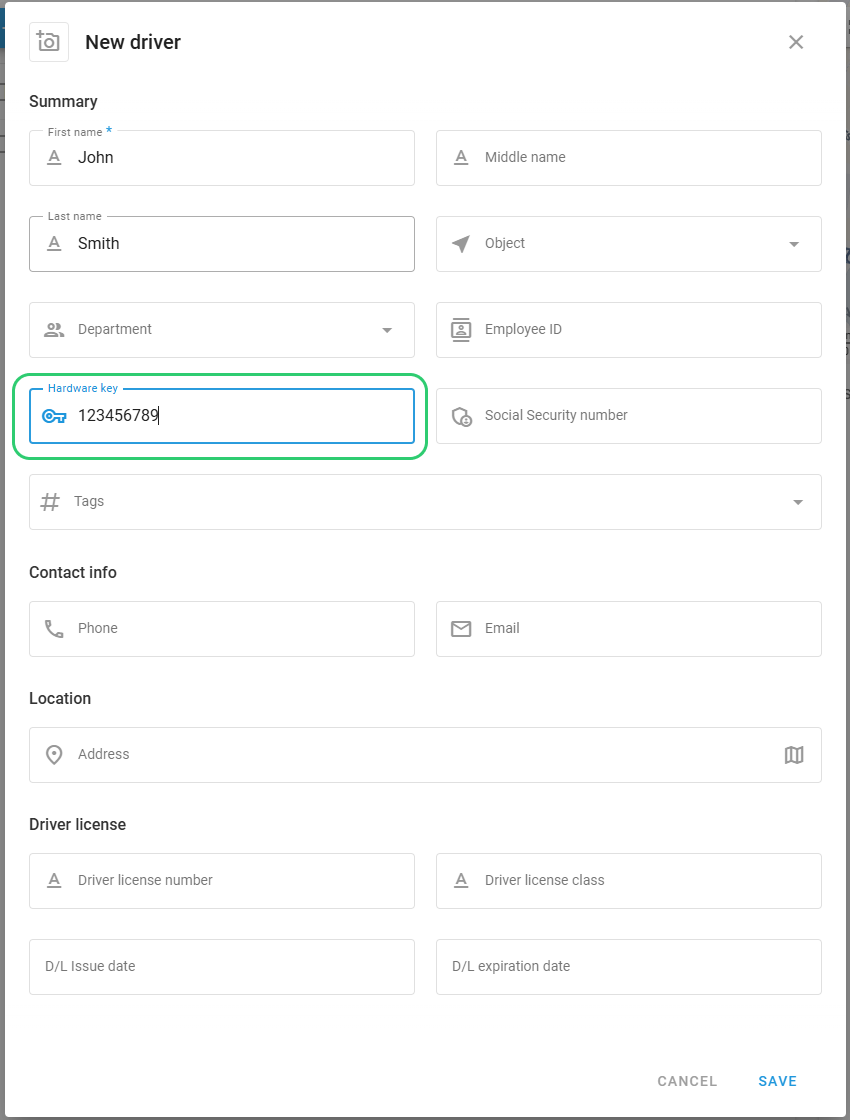
To add a new driver, click the **Add driver** button. This opens a form where you can enter all relevant details about the driver, including their contact information, location, and driver license details. You can also link the driver to a specific vehicle or department within your organization. Additionally, you can upload a photo of the driver to enhance their profile.
### List customization
By clicking on the **Columns** option, you can select which fields you want to be visible, such as the driver's first name, last name, object, department, and more. This feature provides flexibility in how you view and manage driver information, allowing you to tailor the interface to your specific needs.
### Sidebar with detailed information
When you select a driver from the list, a summary of their profile appears on the right side of the screen. This summary includes key details such as the driver’s name, associated device, department, employee ID, hardware key, and social security number, if applicable. Additionally, it provides contact information, including phone numbers and email addresses, which are crucial for maintaining clear communication with your drivers.
## Driver identification
Efficient driver identification is essential for accurate fleet management, ensuring that each driver is correctly assigned to the appropriate vehicle. Navixy offers robust solutions for both automatic and manual driver identification, catering to the diverse needs of fleet managers.
### Automatic driver identification
Navixy supports automatic driver identification through electronic keys such as i-Button or RFID devices. When a driver uses their assigned key, the Navixy platform automatically identifies them and assigns them to the vehicle in real time.
{% columns %}
{% column %}
**To set up automatic identification:**
1. Go to **Fleet management** and select the **DRIVERS** tab
2. Click **Add driver** to create a new driver profile
3. Enter the driver's details, **First name** field is mandatory
4. In the **Hardware key** field, enter the exact identifier from the physical RFID card, i-Button, or BLE device
5. Click **Save**
Once configured, go to the [Tracking ](/docs/user/guide/tracking.md)section to see automatic driver identification when the hardware key is used with the vehicle.
{% endcolumn %}
{% column %}
{% endcolumn %}
{% endcolumns %}
**Requirements for automatic identification:**
The **Hardware key** feature must be enabled for the specific GPS device model, which can be verified on the [Navixy supported devices page](https://www.navixy.com/devices/). If the **Hardware key** option is available in the **State fields** section for your device, then it supports the Driver Identification feature.
### Manual driver identification
In scenarios where automatic identification isn't possible or preferred, Navixy offers a manual driver assignment process:
#### Assigning drivers manually
After creating employee cards for your drivers, you can manually assign them to objects within the Navixy platform. To do this, navigate to the Tracking app, select an object, and assign a driver using the widget panel.
### Driver-based reporting
For fleet operations where multiple drivers use the same vehicle, Navixy provides detailed driver-specific reporting. This feature enables fleet managers to generate travel reports organized by driver, as well as shift change reports, offering a clear overview of each driver’s trips and working hours.
These reports are invaluable for monitoring driver performance, managing workloads, and ensuring compliance with working hours regulations.
---
# Agent Instructions
This documentation is published with GitBook. GitBook is the documentation platform designed so that both humans and AI agents can read, navigate, and reason over technical content effectively. Learn more at gitbook.com.
## Querying This Documentation
If you need additional information that is not directly available in this page, you can query the documentation dynamically by asking a question.
Perform an HTTP GET request on the current page URL with the `ask` query parameter, and the optional `goal` query parameter:
```
GET https://navixy.com/docs/user/guide/fleet-management/drivers.md?ask=&goal=
```
`ask` is the immediate question: it should be specific, self-contained, and written in natural language.
`goal` is optional and describes the broader end goal you are ultimately trying to accomplish on behalf of the user. GitBook uses it to tailor the answer towards what is most useful for that goal.
The response will contain a direct answer to the question and relevant excerpts and sources from the documentation.
Use this mechanism when the answer is not explicitly present in the current page, you need clarification or additional context, or you want to retrieve related documentation sections.