> For the complete documentation index, see [llms.txt](https://navixy.com/docs/llms.txt). Markdown versions of documentation pages are available by appending `.md` to page URLs; this page is available as [Markdown](https://navixy.com/docs/admin/plans/suspending-service-for-a-device.md).
# Suspending a tracker
Suspend a tracker by switching it to a restricted pricing plan, stopping new tracking while keeping historical data
In certain situations, you might need to temporarily suspend service for a tracker, for example, due to a missed payment. In these cases, you can transition the tracker to a restricted pricing plan. While suspended, it stops tracking and recording new data until the restriction is lifted.
{% hint style="warning" %}
All historical data recorded before the suspension remains securely stored and accessible.
{% endhint %}
To create a pricing plan that suspends the service for a device, follow these steps:
{% stepper %}
{% step %}
## Open the Plans page
Open the Admin Panel and navigate to the **Plans** page.
{% endstep %}
{% step %}
## Create a new plan
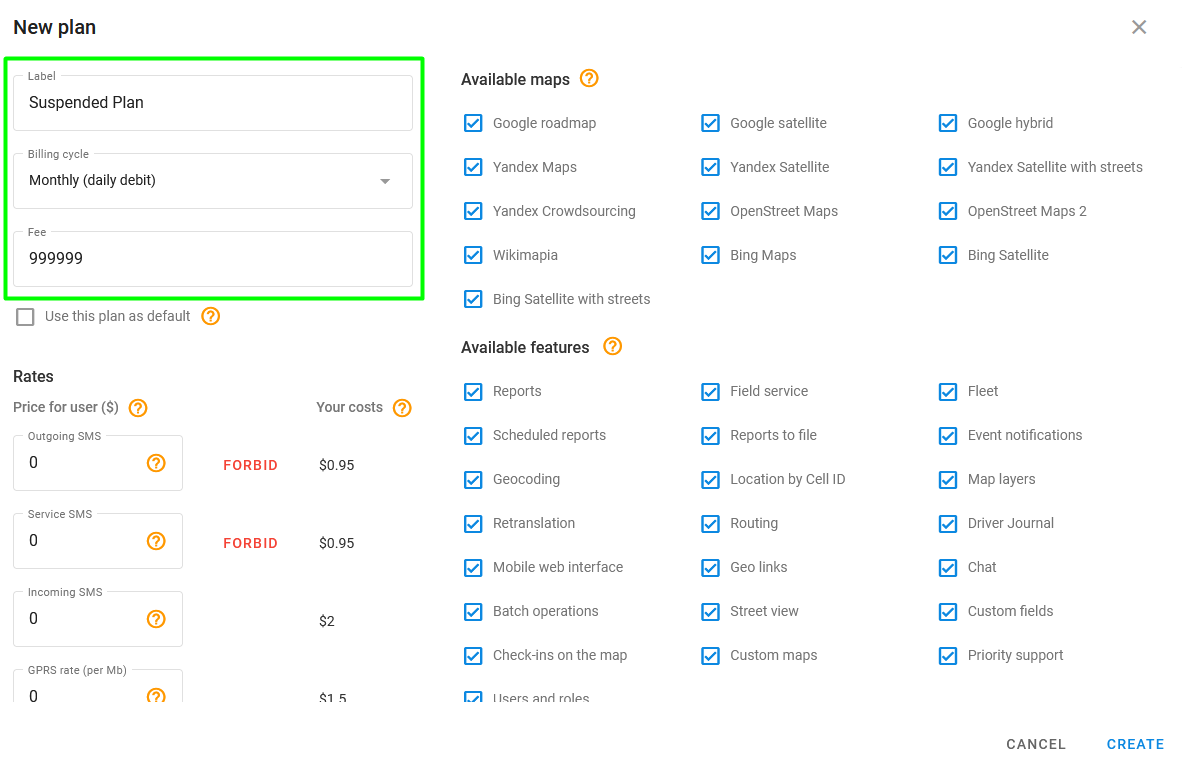
Click to create a new pricing plan and give it a name (e.g., "Suspended Plan").
{% endstep %}
{% step %}
## Set up billing
Select **Monthly (daily debit)** as the billing cycle and set the monthly fee to a very high value, such as $999,999. This prevents the customer from being charged during the suspension period.
{% endstep %}
{% step %}
## Configure the rest of the plan
In the pricing plan settings, disable the features of your choice or leave the default settings to restrict device use.
{% endstep %}
{% step %}
## Finish the creation process
Click **Create** to finish creating the plan.
{% endstep %}
{% step %}
## Assign the plan to a device
Assign the new pricing plan to the device that you want to suspend service for. The device is suspended starting the next day after the pricing plan change.
{% endstep %}
{% endstepper %}
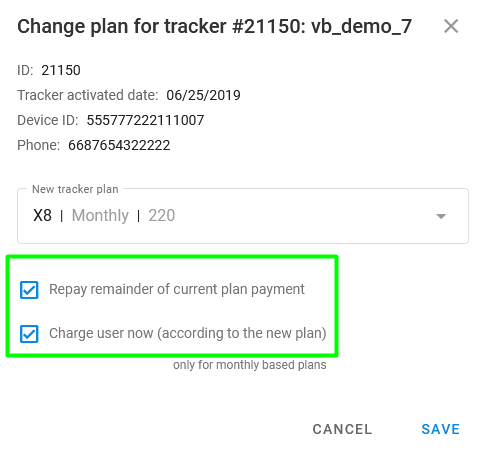
You should check **Repay remainder of current pricing plan payment** and **Charge user now (according to the new plan)** when changing the pricing plan.
Payment options when changing plan
---
# Agent Instructions
This documentation is published with GitBook. GitBook is the documentation platform designed so that both humans and AI agents can read, navigate, and reason over technical content effectively. Learn more at gitbook.com.
## Querying This Documentation
If you need additional information that is not directly available in this page, you can query the documentation dynamically by asking a question.
Perform an HTTP GET request on the current page URL with the `ask` query parameter, and the optional `goal` query parameter:
```
GET https://navixy.com/docs/admin/plans/suspending-service-for-a-device.md?ask=&goal=
```
`ask` is the immediate question: it should be specific, self-contained, and written in natural language.
`goal` is optional and describes the broader end goal you are ultimately trying to accomplish on behalf of the user. GitBook uses it to tailor the answer towards what is most useful for that goal.
The response will contain a direct answer to the question and relevant excerpts and sources from the documentation.
Use this mechanism when the answer is not explicitly present in the current page, you need clarification or additional context, or you want to retrieve related documentation sections.
.png?alt=media)
 to create a new pricing plan and give it a name (e.g., "Suspended Plan").