> For the complete documentation index, see [llms.txt](https://navixy.com/docs/llms.txt). Markdown versions of documentation pages are available by appending `.md` to page URLs; this page is available as [Markdown](https://navixy.com/docs/admin/resellers.md).
# Resellers
Create and manage resellers (sub-dealers), configure permissions, and control activation and suspension statuses
Navixy's channel partners have the ability to expand their business by creating a network of sub-dealers or resellers. This section describes how to create a reseller and the various options of configuring them.
With the reseller feature, partners can invite new organizations to become their sub-dealers and assign them a set of permissions that fit their specific needs. The reseller has access to a dedicated Admin Panel with the ability to manage their own customers, IoT devices, and billing.
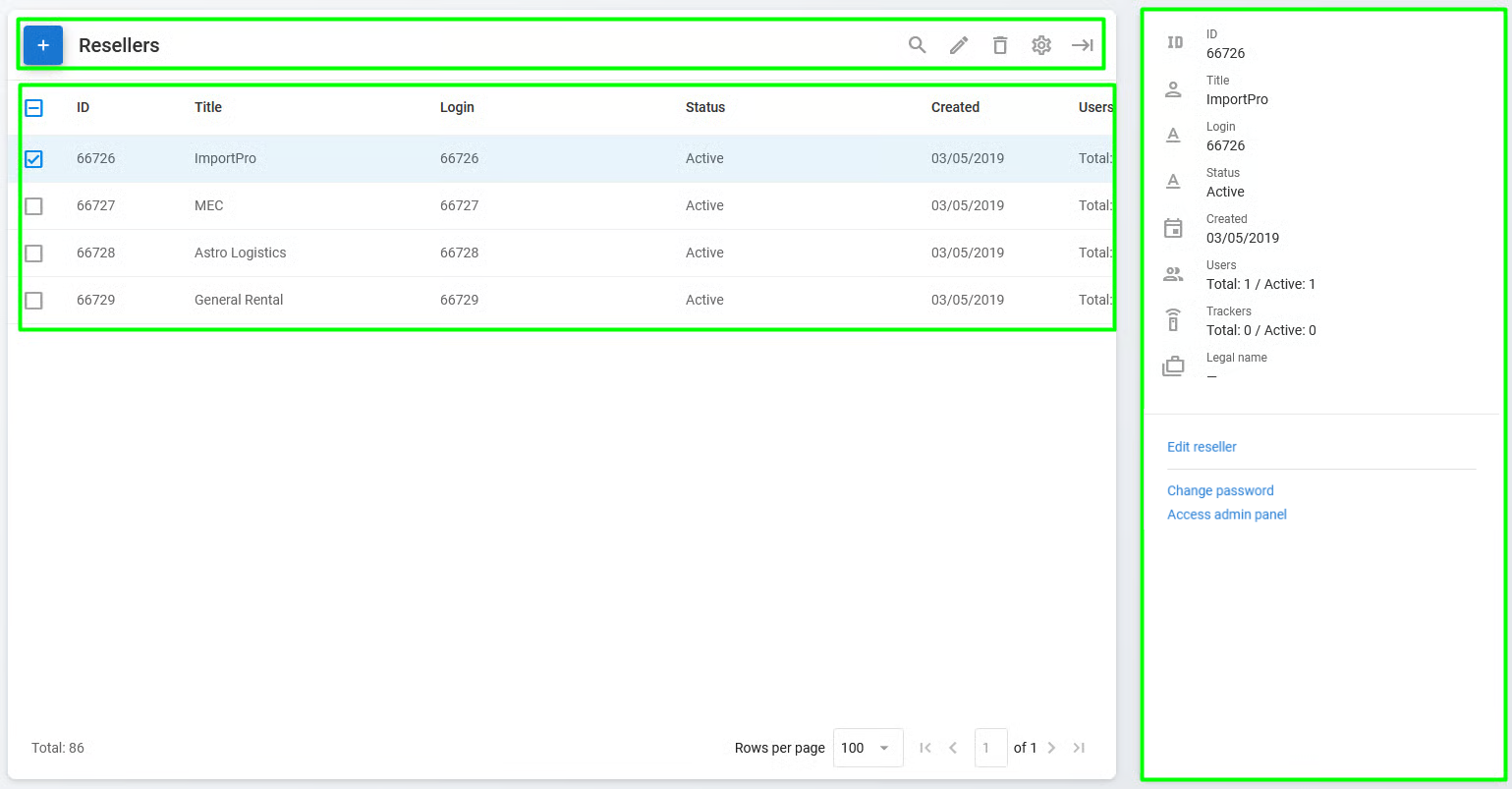
Resellers page
The **Resellers** page consists of the following sections:
* **Reseller toolbar**: A toolbar used to easily create, edit, delete, and find resellers
* **Reseller list:** A list of existing resellers formatted as a table
* **Reseller details:** Information about the selected reseller with a list of related actions:
* **Edit reseller**: Opens the **Edit reseller** window to change their details (also available by clicking in the toolbar)
* **Change password**: Opens the **Change password** window for the reseller
* **Access admin** panel: Opens the reseller's Admin Panel
## Reseller options and restrictions
Resellers can perform the following actions in their Admin Panel:
* Brand and customize their web services and mobile apps
* Set up service preferences, such as language and currency
* Create their own pricing plans
* Manage their GPS devices
* Add and manage users
Resellers aren't allowed:
* Modify the GIS package. The GIS package is inherited from the partner's account.
* Create their own resellers. To do this, they need to become a partner.
* Submit tickets to Navixy support: for any technical questions, they should contact the partner first.
## How to create a reseller
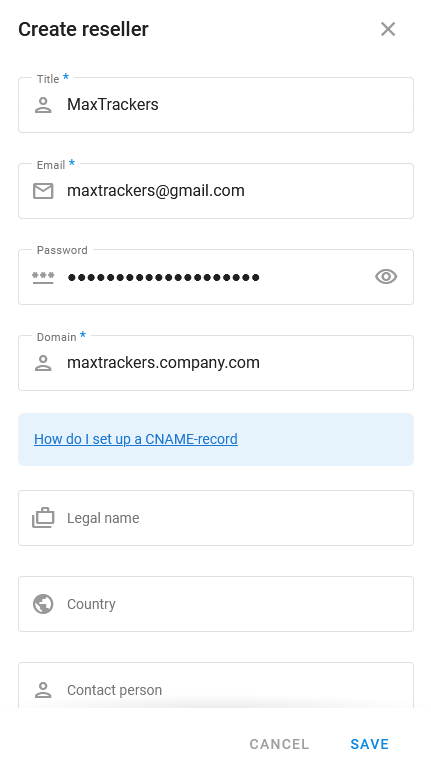
Click to create a new reseller. Enter the required information, such as the reseller's company name and contact details. After creating the reseller profile, the reseller's status is **Not paid**, which means their profile isn't yet activated and their access to the Admin Panel is limited.
Creating a reseller
## Reseller status
Resellers can have the following statuses:
**Not paid**
The reseller profile isn't active, and access to the reseller's Admin Panel is limited. This status is automatically assigned to newly created resellers. If a reseller has the **Not paid** status, the partner can't create new resellers until the payment is completed. After the payment is received, Navixy changes the status to **Active**.
**Active**
The reseller profile is activated, and the reseller has full access to their Admin Panel.
**Admin Panel suspended**
In case of a violation of the cooperation conditions, the partner can restrict the reseller's access to their Admin Panel. However, the reseller's user interface isn't suspended.
**Service fully suspended**
Both the reseller's Admin Panel and user interface are suspended.
In addition, channel partners can install an SMS gateway for their resellers. To set it up, contact [Navixy support](mailto:support@navixy.com).
---
# Agent Instructions
This documentation is published with GitBook. GitBook is the documentation platform designed so that both humans and AI agents can read, navigate, and reason over technical content effectively. Learn more at gitbook.com.
## Querying This Documentation
If you need additional information that is not directly available in this page, you can query the documentation by asking a question.
Perform an HTTP GET request on the following URL with the `ask` and `goal` query parameters:
```
GET https://navixy.com/docs/admin/resellers.md?ask=&goal=
```
`ask` is the immediate question: it should be specific, self-contained, and written in natural language.
`goal` is what the user is ultimately trying to achieve, the reason they need the answer. Sharing it helps GitBook give you a better, more relevant answer. A goal is most helpful when it describes the outcome the user wants rather than restating the question. For example, with `ask=how do I create an API token`, a goal like `automate deployments from our CI pipeline` lets GitBook tailor the answer to that use case.
The response will contain a direct answer to the question and relevant excerpts and sources from the documentation.
Use this mechanism when the answer is not explicitly present in the current page, you need clarification or additional context, or you want to retrieve related documentation sections.
 in the toolbar)
* **Change password**: Opens the **Change password** window for the reseller
* **Access admin** panel: Opens the reseller's Admin Panel
## Reseller options and restrictions
Resellers can perform the following actions in their Admin Panel:
* Brand and customize their web services and mobile apps
* Set up service preferences, such as language and currency
* Create their own pricing plans
* Manage their GPS devices
* Add and manage users
Resellers aren't allowed:
* Modify the GIS package. The GIS package is inherited from the partner's account.
* Create their own resellers. To do this, they need to become a partner.
* Submit tickets to Navixy support: for any technical questions, they should contact the partner first.
## How to create a reseller
Click
in the toolbar)
* **Change password**: Opens the **Change password** window for the reseller
* **Access admin** panel: Opens the reseller's Admin Panel
## Reseller options and restrictions
Resellers can perform the following actions in their Admin Panel:
* Brand and customize their web services and mobile apps
* Set up service preferences, such as language and currency
* Create their own pricing plans
* Manage their GPS devices
* Add and manage users
Resellers aren't allowed:
* Modify the GIS package. The GIS package is inherited from the partner's account.
* Create their own resellers. To do this, they need to become a partner.
* Submit tickets to Navixy support: for any technical questions, they should contact the partner first.
## How to create a reseller
Click  to create a new reseller. Enter the required information, such as the reseller's company name and contact details. After creating the reseller profile, the reseller's status is **Not paid**, which means their profile isn't yet activated and their access to the Admin Panel is limited.