Pro tips on gathering Raw Data via Postman

AuthorArtem P., Field Expert, Navixy IoT
Use case: Data streaming to other applications
Explore how our API facilitates one of the most common business scenarios among our clients: uploading raw data for integration with AI applications, BI tools, and other services. This process enables the construction of extensive Big Data sets, allowing for comprehensive data analysis and business analytics, particularly in transportation utilization. Clients leverage this data to streamline vehicle maintenance costs and improve service offerings, especially in delivery and field service operations. An example of this is the creation of heat maps to visualize activity concentrations in specific areas, whether it be load, employee, or vehicle distribution.
Consider the success story of a client who, after analyzing that a majority of their delivery trucks were concentrated in a particular region, significantly boosted their brand visibility, expanded their operational reach, and enhanced sales in that area. This strategic move involves reallocating resources from less active zones, opening new storage and distribution points, and refining their marketing approach. As a result, they achieved a notable increase in conversion rates by adjusting their advertising expenditure—increasing it in target areas while scaling back in regions with lower interest. This remarkable outcome was accomplished in just a few months.
Let's delve deeper into how you can request this data for your applications, enabling the automatic acquisition of critical information. Utilizing this data can significantly boost the profitability of your business or that of your clients.
Requesting raw data export file with Postman
Authorization
To start, you'll need to obtain your user API key from our collection. This is done through the user/auth API request. Here's how:
Authenticate Your User: Use the user/auth API request by providing your user login and password. Refer to our documentation and replicate the example provided for clarity.
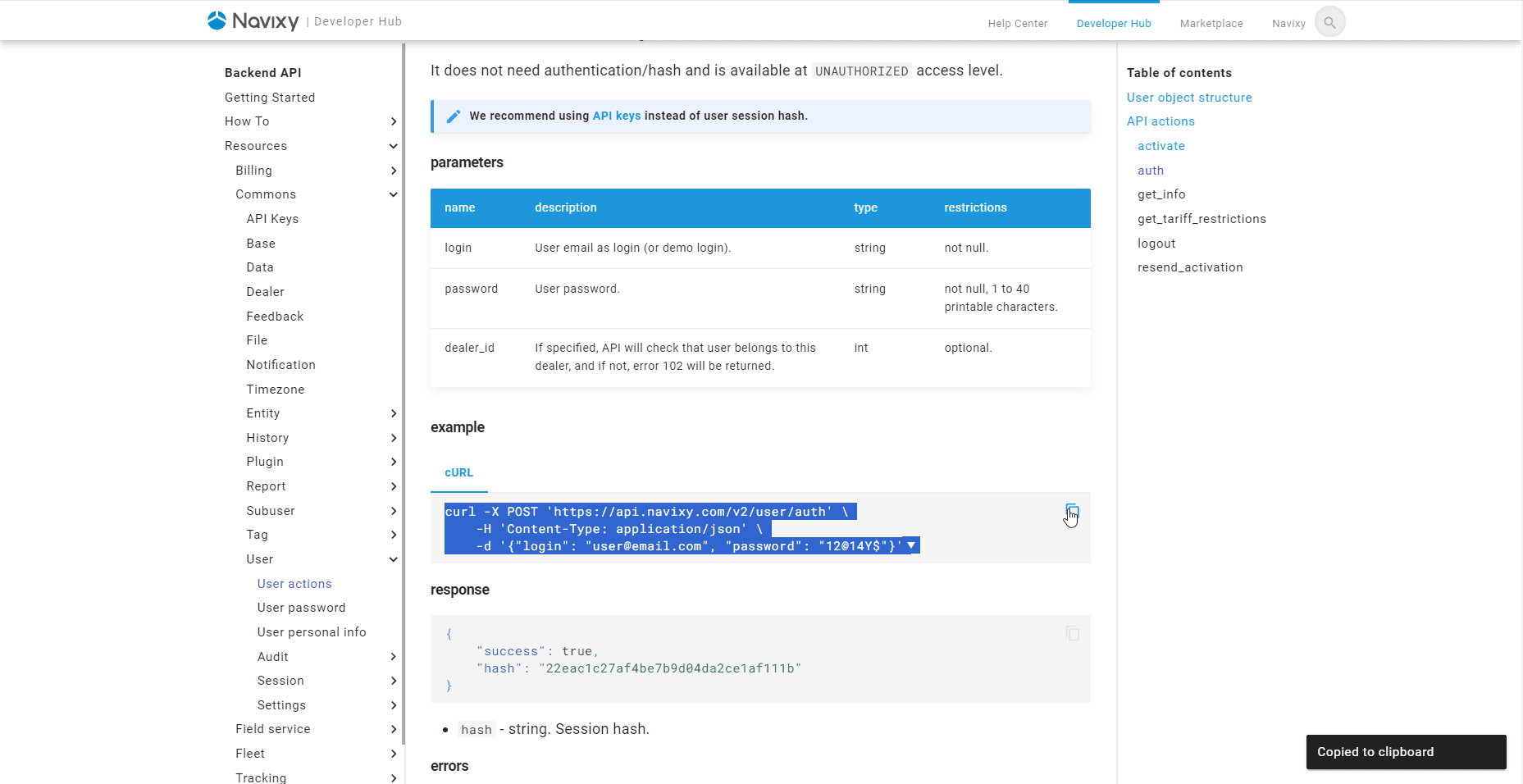
In Postman, paste the example into the request line.

Enter Login Details: Move to the Body section and enter your user account's login and password.
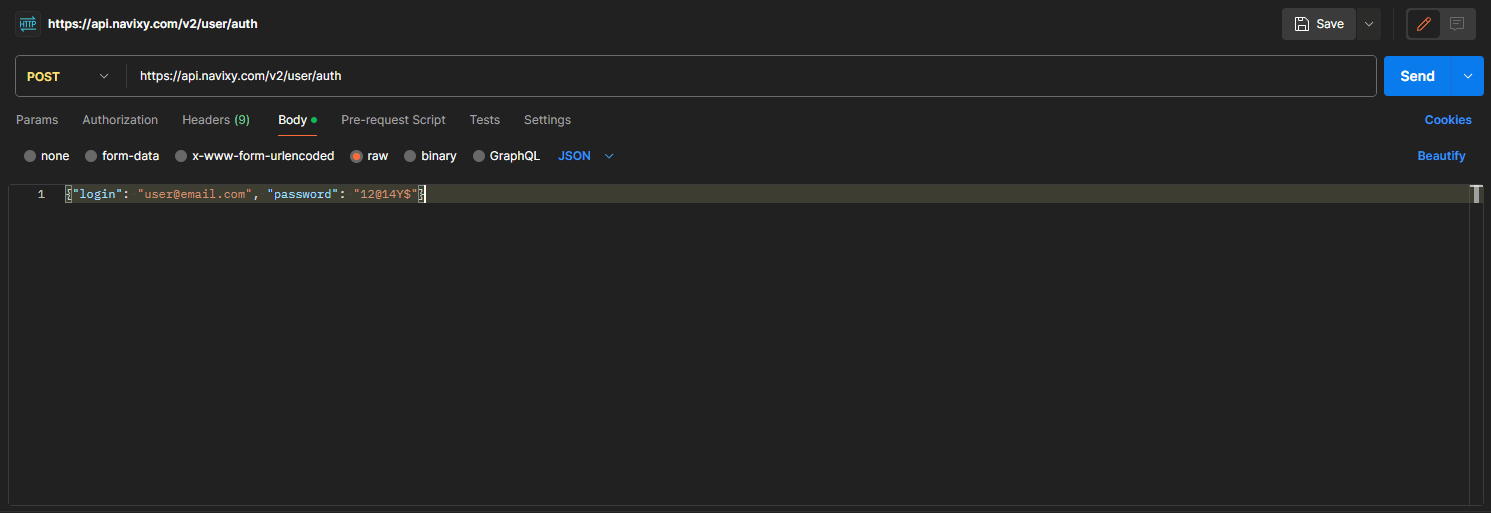
Upon sending this request, the platform will respond with a session hash. However, this session hash expires after 30 days without renewal. Therefore, we recommend generating an API key for your collection.
Create an API Key: If you haven't done so already, create an API key by executing the api/key/create API request. Use the session hash you obtained earlier and specify a title for the key, such as "for raw data”.
Creating a new collection in Postman
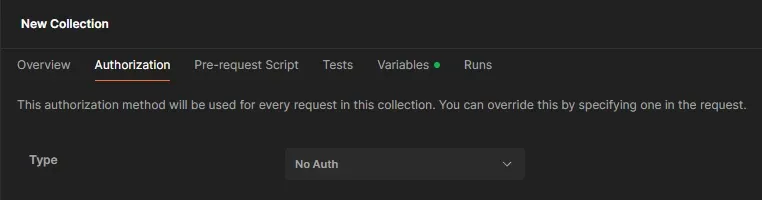
In Postman, start by creating a new collection and then proceed to the 'Authorization' tab. Here's how to configure it for different use cases.
For Individual Use:
- Select the Authorization Type: Choose 'API Key' from the dropdown menu.
- Configure the Key and Value:
- Key: Enter 'hash'.
- Value: Input your specific API key here.
- Add to: Choose 'Query params'. Postman will then automatically include your API key in all API calls made from this collection.
For Team Use:
If the collection is to be used within a team, it's beneficial to set up collection variables for greater flexibility.
- Select the Authorization Type: Choose 'No Auth'.
- Add API Key to Collection Variables:
- Navigate to the 'Variables' section of the collection settings.
- Create a new variable (name it something relevant like 'hash' or 'user1' if managing multiple users).
- Assign any initial value, but make sure the 'Current Value' is set to the API key you've recently obtained.

Remember to save your changes after setting up the variables.
Managing Multiple Users:
For collaborating with another user, simply add a new variable for their API key, for instance, name it 'user2'.
This structured approach ensures secure and efficient management of API keys in Postman, both for individual projects and team collaborations.
Requesting a Raw Data File
To export a raw data file from our platform, please ensure you provide the following essential details:
**tracker_id**: The unique object ID of your device registered on the platform.**from**: The start time for the data export period.**to**: The end time for the data you wish to retrieve from your device.**columns**: Specify the types of information you want to include in your file (e.g., location, speed, temperature).
Obtaining Tracker ID
To retrieve your tracker IDs using the tracker/list API call, follow these steps:
Start by Adding a New Request: In Postman, create a new collection if you haven't already, and add your first request to this collection aimed at obtaining tracker IDs.
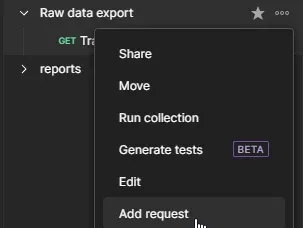
Configure the Request: Copy our example request configuration. The parameters will be automatically added to either the query params or the Body, depending on whether the example is a GET request or a cURL command.

Send the Request and Analyze the Response: After sending the request, you will receive a response containing a list of tracker objects. Focus on the id field of each object, as this is your tracker_id.
{
    "list": [
        {
            "id": 642546,
            "label": "Tracker1",
            "group_id": 152722,
            "source": {
                "id": 416083,
                "device_id": "100000000002024",
                "model": "telfmb920",
                "blocked": false,
                "tariff_id": 12163,
                "phone": "+442071234567",
                "status_listing_id": 80098,
                "creation_date": "2020-05-07",
                "tariff_end_date": "2024-03-01"
            },
            "tag_bindings": [],
            "clone": false
        }]
}
Obtaining all supported parameters of a tracker
To discover the parameters supported by your tracker, follow these steps to add a new API call:
Configure the API Call: Use the tracker/raw_data/get_inputs API call. In the request Body, make sure to include both your hash and the tracker_id you obtained earlier.
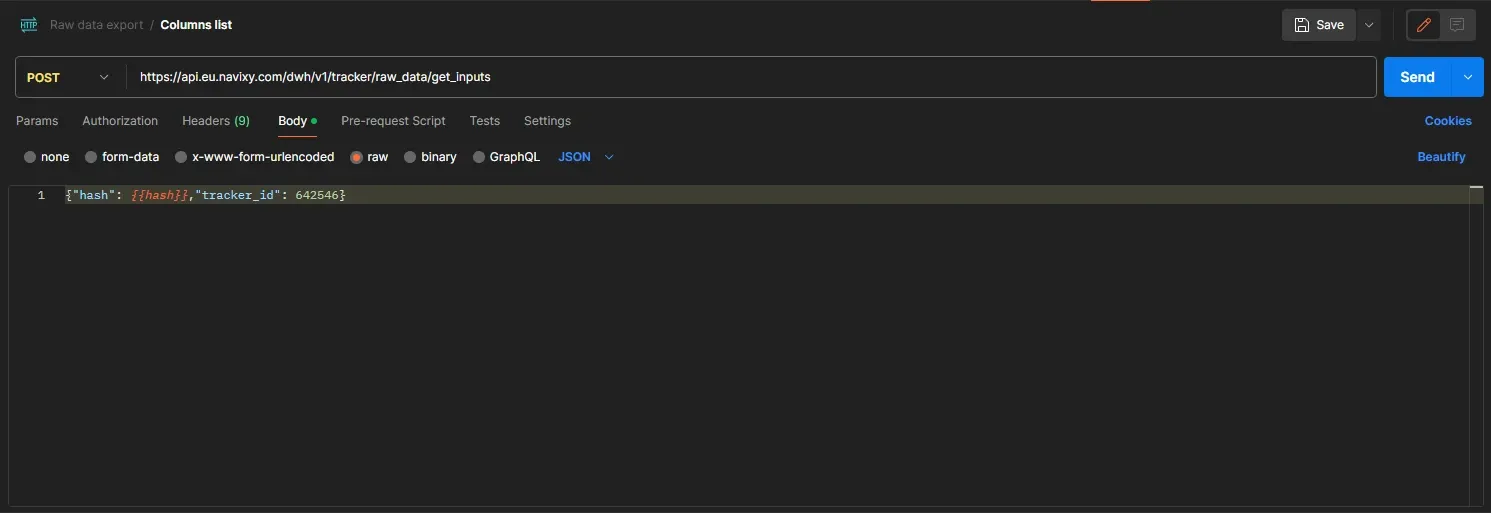
Analyze the Response: After sending the request, the platform will return a list of available parameters for the tracker. These parameters can include various data points, such as location, speed, temperature, etc., and the availability of these parameters may differ based on the tracker model.
Repeat for Different Models: If you are working with multiple tracker models, it's recommended to perform the get_inputs call for each model to accurately identify the supported parameters for each.
{
    "discrete_inputs": 2,
    "discrete_outputs": 1,
    "inputs": [
        "analog_1",
        "avl_io_100000",
        "axis_x",
        "axis_y",
        "axis_z",
        "battery_current",
        "battery_voltage",
        "ble_battery_level_4",
        "ble_battery_voltage_4",
        "ble_frequency_4",
        "ble_humidity_4",
        "ble_lls_level_4",
        "ble_lls_temperature_4",
        "ble_luminosity_4",
        "ble_pitch_4",
        "ble_roll_4",
        "ble_temp_sensor_4",
        "board_voltage",
        "ext_temp_sensor_4",
        "hw_mileage",
        "impulse_counter_1",
        "obd_absolute_load_value",
        "obd_barometric_pressure",
        "obd_consumption",
        "obd_control_module_voltage",
        "obd_coolant_t",
        "obd_custom_fuel_litres",
        "obd_custom_odometer",
        "obd_engine_load",
        "obd_fuel",
        "obd_intake_air_t",
        "obd_mil_run_time",
        "obd_oil_temperature",
        "obd_rpm",
        "obd_speed",
        "obd_throttle",
        "obd_time_since_engine_start"
    ],
    "states": [
        "ble_magnet_sensor_4",
        "event_code",
        "hardware_key",
        "obd_dtc_cleared_distance",
        "obd_dtc_codes",
        "obd_dtc_number",
        "obd_mil_activated_distance",
        "obd_mil_status",
        "obd_vin"
    ],
    "success": true
}
Requesting a file
Our goal is to compile data encompassing server time, geographical coordinates (latitude, longitude), movement speed, satellite connections, and various other details such as analogue fuel sensor readings, discrete input/output statuses, and hardware key information.
Simple vs. Complex Parameters:
- Simple Parameters: Server time, latitude (lat), longitude (lng), speed, and satellite data are straightforward parameters accessible for all trackers. You can locate these in the API documentation.
- Complex Parameters: For accessing values from more intricate data points, use a period (.) to delve into a complex column's internal value.
Specifying Parameters for Our Columns Object:
server_time: Essential for timestamping when data was received by the platform.latandlng: For pinpointing location.speed: To capture the movement speed.satellites: For the count of satellites in connection.discrete_inputs.*: To collect the status information from all inputs.discrete_outputs.1: Given the device has a singular discrete output, we specify this with '1'. An asterisk (*) could also be used for generalization.
Implementing the API Call:
- Copy the provided example for the tracker/raw_data/read API call into Postman.
- Enter all the necessary parameters as outlined.
Time Zone Specification:
- The
fromandtoparameters are available for time zone adjustments, though our example defaults to UTC+0.
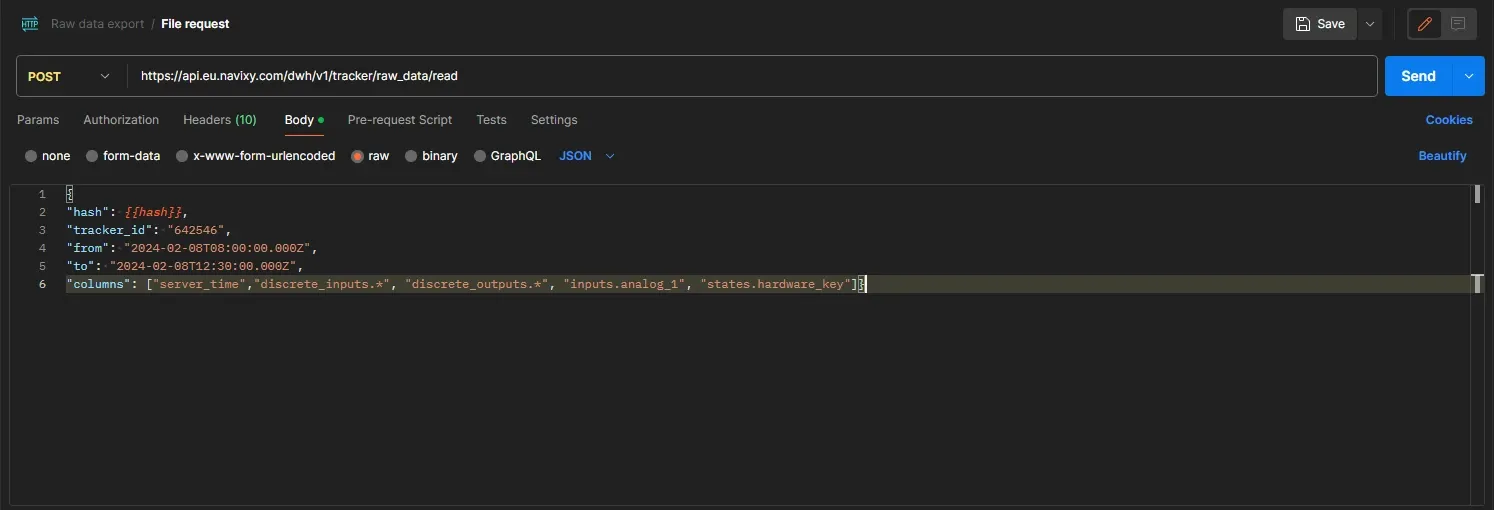
Upon successfully processing your request, the platform will respond with the data in CSV format. This format is widely supported and can be easily integrated into your program for further analysis, manipulation, or visualization. Ensure your application is prepared to parse CSV files to make the most out of the data provided.
"msg_time","server_time","lat","lng","speed","satellites","discrete_inputs.2","discrete_outputs.1"
"2024-02-08T02:00:00-0600","2024-02-08T02:00:03-0600",13.73135,-89.3933483,0,20,0,0
"2024-02-08T02:05:01-0600","2024-02-08T02:05:03-0600",13.73135,-89.3933483,0,21,0,0
"2024-02-08T02:10:01-0600","2024-02-08T02:10:04-0600",13.73135,-89.3933483,0,21,0,0
"2024-02-08T02:15:02-0600","2024-02-08T02:15:04-0600",13.73135,-89.3933483,0,21,0,0
"2024-02-08T02:20:02-0600","2024-02-08T02:20:04-0600",13.73135,-89.3933483,0,20,0,0
"2024-02-08T02:25:03-0600","2024-02-08T02:25:09-0600",13.73135,-89.3933483,0,22,0,0
"2024-02-08T02:30:03-0600","2024-02-08T02:30:06-0600",13.73135,-89.3933483,0,22,0,0
"2024-02-08T02:35:04-0600","2024-02-08T02:35:07-0600",13.73135,-89.3933483,0,21,0,0
"2024-02-08T02:40:04-0600","2024-02-08T02:40:07-0600",13.73135,-89.3933483,0,21,0,0
"2024-02-08T02:45:04-0600","2024-02-08T02:45:07-0600",13.73135,-89.3933483,0,22,0,0
"2024-02-08T02:50:05-0600","2024-02-08T02:50:09-0600",13.73135,-89.3933483,0,22,0,0
"2024-02-08T02:55:05-0600","2024-02-08T02:55:08-0600",13.73135,-89.3933483,0,21,0,0
Embracing the Future of Business with Advanced Data Analytics
The advent of advanced APIs and data analysis tools heralds a new era for businesses seeking to optimize their operations and enhance decision-making. By harnessing the power of real-time data collection, analysis, and the strategic use of this information, companies can achieve unprecedented levels of efficiency, customer satisfaction, and profitability. As demonstrated, the practical application of these technologies in areas such as tracker data management not only simplifies complex processes but also opens avenues for innovation and growth. The key to success lies in the effective integration of these tools into business models, coupled with a continuous quest for improvement and adaptation to emerging trends. In doing so, businesses position themselves at the forefront of their industries, ready to meet the challenges of the future with confidence and agility.