Navixy App Connect: How Authentication Middleware Removes the Hidden Tax from Every Custom Integration

Every custom integration project has a line item nobody wants to discuss in the proposal. Not the features — those are the exciting part. Not the timeline — that's negotiable. The line item is authentication.
If you've built custom fleet tools, you know the pattern: new tool means new login flow, new token management, new permission model to maintain. A system integrator building a maintenance planner for one enterprise client will spend roughly 20-30% of development time on auth infrastructure — credentials, session handling, user mapping, secure token storage. That's before writing a single line of business logic.
The costs multiply beyond development hours. Each custom auth system expands the security surface you have to monitor. User friction increases when dispatchers and fleet managers need separate logins for every internal tool. Audit trails fragment across systems. When a client asks "who accessed what, when?" the answer requires stitching together logs from multiple identity silos.
Here's what makes this particularly frustrating: if you're already working within a telematics platform like Navixy, your users already have verified identities. They're authenticated. But every external tool you build treats them like strangers, demanding fresh credentials and fresh infrastructure.
App Connect exists to remove authentication from the critical path entirely.
What App Connect actually is (and isn't)
App Connect is authentication middleware built into the Navixy platform. That distinction matters: it's not a library you deploy, not an SDK you integrate, not an external identity service you configure. It runs inside Navixy infrastructure, handling the identity translation work so you don't have to.
The core behavior is straightforward. When a user who's already authenticated in Navixy needs to access an external application, App Connect receives that authentication confirmation, packages the user's identity into a standard JWT (JSON Web Token), and transmits it to your application. Your app validates the token, and the user is in — no separate login, no credential re-entry, no redirect chains.
What App Connect is not: it's not user-facing. End users never interact with it directly. It's not a dashboard feature or admin setting for fleet operators. And critically, it's not a replacement for application-level authorization. App Connect confirms identity — who the user is. What they're permitted to do once inside your application remains your responsibility.
The elegance is in the minimal contract. Your application needs exactly two things to work with App Connect: an API endpoint that receives the JWT, and the ability to validate that token using a shared secret. That's the entire integration surface.
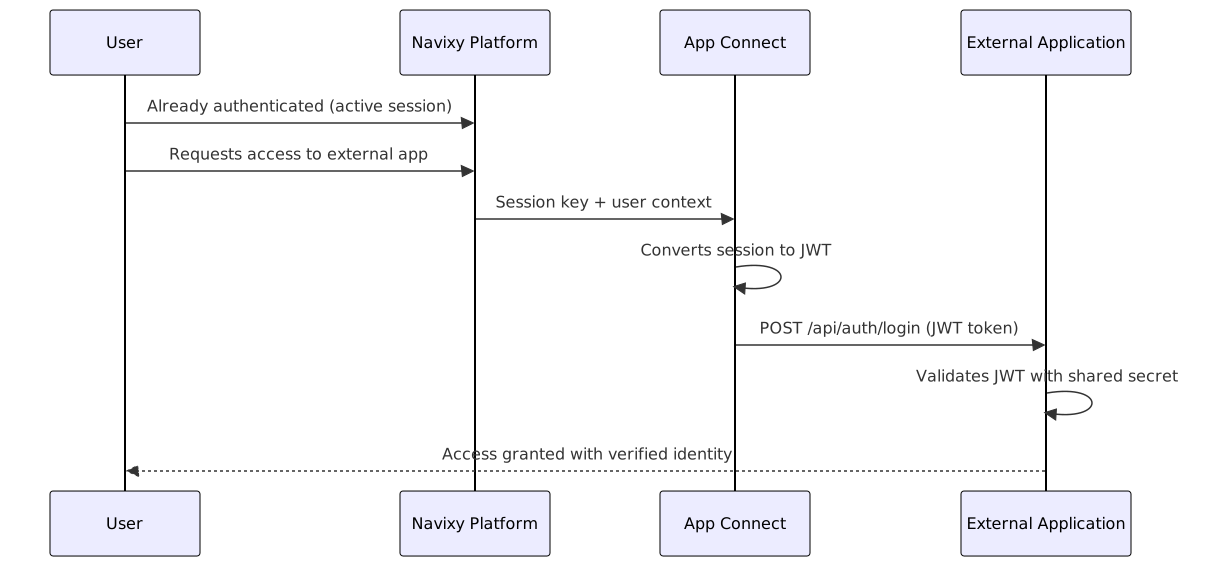
The authentication flow: step by step
The authentication handoff works in four steps, all transparent to the end user.
Step 1: The user, already logged into Navixy, requests access to an external application — your custom dashboard, analytics tool, or compliance checker.
Step 2: Navixy passes the active session to App Connect, which converts the session into a JWT containing the user's identity claims.
Step 3: App Connect sends this JWT to your application's designated endpoint (typically /api/auth/login or equivalent).
Step 4: Your application validates the JWT using the shared secret (JWT_SECRET), extracts the user identity, and grants access.
From the user's perspective? They click a link in Navixy and your application loads, ready to use. No login screen. No password entry. No OAuth redirects. The identity is already verified.
The contract your application fulfills is complete at two requirements:
- API Endpoint: Expose an endpoint that accepts POST requests with the JWT payload
- JWT Validation: Decode and validate the token using the JWT_SECRET configured during deployment
The JWT_SECRET is the critical deployment configuration. It's a shared secret between App Connect and your application — the mechanism that proves the token genuinely came from Navixy, not an attacker. Standard JWT practice, applied to a specific integration problem.
For the technical specification and JWT payload structure, see the App Connect developer documentation.
Who benefits and how
The value distribution differs by role, but the underlying mechanism remains consistent: centralized identity means reduced complexity everywhere identity would otherwise need handling.
System integrators gain the most direct development efficiency. Authentication drops out of the project scope entirely. You don't budget for login flows, don't design credential storage, don't maintain separate user databases. Security audit responsibility stays with Navixy rather than distributed across every custom tool. And here's the multiplier effect: applications built for one client become deployable to others without per-customer auth rebuilds. Reusable apps become practical when identity works identically across deployments.
Developers building on the platform inherit a unified access control model. User identity comes pre-packaged in every request. Credential management disappears as a concern. The time previously allocated to auth infrastructure reallocates to the features that actually differentiate your application.
End users — the fleet managers, dispatchers, and analysts who use these tools daily — experience the benefit without needing to understand the mechanism. No separate accounts for each custom tool. No extra passwords to manage (and forget, and reset). No login redirects breaking their workflow. They access through Navixy, and it works.
Platform administrators maintain centralized control through User Applications settings in their Navixy account. They decide which applications integrate with App Connect, manage the application ecosystem from one location, and retain audit visibility across all connected tools.
Real-world scenarios: what this looks like in practice
Consider a system integrator building custom fleet analytics that pulls operational data from Navixy, enriches it with external business metrics, and presents unified dashboards. Without App Connect, this requires: Navixy API authentication, session management for the analytics app, user mapping between systems, and secure token handling throughout. With App Connect: the user's identity flows from Navixy to the analytics application automatically. The integrator focuses on data visualization, not infrastructure plumbing.
Internal operational tools follow the same pattern. Maintenance planners that schedule service windows based on real-time vehicle status. Dispatcher dashboards that overlay job assignments with live location data. Compliance checkers that validate records against regulatory requirements. Each tool that would traditionally require its own auth system instead inherits identity from the platform.
The Navixy Marketplace demonstrates this at scale. Dashboard Studio, available in the marketplace, uses App Connect as its authentication mechanism — a production reference implementation showing that this architecture works in deployed, customer-facing applications. System integrators building marketplace-ready tools can distribute across multiple customer deployments with identical auth handling.
For applications leveraging IoT Query to access extended telematics data, App Connect handles the credential negotiation. Your application receives verified user identity; IoT Query operations execute under that identity; data flows to your visualization layer. One authentication handshake enables the entire data pipeline.
Implementation walkthrough: from local development to production
The path from concept to deployed App Connect integration follows five phases, each with concrete deliverables.
Phase 1: Local development
Build your application locally with hard-coded credentials for testing. This is standard practice — you need a working application before adding external authentication. Focus on the core functionality: what does your tool actually do?
Phase 2: App Connect compatibility
Add the two required components. First, create an API endpoint (typically /api/auth/login) that accepts POST requests. Second, implement JWT handling — receive the token, decode it, validate the signature using your JWT_SECRET. Most programming languages have mature JWT libraries that handle the cryptographic verification.
Phase 3: Deployment
Deploy to a publicly accessible HTTPS endpoint. Cloud hosting platforms like Render.com, Railway, or similar services work well for this. Two critical requirements at deployment:
- HTTPS is mandatory. App Connect will only communicate with secure endpoints. The URL you register must include the
https://prefix. - JWT_SECRET must be configured as an environment variable. This is not optional. Your deployed application needs this secret to validate incoming tokens. Missing this configuration is the most common reason deployments fail silently.
Phase 4: Registration
Register your application in Navixy via Account Settings → User Applications. Enter the application URL (full URL with https:// prefix), configure the JWT_SECRET, and enable the integration.
Phase 5: Verification
Test the complete flow. Access your application through Navixy. Verify that identity data arrives correctly. Confirm that your application operates with the authenticated user context.
For AI-assisted development: If you're using coding assistants like Cursor or Claude Code, provide the App Connect documentation as context. The specification is complete enough that AI tools can generate the endpoint and JWT validation code with high accuracy.
Technical requirements summary
| Requirement | Specification |
|---|---|
| API Endpoint | Expose /api/auth/login (or equivalent path) accepting POST requests with JWT payload |
| JWT Token Support | Receive, decode, and validate JWT using shared secret |
| JWT_SECRET | Environment variable containing secure, unique secret value — absolutely essential |
| HTTPS | Valid SSL certificate required; full URL including https:// prefix when registering |
| Public Accessibility | Endpoint must be reachable from internet for App Connect communication |
The contract is intentionally minimal. Five requirements constitute the complete integration surface. Any complexity beyond this is your application's business logic — the part that should receive your development attention.
Troubleshooting: when things don't work
Certain error patterns appear consistently in App Connect integrations. Understanding the actual causes saves hours of debugging.
"IoT Query is not enabled for this user" sounds like a permissions issue but typically indicates a URL configuration problem. If you see this error, first verify that the application URL registered in User Applications is correct and includes the https:// prefix. This error message doesn't always mean what it says.
HTTPS prefix disappearing after entry: Some browsers or interfaces strip the protocol prefix. If your application URL was registered without https://, re-enter it with the complete URL. App Connect requires the full specification.
Application works locally but fails when deployed: Check the JWT_SECRET environment variable first. Local development often uses hard-coded values; deployed applications must read the secret from environment configuration. If JWT_SECRET is missing or incorrect, token validation will fail silently and your application won't receive valid user identity.
Token validation errors: Verify that the JWT_SECRET in your deployment matches exactly what's configured in the Navixy User Applications settings. Character-for-character match is required — trailing whitespace or newline characters will cause validation failures.
For persistent issues: The Navixy support team can assist with integration debugging. But in most cases, the resolution involves one of the above: URL configuration, HTTPS requirements, or JWT_SECRET deployment.
Conclusion: authentication as a given, not a problem
The shift App Connect enables is architectural, not just technical. Authentication moves from being a project deliverable — something you build, budget for, and maintain — to being platform infrastructure. Identity becomes a given.
What this enables for system integrators: predictable project scopes where auth complexity doesn't inflate timelines. Reusable applications that deploy across customers without per-deployment identity work. Reduced security surface because credential handling concentrates in one system you don't have to maintain.
What this enables for developers: faster iteration cycles when identity is already solved. More time spent on differentiating features, less on infrastructure plumbing. A simpler mental model where "user" is a verified entity rather than a challenge to establish.
The mechanism is JWT, an industry standard (RFC 7519). The contract is minimal: two requirements. The implementation path is documented with production examples available in the marketplace.
Explore App Connect in the Navixy Developer Documentation to start building authenticated applications that work inside your customers' telematics workflow. For a reference implementation, see how Dashboard Studio handles the same integration pattern in production.
On this page
- What App Connect actually is (and isn't)
- The authentication flow: step by step
- Who benefits and how
- Real-world scenarios: what this looks like in practice
- Implementation walkthrough: from local development to production
- Technical requirements summary
- Troubleshooting: when things don't work
- Conclusion: authentication as a given, not a problem