Webhook node in IoT Logic: trigger immediate actions in the external systems you already use

AuthorSvyatoslav I., Product Manager, Navixy IoT Logic
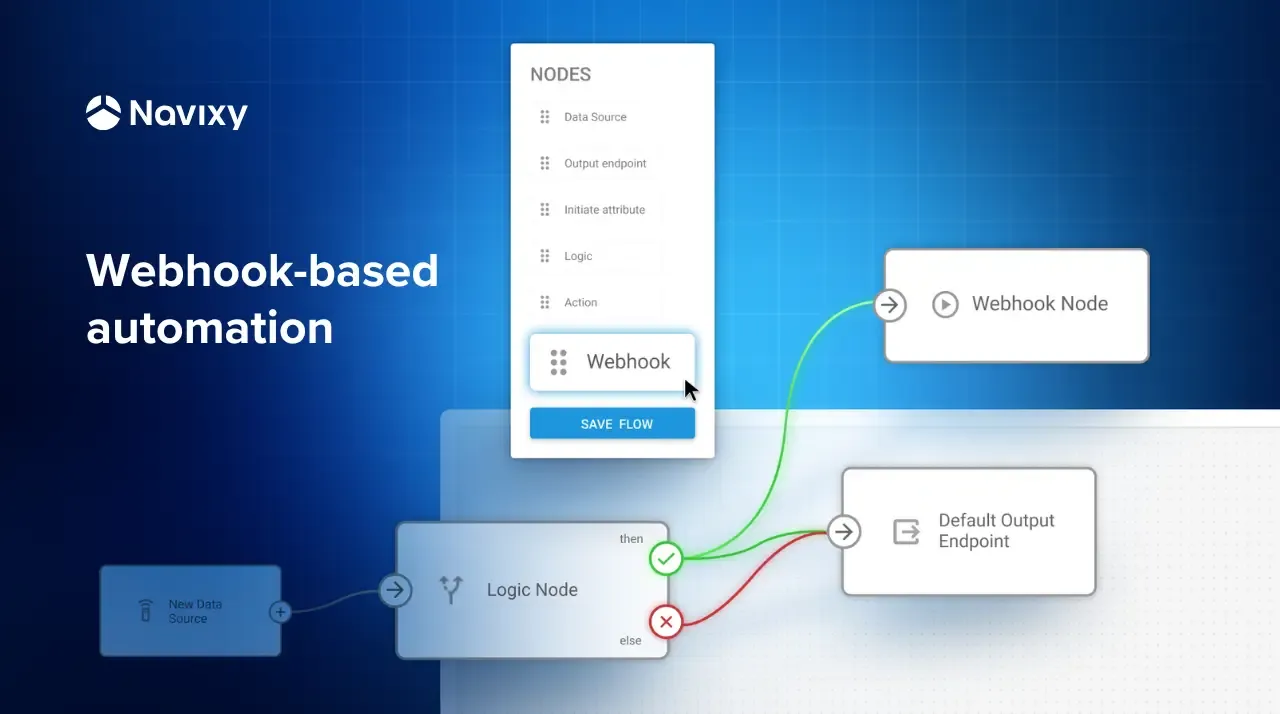
Telematics businesses and fleet operators often face the same problem. Device data arrives quickly but business processes respond slowly. Creating a ticket, alerting a team, updating a workflow or triggering equipment usually depends on custom code or separate middleware that takes time to build and maintain. Webhook node in Navixy IoT Logic removes these delays, connecting events directly to the systems that keep your operation moving. In one step, data shifts from passive information to an immediate trigger for action.
Below, we explain how this works in practice and why it can change the way you build telematics solutions.
Key takeaways
- Webhook nodes in Navixy IoT Logic enable real-time automation by sending telematics events directly to external systems such as CRM, ERP, communication, and workflow tools.
- Asynchronous execution and lightweight payloads ensure reliable, scalable integrations even when third-party APIs are slow or unavailable.
- By connecting live IoT data to business systems, telematics moves from passive monitoring to immediate, actionable operational workflows.
What is Webhook node and why it might matter for your business
Webhook node is an action trigger in Navixy’s IoT Logic that sends selected device data to any external system the moment an event occurs. It creates a direct link between telematics messages and the business applications that rely on timely information. As a result, systems receive the required data immediately and can respond without delay.
In other words, Webhook node offers a practical way to automate daily operations for telematics businesses with not just the functionality within the Navixy platform involved but other systems a business might use, from ERPs to messengers and more.
How Webhook node works and its benefits
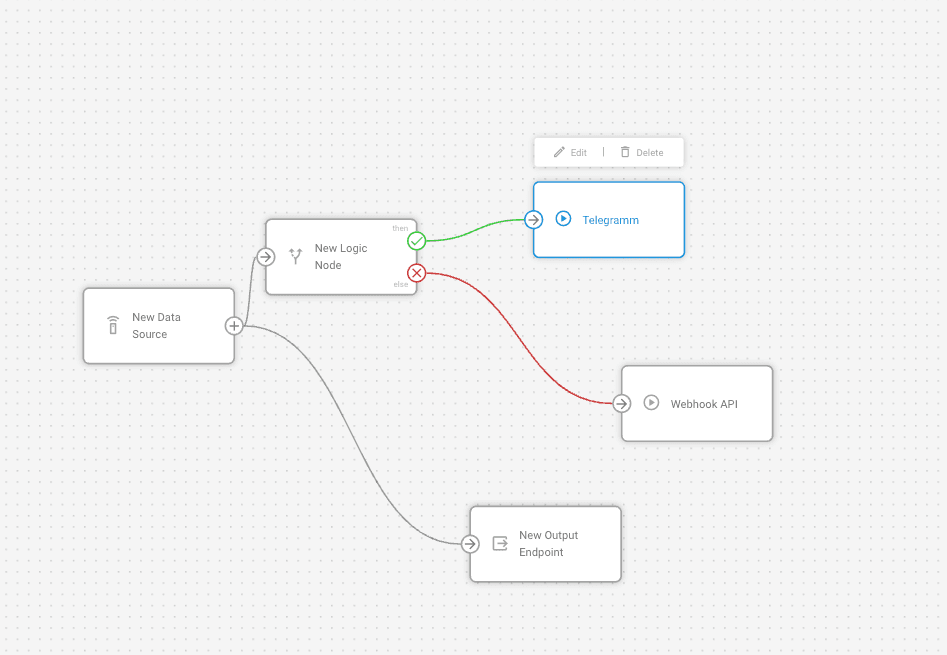
What can it look like in practice? A movement start can initiate a flow in a customer service application. A temperature change can open a maintenance task. A geofence event can notify a dispatcher or activate equipment that reacts to location-based conditions. All these processes can run in real time and do not require building separate backend components.
This way, Webhook node closes the gap between field events and the systems that must respond to them. How can it affect businesses?
Well, most obviously, it improves reaction time in day-to-day operations and reduces manual data handling. Many tasks that once depended on middleware can now run directly in IoT Logic, which lowers development effort and simplifies maintenance.
Another advantage is efficiency. The node sends only the data bits required by a downstream system. It keeps payloads lean, reduces the processing burden on external applications and helps maintain stable integrations. Because each request is asynchronous, IoT Logic continues running even if an external API responds slowly. This supports predictable performance as automations grow.
What’s behind these outcomes?
Behind the scenes, when a device message or processed data packet reaches the node, it prepares and sends an HTTP POST request according to the flow configuration. The steps are as follows.
- The node gathers all current attributes available at its input. This includes original device parameters and any calculated values created earlier in the flow.
- It substitutes dynamic values in the JSON body. Placeholders such as quot;attribute_name" reference actual attribute values. Before sending, each placeholder is replaced with the current value.
- The node forms the JSON body and applies the required HTTP headers. Headers may include content type definitions, authentication tokens or other fields required by the external API.
- It sends an HTTP POST request to the configured URL.The request contains only the information defined in the body and headers.
- The node does not wait for a response. The call is asynchronous. IoT Logic continues processing immediately, even if the external system responds slowly or not at all.
Each incoming data packet produces its own outbound call. If several branches in a flow lead to Webhook node, each branch generates a separate request. This provides predictable, event-level communication with external systems and gives organizations clear control over what data is sent and when.
Key capabilities of Webhook node
Taken together, these mechanics make Webhook node a flexible tool for linking telematics data with the systems that support daily operations. Let’s take a closer look at the capabilities that enable this level of control and adaptability.
HTTP POST to any reachable URL
Webhook node can connect to any REST API your business depends on, whether hosted locally or in the cloud. This makes it possible to integrate telematics events with a wide range of external services without additional middleware.
Flexible JSON request body
The node allows you to structure outgoing data in the exact format required by the receiving system. Static values and dynamic attributes can be combined to build clear, predictable payloads for any downstream application.
Custom HTTP headers
Support for up to ten headers gives you control over authentication, formatting and API-specific requirements. This helps ensure compatibility with partner systems, enterprise software and third-party services.
Asynchronous execution
Webhook node works independently of the flow. This means IoT Logic continues processing new data even when an external API is slow to respond, which helps maintain overall system stability during high-volume or multi-integration workloads.
Webhook node’s place in the IoT Logic flow
IoT Logic is Navixy’s visual environment for building real-time data processing flows without writing code. It allows organizations to take incoming telemetry, apply business logic, react to events and forward results to other parts of the platform or external systems.
An IoT Logic flow is built from connected nodes, each performing a specific role in how data is handled.
Core node types in an IoT Logic flow
- Data source node receives and decodes incoming messages from devices, introducing raw telemetry into the flow.
- Initiate attribute node creates new attributes or transforms existing ones by applying calculations, conversions or other data preparation logic.
- Logic node evaluates conditions and controls branching so the flow can react differently based on specific criteria.
- Action node sends commands back to devices when the flow determines that a direct device-side response is required.
- Output Endpoint node forwards processed data in a continuous stream to external systems such as MQTT brokers, TCP endpoints or storage services.
Connected, the nodes create a pipeline that transforms incoming telemetry into the structure, rules and actions a business needs. They help standardize data, apply custom logic and trigger the right responses at the right moment. Each node contributes one step in this processing sequence, and the output from one becomes the input for the next.
Where Webhook node fits in this architecture
Webhook node adds a new dimension to this structure. While other nodes process incoming telemetry or control device behavior, Webhook node sends selected data outside Navixy exactly when it matters. It performs a direct call to an external system when a condition or event in the flow requires attention beyond the platform.
It functions as a terminal node. When data reaches it, the flow ends and responsibility passes to the external application that receives the request. This makes Webhook node the point where a workflow leaves IoT Logic and continues inside CRMs, ERPs, notification services, automation tools or any system with an API.
Webhook node vs Output Endpoint node
Webhook nodes and Output Endpoint nodes both deliver information to external systems, but the way they operate and the problems they solve are different.
Output Endpoint node sends the full telemetry stream continuously, which is ideal for partners that need complete data for analytics, storage or monitoring. Webhook node sends only the fields required for a specific event and does so at the moment that event occurs. It is suited for triggering workflows or updates in business systems without forwarding the full stream.
Here is how the two nodes differ when choosing the right integration strategy.
| Feature | Webhook node | Output Endpoint node |
|---|---|---|
| When it sends data | When a condition or event triggers it | With every incoming message |
| Data volume | Only selected attributes | Full telemetry package |
| Primary use | Trigger workflows or actions in external apps | Continuous data replication or monitoring |
| Integration style | HTTP POST using REST APIs | MQTT, TCP, or other streaming protocols |
| Flow position | Terminal node, event driven | Non terminal, stream oriented |
| Execution | Asynchronous and does not wait for API response | Depends on protocol but typically continuous |
As mentioned, using both nodes in the same flow is common. For example, one branch may stream complete telemetry to storage through Output Endpoint while another triggers Webhook node to notify a support system when a threshold is exceeded. The nodes operate independently and do not interfere with each other.
Webhook node use cases and practical examples
Webhook node supports a wide range of integration scenarios. Below are the most common patterns used by telematics businesses and system integrators.
Notifications and alerts in messengers or email
When defined events occur, Webhook node can send messages directly to communication platforms such as Slack, Telegram, Microsoft Teams, WhatsApp, SMS gateways or email services like Twilio and SendGrid. An emergency event or movement start, or a speeding event, if you will, can be delivered instantly to the responsible team through the channel they use most.
Integration with CRM, ERP and business systems
Webhook nodes can create or update records in external systems through their APIs. For example, a detected equipment fault may trigger a support ticket in a CRM, or an asset event may update information in an ERP such as maintenance schedules or warehouse activity. This removes the need for manual data entry and helps keep business systems aligned with field events.
Controlling external devices and IoT services
Because Webhook node can call any REST API, it can interact with hardware and cloud services that accept HTTP commands. This includes opening gates, enabling access control, turning lights or sirens on and off or triggering other connected equipment. A geofence entry, for instance, can initiate an automated response without operator involvement.
Workflow automation platforms
Webhook nodes can initiate automation chains in tools such as Zapier, n8n, Make or Dify. A simple condition in IoT Logic (for example, temperature exceeding a threshold or arrival at a location) can activate a workflow that updates spreadsheets, adds calendar events, generates documents or performs other multi-step business processes.
Selective data retransmission
When a partner or customer needs location or sensor data in a specific format, Webhook node can forward only the required fields to an external system. Unlike Output Endpoint, which streams full telemetry, Webhook node can deliver targeted attributes such as coordinates or timestamps in a structured JSON payload. This is useful for government reporting, analytics systems or client applications that require real-time updates without full data volume.
Practical examples of Webhook node use
From theory to practice, let’s look at how Webhook nodes can potentially be set up for these real life scenarios.
Example #1: movement start notification sent to Telegram
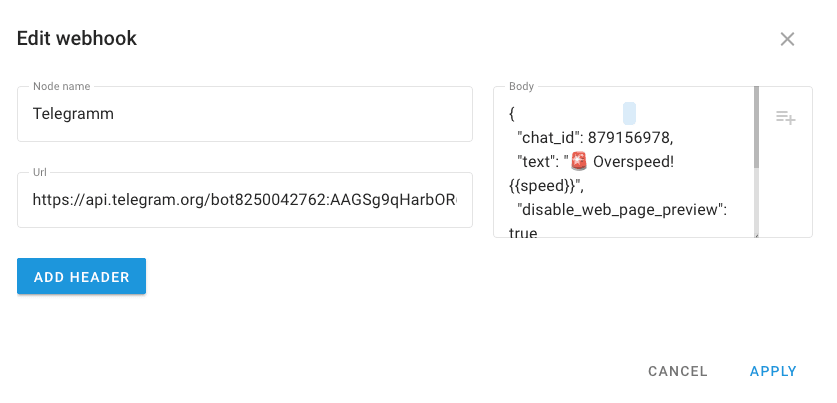
Consider a scenario where a dispatcher must be notified when a vehicle starts moving after being stationary. IoT Logic can detect this event using a Logic node. When the condition is met, data flows to Webhook node, which sends a message through the Telegram Bot API.
Webhook node configuration
URL:
https://api.telegram.org/bot<YOUR_BOT_TOKEN>/sendMessage
Headers: (Telegram requires JSON)
Content-Type: application/json
Request body example:
{
  "chat_id": "123456789",
  "text": "🚗 The object has started moving! Speed: quot;speed" km/h"
}
Here,
quot;speed" is a dynamic attribute that inserts the actual value at the moment of sending. You can add more parameters if needed, such as movement start time or device name.This approach eliminates manual monitoring. The responsible person receives an instant notification through a familiar communication channel.
Note: A Telegram bot and chat ID are required. The bot token is included in the URL and the chat ID is placed in the request body.
Example #2: retransmitting coordinates to an external server
Many integrators must send GPS/GLONASS data to partner systems. Webhook node can forward only the essential fields, reducing data volume and making the payload easy to use.
Suppose the receiving server expects POST requests at:
https://partner.example.com/api/coordinates
Request body example:
{
  "device_id": quot;device_id",
  "latitude": quot;latitude",
  "longitude": quot;longitude",
  "timestamp": quot;message_time"
}
IoT Logic inserts real values received from the device, and you can include additional attributes such as speed or course.
Unlike Output Endpoint, which streams the full telemetry via MQTT, Webhook node sends only the required parameters in a structured format. This is ideal for map displays, fleet applications or integrations where only specific real-time fields are needed.
What Webhook node in IoT Logic means for telematics business
Webhook node gives telematics companies a simple way to let real-world events move work forward. A device report can update a business system, notify the right people or trigger equipment without waiting for someone to step in. This helps teams react sooner, keep systems in sync and cut out a lot of the small manual tasks that tend to pile up around daily operations.
For many organizations, this becomes a more practical way to build and refine solutions. Integrations take less effort to maintain, new ideas are easier to test and automations can be shaped visually instead of through custom code. As projects grow, teams can focus more on the services they want to deliver and less on the plumbing that holds everything together.
If you’d like to explore how Webhook node could support your business or help you design new integrations, our team can walk you through real examples. Book a demo to see Webhook node in action and discuss ideas tailored to your needs.