> For the complete documentation index, see [llms.txt](https://navixy.com/docs/llms.txt). Markdown versions of documentation pages are available by appending `.md` to page URLs; this page is available as [Markdown](https://navixy.com/docs/user/guide/account/iot-logic/nodes/logic-node.md).
# IF/THEN Logic
Route IoT Logic data flows based on conditions with the IF/THEN Logic node. Evaluate telemetry values, trigger actions for matching records, and skip the rest.
## Technical overview and capabilities
{% columns %}
{% column %}
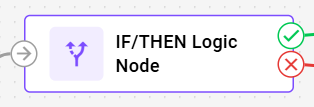
The **IF/THEN Logic** node creates intelligent branching points that route incoming data down different paths based on logical conditions. It receives data from other nodes, validates it against your defined conditions, and routes the results down different paths based on whether the validation succeeds or fails. The node enables you to build IF->THEN/ELSE workflows where different actions occur automatically based on real-time data conditions.
{% endcolumn %}
{% column %}
{% endcolumn %}
{% endcolumns %}
{% hint style="info" %}
The **IF/THEN Logic** nodes are configured separately for each flow in the Navixy platform UI. Each node contains only one logical formula, relying on [Navixy IoT Logic Expression Language](/docs/iot-logic-api/technologies/navixy-iot-logic-expression-language.md).\
For specific syntax options related to logical expressions, see [IF/THEN Logic expressions and syntax](/docs/user/guide/account/iot-logic/nodes/logic-node/logic-node-expressions-and-syntax.md).
{% endhint %}
### How IF/THEN Logic nodes work
When data first reaches an **IF/THEN Logic** node, IoT Logic creates a user-defined boolean attribute that stores the evaluation results. Each subsequent data packet is evaluated against your logical expression, updating this attribute's value and routing the data accordingly:
* **True results**: Data flows through the THEN connection (green) with the boolean attribute set to `true`.
* **False results**: Data flows through the ELSE connection (red) with the boolean attribute set to `false`. That's the usual case, but not the only one: on a missing value, some operators route to ELSE while leaving the attribute `null` instead of `false`. See [Missing values and null routing](/docs/user/guide/account/iot-logic/nodes/logic-node/logic-node-expressions-and-syntax.md#missing-values-and-null-routing).
This evaluation happens independently for each data packet, allowing different records from the same device to follow different paths based on real-time conditions.
### Flow architecture integration
The boolean attributes created by **IF/THEN Logic** nodes extend beyond flow routing and integrate with Navixy's broader monitoring capabilities. Since these are user-defined custom attributes, they can be:
* **Monitored in real-time**: View evaluation results in [Data Stream Analyzer](/docs/user/guide/account/iot-logic/data-stream-analyzer.md) to troubleshoot conditions and verify logic
* **Added as custom sensors**: Integrate with Navixy's main interface for ongoing monitoring
As custom sensors, these attributes enable two key capabilities:
* **Triggering alerts**: You can create custom rules based on a sensor’s value to receive notifications in case of deviations. For details on rule creation, see [Rules and notifications](/docs/user/guide/events-and-notifications.md).
* **Monitoring entities**: You can add an attribute to the [Object list](/docs/user/guide/tracking/objects-list.md) widget to monitor its value along with other device readings. For details on how to create a custom sensor from an IoT Logic attribute, see [Displaying new calculated attributes on the Navixy platform](/docs/user/guide/account/iot-logic/nodes/initiate-attribute-node/displaying-new-calculated-attributes-on-the-navixy-platform.md).
{% hint style="info" %}
The **IF/THEN Logic** node requires a connection to at least one preceding node (**Data Source** or other processing nodes) to receive input data for validation.
{% endhint %}
### Node capabilities
The **IF/THEN Logic** node offers:
* **Conditional data routing**: Create branching workflows that automatically direct data based on logical expressions returning true or false results.
* **Real-time validation**: Test incoming device data against business rules and operational thresholds as data arrives.
* **Complex condition support**: Combine multiple parameters using logical operators (AND, OR, etc.) for sophisticated decision-making.
* **Geofence-based conditions**: Reference named Navixy geofences directly in expressions using the `inGeofence()`, `enterGeofence()`, and `leaveGeofence()` functions, without manual coordinate comparisons. `geofenceName()` returns the name of the geofence the device is in, so one condition can cover many areas. See [Geofence functions](/docs/user/guide/account/iot-logic/nodes/geofence-functions.md).
* **Attribute creation**: Generate boolean attributes that record validation results for use in other node, Navixy's monitoring systems and 3rd-party services.
* **Flexible output paths**: Route data through THEN (true) and ELSE (false, or occasionally null on a missing value) connections to trigger different subsequent actions.
## Configuration options
{% columns %}
{% column valign="middle" %}
The **IF/THEN Logic** node allows you to define conditional expressions that evaluate incoming data and create branching paths in your flow based on the results.
{% endcolumn %}
{% column %}
{% endcolumn %}
{% endcolumns %}
Let's see what elements this node uses and what you can configure when working with it.
### Configuration steps
{% stepper %}
{% step %}
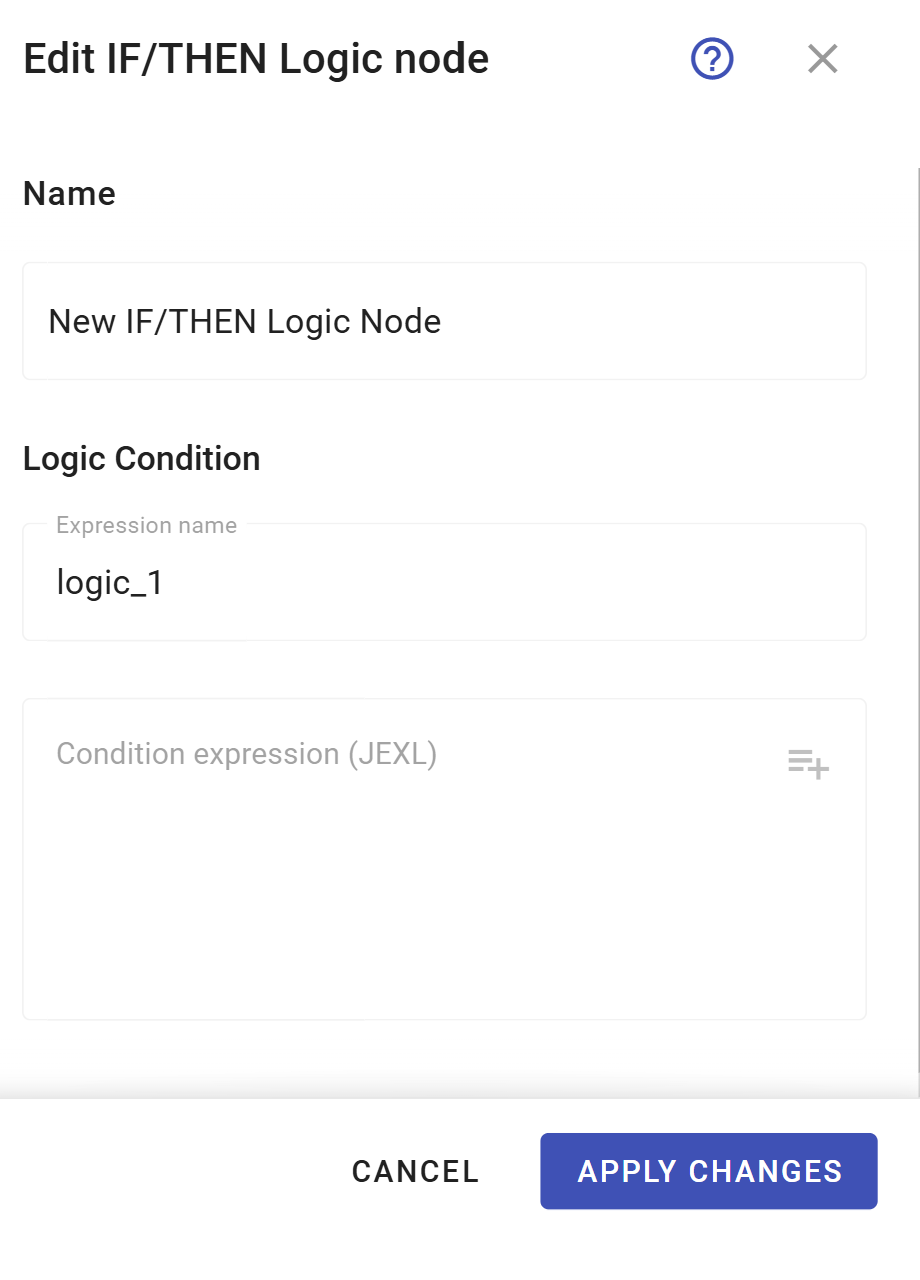
#### Specify node name
Enter a descriptive name for this **IF/THEN Logic** node.
* Use a name that clearly identifies the validation purpose (e.g., *Temperature Alert Check*, *Speed Violation Detection*).
* This name will be displayed in the flow diagram for easy identification.
{% endstep %}
{% step %}
#### Define expression name
Enter the name for the boolean attribute that will store the validation result.
* This attribute will appear in [Data Stream Analyzer](/docs/user/guide/account/iot-logic/data-stream-analyzer.md) and become available for use in subsequent nodes.
* Use descriptive names like *high\_temperature\_alert* or speed\_violation\_detected.
* The system will auto-generate names like *logic\_1*, *logic\_2* if not specified.
{% endstep %}
{% step %}
#### Create a conditional expression
Build your logical statement using the expression field.
* Use [logical operators according to Navixy Expression Language syntax](/docs/user/guide/account/iot-logic/nodes/logic-node/logic-node-expressions-and-syntax.md) to reference device parameters and calculated attributes.
* The expression must return a boolean value (true/false) for proper node operation. A missing value can behave differently. See [Missing values and null routing](/docs/user/guide/account/iot-logic/nodes/logic-node/logic-node-expressions-and-syntax.md#missing-values-and-null-routing).
* Use the [autocomplete feature](/docs/user/guide/account/iot-logic/nodes/initiate-attribute-node/managing-attributes.md#autofill-attribute-names) to select available attributes from connected data sources.
* To reference a Navixy geofence as a condition, use the [geofence picker](/docs/user/guide/account/iot-logic/nodes/geofence-functions.md#how-to-add-a-geofence-condition) in the expression field.
{% endstep %}
{% step %}
#### Save the node configuration
Click **Apply changes** to complete the node creation.
{% endstep %}
{% step %}
#### Connect output paths
After you configured the node, you need to establish connections for the validation results.
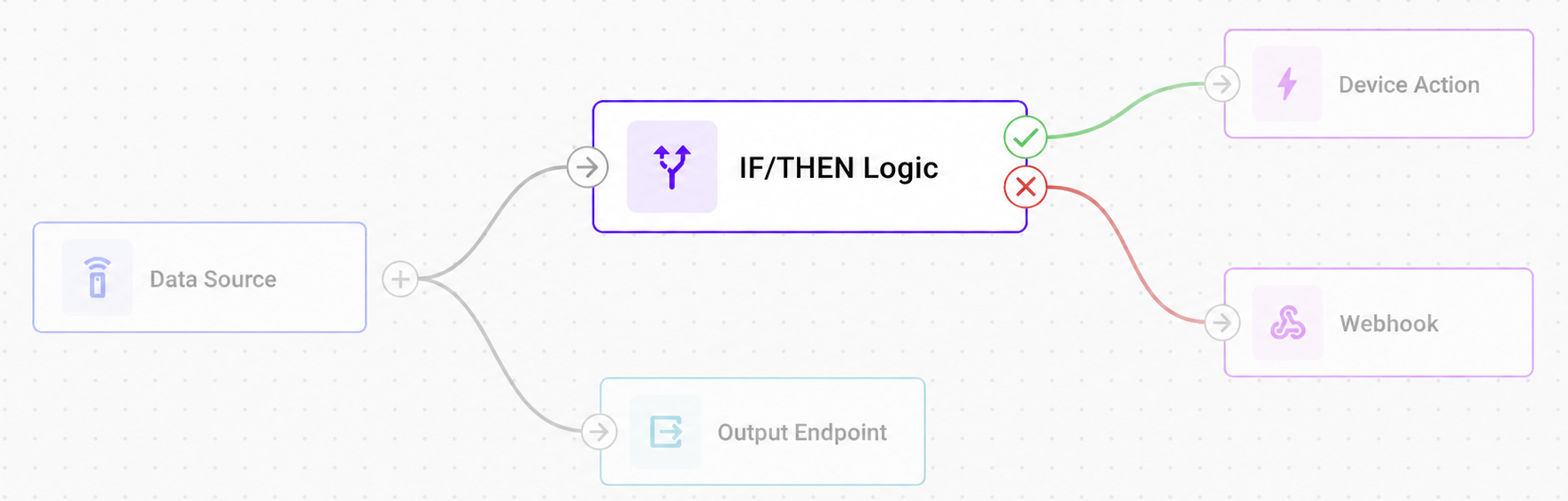
* **THEN connection** (green): Connects to nodes that should process data when the expression evaluates to true.
* **ELSE connection** (red): Connects to nodes that should process data whenever the expression doesn't evaluate to true. This includes a false result or a missing value that the node couldn't evaluate.
* The THEN connection is mandatory, while the ELSE connection is optional.
{% endstep %}
{% endstepper %}
{% hint style="warning" %}
Missing data often routes to the ELSE path, but not always. A `!=` comparison against a missing value and a non-null literal evaluates to `true` and routes to THEN instead, and so do `!~`, and `!^` and `!$` when the value comes from `value()`. Syntax errors also route to ELSE, but store the attribute as `null`, not `false`. See [Missing values and null routing](/docs/user/guide/account/iot-logic/nodes/logic-node/logic-node-expressions-and-syntax.md#missing-values-and-null-routing) for the full set of null-safe patterns and operator tables.
{% endhint %}
For detailed information on expression syntax, operators, and data flow behavior, see [IF/THEN Logic expressions and syntax](/docs/user/guide/account/iot-logic/nodes/logic-node/logic-node-expressions-and-syntax.md).
## Output connections and data flow
The **IF/THEN Logic** node creates two distinct output paths based on the expression evaluation results.
### THEN connection (green)
* **Activates when**: The logical expression returns `true`.
* **Connection requirement**: Mandatory. Every IF/THEN Logic node must have at least one THEN output.
* **Multiple connections**: Can connect to multiple subsequent nodes for parallel processing.
* **Typical uses**: Triggering alerts, special processing, conditional calculations, or routing data to specific endpoints.
### ELSE connection (red)
* **Activates when**: The logical expression returns `false`, evaluates to `null`, or can't be evaluated.
* **Exceptions to watch for**: Most missing-value comparisons route here. A `!=` comparison against a missing value and a non-null literal routes to THEN instead, and so do `!~`, and `!^` and `!$` on a missing `value()` result.
* **Stored value isn't always `false`**: Routing to ELSE doesn't guarantee the boolean attribute is stored as `false`. Relational comparisons (`<`, `<=`, `>`, `>=`) and a bare missing-value reference land on ELSE with the attribute left `null`. See [Missing values and null routing](/docs/user/guide/account/iot-logic/nodes/logic-node/logic-node-expressions-and-syntax.md#missing-values-and-null-routing).
* **Connection requirement**: Optional. Use only when you need to handle negative results.
* **Error handling**: Processes cases where expressions can't be evaluated due to syntax errors or invalid data types. Missing-data routing depends on the operator. See [Missing values and null routing](/docs/user/guide/account/iot-logic/nodes/logic-node/logic-node-expressions-and-syntax.md#missing-values-and-null-routing).
* **Typical uses**: Logging failed validations, routing data through alternative processing paths, or continuing normal operations.
### **Terminal node requirement**
When connecting to terminal nodes ([Action](/docs/user/guide/account/iot-logic/nodes/action-node.md), [Webhook](/docs/user/guide/account/iot-logic/nodes/webhook-node.md)) that don't support outbound connections, create parallel connections to ensure both the terminal node and an Output Endpoint receive data:
**Why both branches need Output Endpoints:**
* Ensures data persistence and system visibility
* Enables flow validation
* Both branches can share the same Output Endpoint node
{% hint style="danger" %}
**Validation error:** Flows without Output Endpoints on all branches will fail to save with the error.
{% endhint %}
## Frequently asked questions
#### Can I use attributes created by other nodes in IF/THEN Logic expressions?
Yes. **IF/THEN Logic** nodes can reference any attributes available from connected data sources, including original device parameters and attributes calculated by preceding **Initiate Attribute** nodes. The autocomplete feature helps you select from all available attributes.
#### What happens if my expression contains syntax errors?
If an expression contains syntax errors or can't be evaluated, the **IF/THEN Logic** node routes data through the ELSE connection and stores the attribute as `null`, not `false`. Check the expression syntax and ensure all referenced attributes exist in your data stream.
#### Can I connect multiple nodes to the same IF/THEN Logic node output?
Yes. Both THEN and ELSE connections support multiple outgoing connections, allowing you to trigger several different actions based on the same logical condition. This enables parallel processing for complex business workflows.
#### How do I monitor IF/THEN Logic node results?
IF/THEN Logic node results appear as boolean attributes in the [Data Stream Analyzer](/docs/user/guide/account/iot-logic/data-stream-analyzer.md) table. Select your devices and look for the attribute name you specified in the expression name field. Values usually display as `true` or `false`, but a missing value can leave the attribute `null` instead, depending on the operator. See [Missing values and null routing](/docs/user/guide/account/iot-logic/nodes/logic-node/logic-node-expressions-and-syntax.md#missing-values-and-null-routing).
#### Why did my condition fire even though the attribute has no value yet?
Most likely the condition uses `!=` against a non-null literal, or `!~`, on a value that's never been received. Both operators treat "no value" as different from the literal that you're comparing against, so they evaluate to `true` and route to THEN. A safe default would do the opposite. The `!^` and `!$` operators do the same on a missing `value()` result, and resolve to `null` when the attribute is referenced by name. Add a presence guard (`value('attr', 0, 'all') != null && ...`) or an explicit `== null` check if the condition should only fire once the attribute has a real value. See [Missing values and null routing](/docs/user/guide/account/iot-logic/nodes/logic-node/logic-node-expressions-and-syntax.md#missing-values-and-null-routing) for the full operator-by-operator breakdown.
#### Can I chain multiple IF/THEN Logic nodes together?
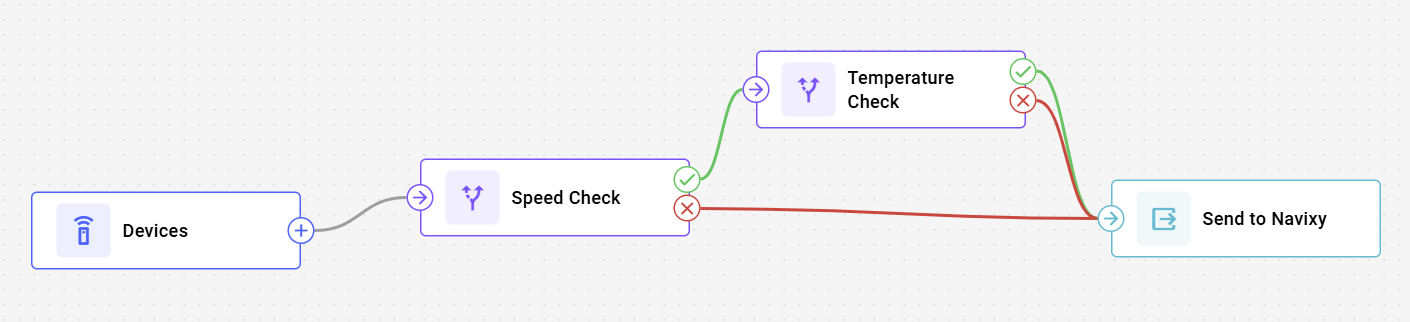
Yes. You can connect **IF/THEN Logic** nodes sequentially to create complex decision trees. Each **IF/THEN Logic** node can reference the boolean attributes created by previous **IF/THEN Logic** nodes, enabling sophisticated multi-stage validation workflows.
#### Why must IF/THEN Logic branches connect to Output Endpoints?
Every IF/THEN Logic branch must terminate in an Output Endpoint for data flow validation and system visibility. When using terminal nodes (Action, Webhook) that don't support outbound connections, create a parallel connection from the IF/THEN Logic node directly to an Output Endpoint. Both branches can share the same Output Endpoint if needed.
---
# Agent Instructions
This documentation is published with GitBook. GitBook is the documentation platform designed so that both humans and AI agents can read, navigate, and reason over technical content effectively. Learn more at gitbook.com.
## Querying This Documentation
If you need additional information that is not directly available in this page, you can query the documentation by asking a question.
Perform an HTTP GET request on the following URL with the `ask` and `goal` query parameters:
```
GET https://navixy.com/docs/user/guide/account/iot-logic/nodes/logic-node.md?ask=&goal=
```
`ask` is the immediate question: it should be specific, self-contained, and written in natural language.
`goal` is what the user is ultimately trying to achieve, the reason they need the answer. Sharing it helps GitBook give you a better, more relevant answer. A goal is most helpful when it describes the outcome the user wants rather than restating the question. For example, with `ask=how do I create an API token`, a goal like `automate deployments from our CI pipeline` lets GitBook tailor the answer to that use case.
The response will contain a direct answer to the question and relevant excerpts and sources from the documentation.
Use this mechanism when the answer is not explicitly present in the current page, you need clarification or additional context, or you want to retrieve related documentation sections.