
How to create route-based geofences faster using KML files

Fleet teams rely on route-based geofences to control operations, verify service execution, and respond to deviations in real time. As routes change frequently or scale across large fleets, manual geofence creation quickly becomes a bottleneck.
Below, we explain how KML files and geofencing in Navixy address this challenge, using a real operational example to show how route-based geofences can be created faster and with less effort.
Key takeaways
- Geofences built around planned routes give fleets direct control over route adherence, service validation, and deviation detection.
- KML files make it possible to reuse real vehicle routes, but manual geofence creation does not scale well.
- Navixy supports KML-based geofences, allowing fleets to reduce setup time from hours to minutes with the right processing approach.
Route-based geofences and operational control in fleet management
When fleets rely only on static geofences, they can tell where a vehicle was, but not how it got there. That gap matters once routes become part of daily operations rather than exceptions. If drivers are expected to follow specific paths, teams need a way to monitor those paths directly.
Geofences built around routes solve that problem. Instead of watching for entry and exit from fixed zones, teams can see whether vehicles stay on approved routes, skip segments, or take detours that affect timing, fuel use, or service quality. In industries with contractual or regulatory requirements, this visibility also supports route compliance without adding manual checks.
There is also a practical side that often gets overlooked. Route-based geofences create a clear record of what actually happened on the road. That record becomes useful when customers question service completion, when routes are reviewed after an incident, or when operations teams need to resolve disagreements using objective data.
To make this work in practice, fleets need a reliable way to capture and reuse real vehicle routes. KML files provide that structure.
You might also want to read: How small fleets can stay on schedule without a dispatcher.
What KML files are and how fleets use them
In simple terms, a KML file is a way to store geographic information such as routes, points, and areas in a format that mapping tools and fleet systems can read consistently. It does not define how a fleet should operate. It defines what happened on the map.
For fleet teams, the value of KML files is practical. A route captured from real vehicle movement can be saved as a single object, reviewed visually, and reused without having to redraw it by hand. Operations teams can check whether the route makes sense, technical teams can validate the geometry, and the same file can be shared across tools without losing detail.
KML files are also widely supported, which matters in real environments where data moves between systems. Routes exported as KML can be opened in common mapping applications for inspection or shared with partners and customers when route transparency is required. Everyone is working with the same route data, not a simplified or reinterpreted version.
When KML files are used to create geofenced routes, the process is straightforward in principle:
- A vehicle’s actual route is captured from tracking data and saved as a KML file.
- The route geometry is imported into the fleet system.
- That geometry is treated as a monitored corridor rather than a static line.
- The system can then detect when a vehicle follows the route, leaves it, or deviates from it.
This is the point where a recorded route stops being just a visual reference and becomes an operational control.
Importing route-based geofences in Navixy: a practical example
For Navixy users, geofences are a core operational tool rather than a secondary feature. They allow teams to define virtual boundaries on the map, whether circular, polygonal, or route-based, and automatically monitor how vehicles interact with those boundaries. Entry, exit, and dwell events are recorded without manual oversight, supporting daily operations in areas such as warehouses, delivery points, and restricted zones.
In practice, several Navixy partners raised a specific operational request. They needed to create route-based geofences derived from the actual routes their vehicles followed. This capability was critical for their operations, especially in environments where routes changed frequently or reflected real driving conditions rather than predefined plans.
Navixy allows users to create route-based geofences manually. However, for large fleets this approach proved difficult to sustain. In some cases, building a single daily route geofence required up to eight continuous hours of manual work. This directly affected productivity and response times, delayed the rollout of new routes, and, in some situations, put customer retention at risk, with reported losses of up to 200 units per month due to route-generation delays.
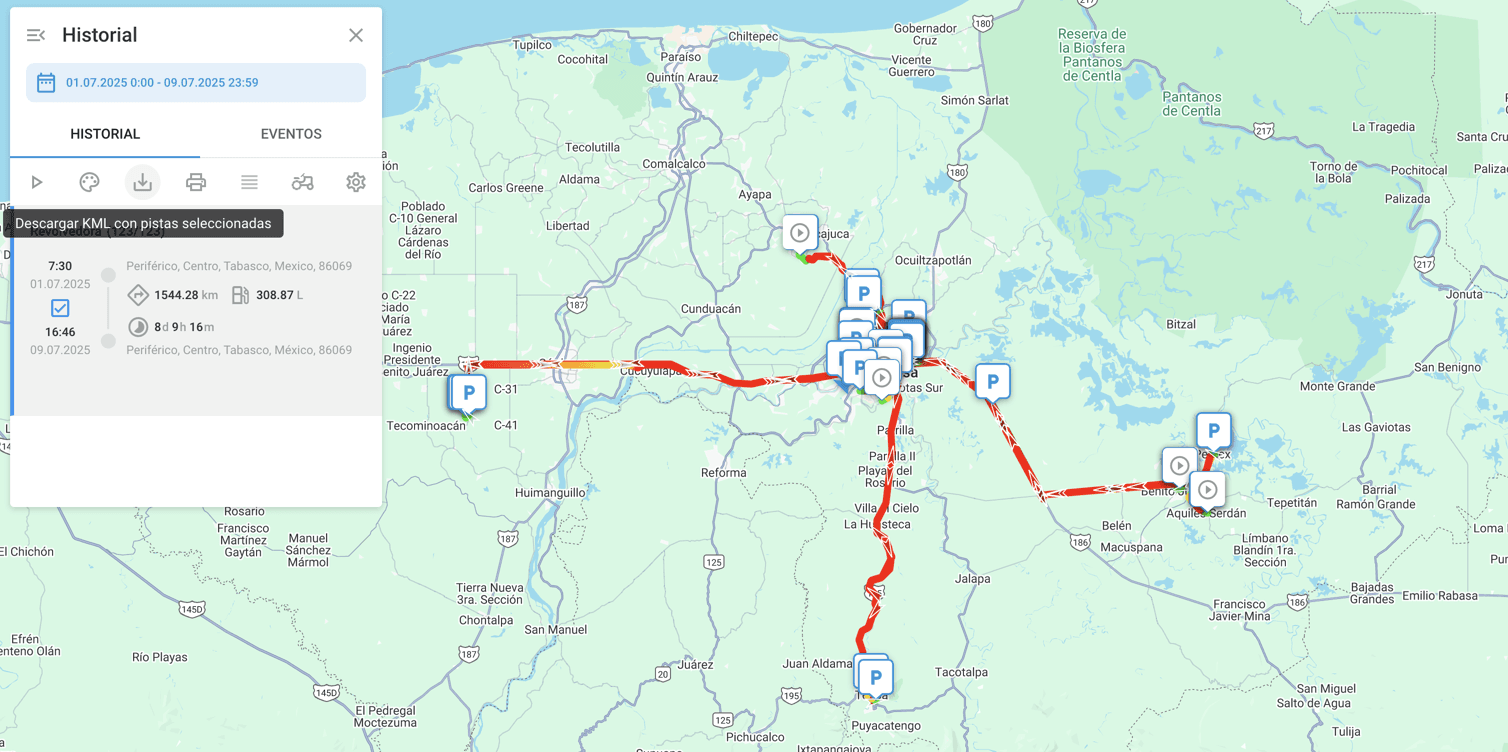
When a route is generated in Navixy, it can be downloaded in KML format. This allows teams to review the route in external mapping tools or reuse it in other workflows where route data is needed.
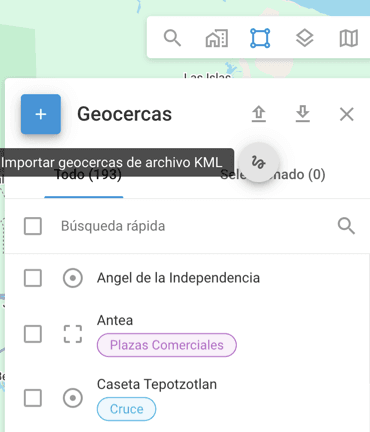
Navixy also supports importing KML files to create route-style, or “sausage-shaped,” geofences. These geofences follow the actual route geometry, giving teams a way to monitor vehicle movement along predefined paths rather than relying only on static zones.
Why a specialized solution is needed when KML import and export already exist
Although Navixy supports both exporting and importing routes using KML files, imported data often includes stop points. When a vehicle’s route is not continuous, this results in multiple fragmented geofences instead of a single clean route. Managing these fragments manually can quickly become impractical, especially when each point must be reviewed and linked to alerts.
The example below shows a KML file imported without additional processing.
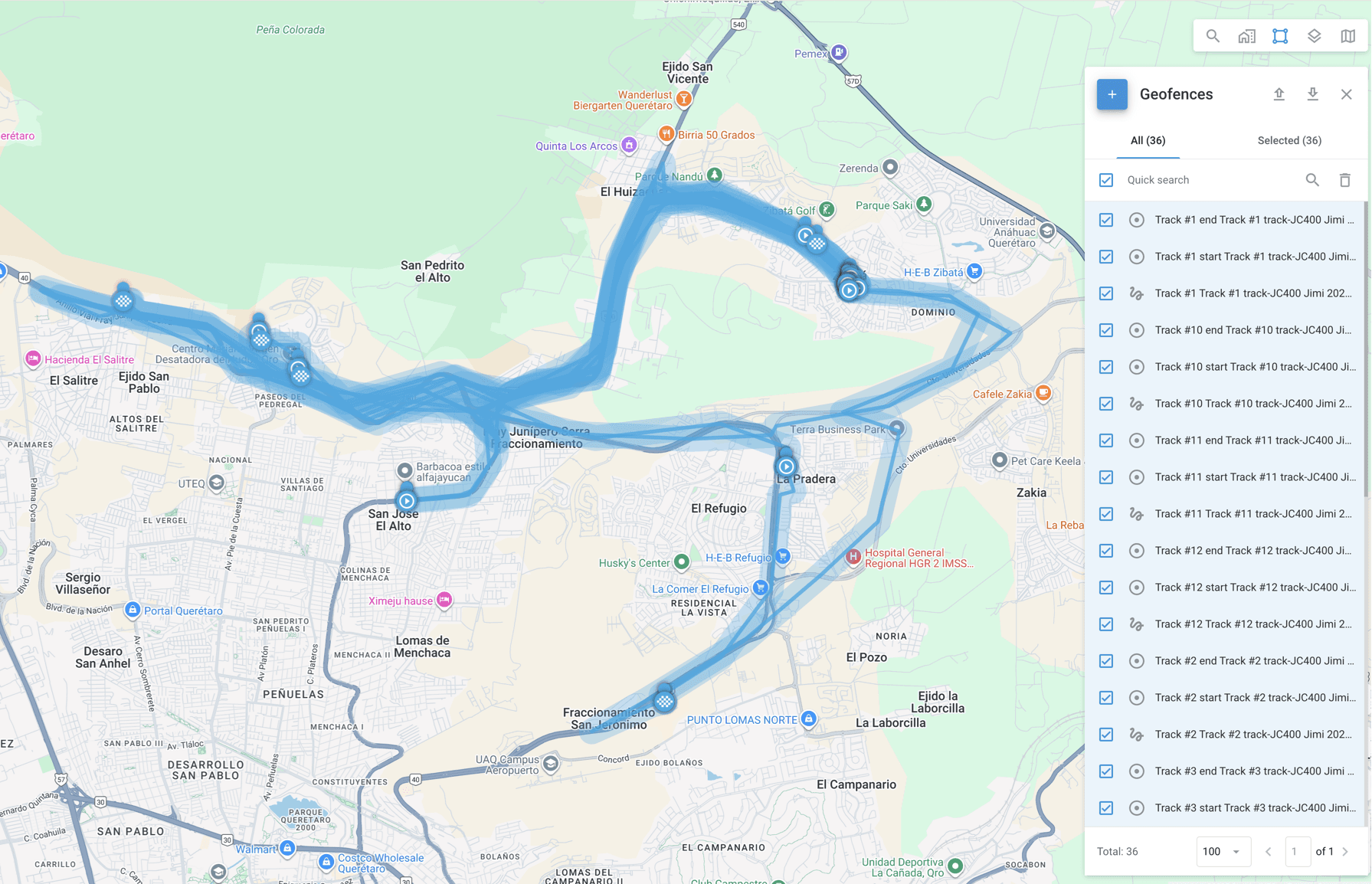
As shown, the system created 36 separate geofences, consisting of individual points, marked as circles, and disconnected route segments. This made it difficult to manage the route as a single operational object.
This highlighted the need to unify route segments and remove stop points before importing the file as a route-based geofence. Doing this manually requires a solid understanding of KML structure, along with the technical effort needed to decompose and merge route data correctly.
Artificial intelligence for creating route-based geofences
Manually unifying route segments and removing stop points from KML files requires a clear understanding of KML structure and careful handling of route geometry. For large or frequently changing routes, doing this by hand quickly becomes impractical.
To reduce that effort, the team used artificial intelligence to automate the cleanup process. The goal was not to generate new routes, but to take an existing KML file and transform it into a cleaner version that could be imported as a single route-based geofence.
To do this reliably, it is first necessary to understand how a KML file exported from Navixy is structured. A typical file contains three main elements:
- Placemark, which acts as a container for map features such as routes and points
- LineString, which defines a route using a sequence of coordinates
- Point, which represents an individual location, such as a stop
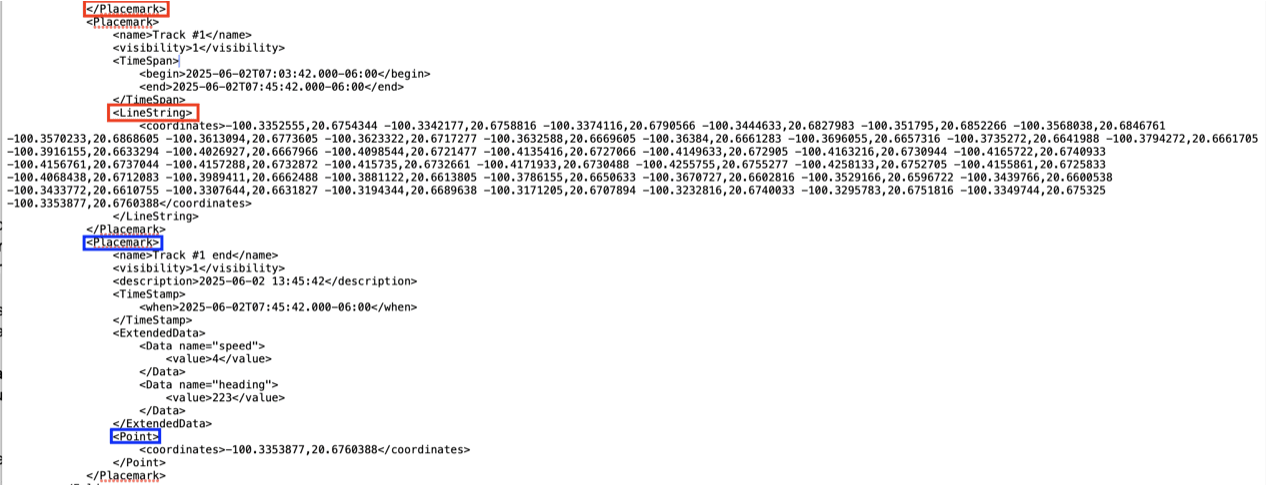
By understanding this structure and how imported stop points are represented, AI tools can be used to generate a new KML file without points and with unified routes. The process involves extracting all coordinates from LineString elements, removing Point elements, and merging separate route segments into a single LineString within one Placemark.
In practical terms, the AI is instructed to:
- Extract all coordinates from LineStrings within Placemarks and remove Points.
- Merge the extracted coordinates into a single LineString element.
- Return a valid KML file with one Placemark containing the unified route geometry.
The resulting file contains one Placemark and one LineString with all route coordinates joined together.
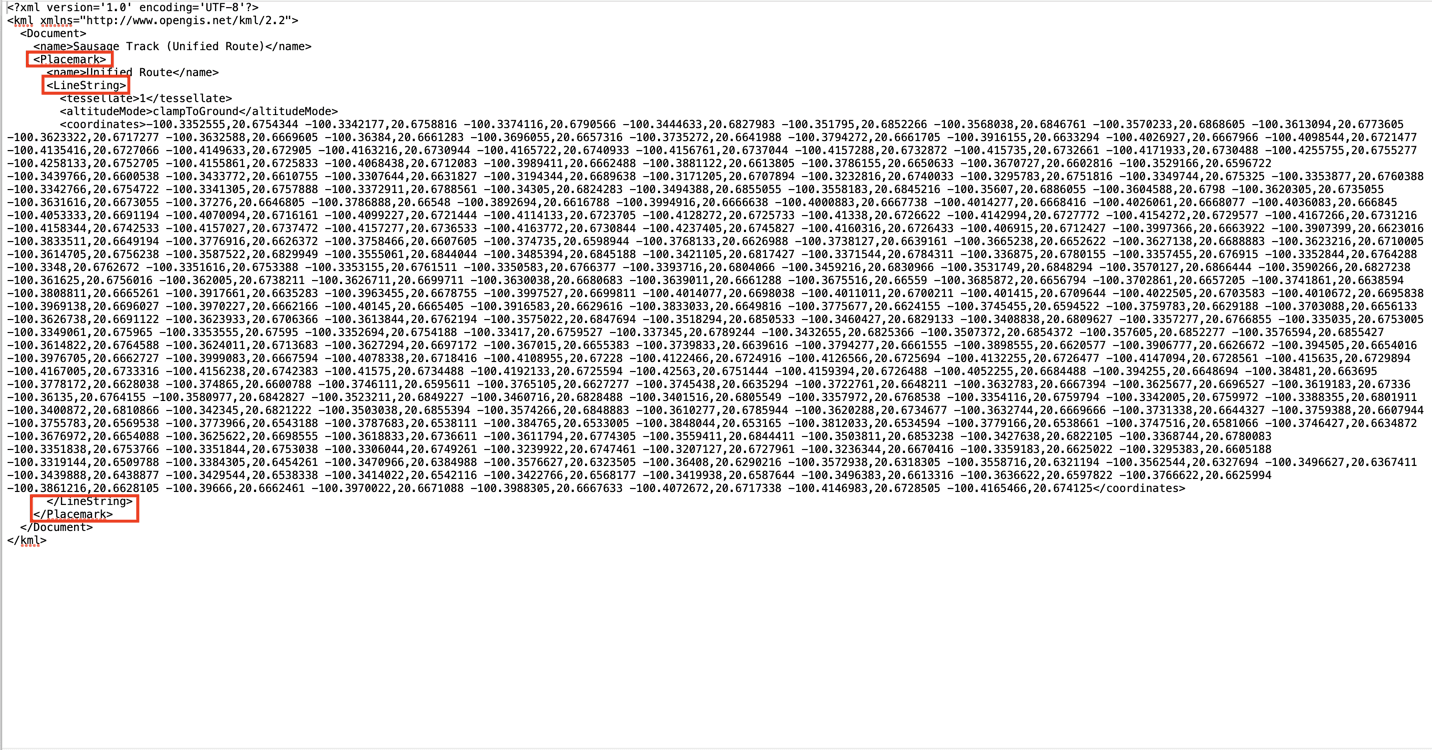
After importing this processed file back into Navixy, the system displays a single route encompassing all previously separated segments.
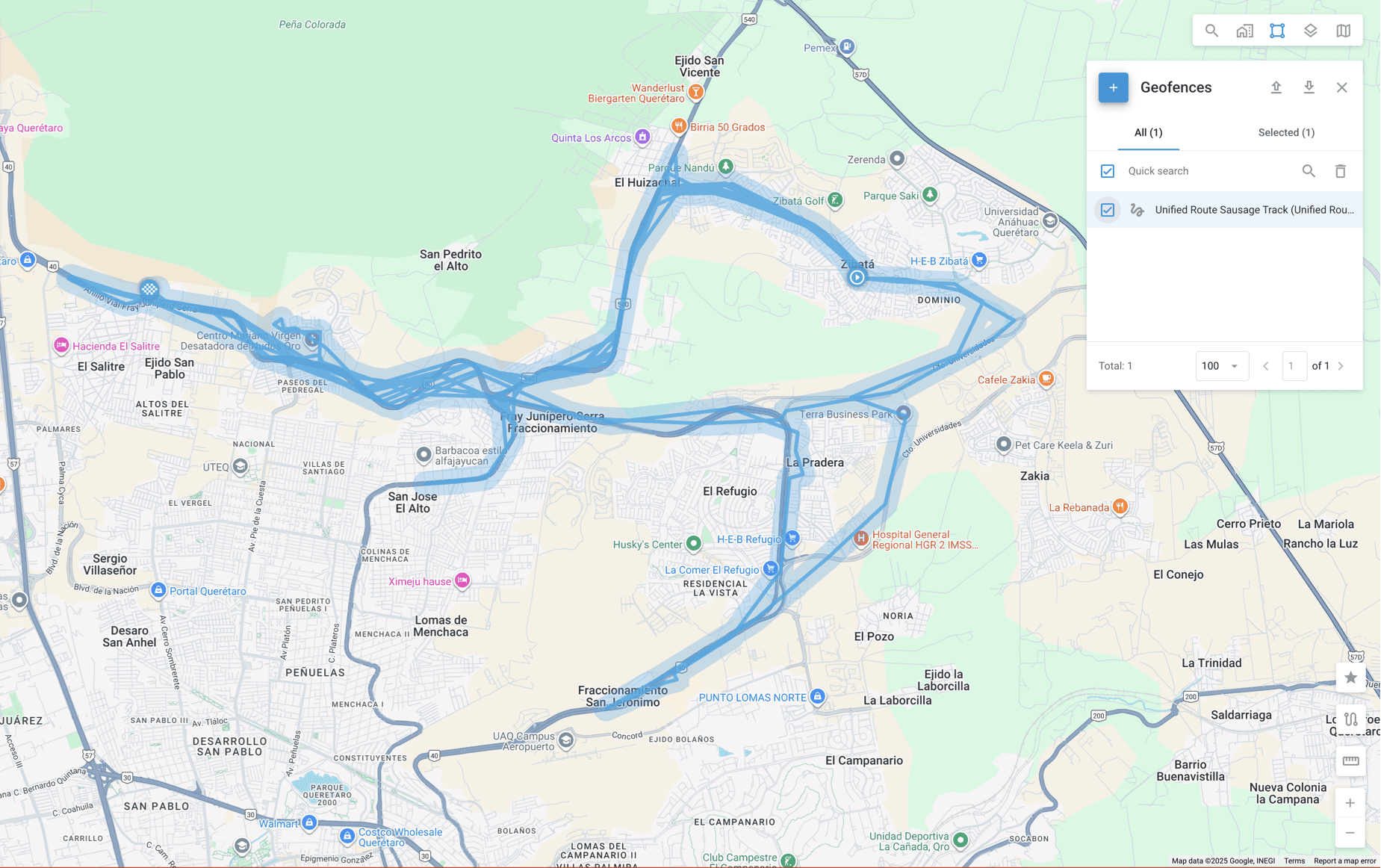
As shown, the route is now unified and appears as one selectable geofence that can reliably trigger entry and exit alerts along its entire length.
Limitations of the AI-assisted KML processing approach
While this approach significantly reduces manual effort, it is important to account for several practical limitations observed during testing.
Route duration
Routes covering a single day can be processed without issue. In testing, the approach was extended to two-day routes using a device transmitting data every three minutes. When attempting to process routes spanning three days, the AI was no longer able to handle the data reliably, and results became inconsistent.
Number of points
Route-style, or “sausage-shaped,” geofences are limited to 1,024 points. Longer routes with a high density of tracking data may exceed this limit and require additional handling, such as splitting the route into segments.
AI account constraints
The KML processing described here was performed using premium AI provider accounts. Standard accounts may impose stricter limits on file size, processing time, or prompt complexity, which can affect results.
What the KML-based approach changes for route geofencing
This case shows how route-based geofences can move from being a manual, time-intensive task to a repeatable operational process. By using KML files as a common format for capturing and reusing real vehicle routes, fleets gain a practical way to turn tracking data into enforceable controls without redrawing routes from scratch.
In the Navixy example, this approach reduced route geofence setup time from several hours to a matter of minutes. That change alone affects how quickly new routes can be deployed, how responsive operations teams can be, and how easily route compliance can be verified when questions arise.
At the same time, the example shows that this approach does not apply equally in every situation. Route length, data density, and processing limits all play a role, and these constraints need to be understood before applying the workflow at scale. Used within those boundaries, the approach offers a reliable way to simplify route management while keeping full visibility into what happens on the road.
Taken together, KML files, route-based geofencing, and targeted automation form a practical toolkit for fleets that need more control over how routes are executed, not just where vehicles appear on a map.
Want to see how KML-based route geofencing works in practice? Book a demo to explore how Navixy helps fleets turn real routes into usable geofences, reduce manual setup time, and maintain operational control at scale.