Proactive support dashboards for TSPs: Boost LTV, cut churn

Running a GPS tracking business is profitable only when customers stay for the long haul. Proactive support dashboards help cut churn, boost LTV, and turn raw data into loyalty.
Key takeaways
- High CAC and early churn threaten profitability in subscription-based GPS monitoring.
- Proactive monitoring with Navixy DataHub detects device issues before customers notice.
- Dashboards and alerts turn raw telematics data into actionable support insights.
- Simple BI tools like Metabase empower lean teams to build prevention-focused workflows.
Subscription‑based GPS monitoring is a long‑tail business. A customer may install dozens or even hundreds of tracking devices and pay monthly fees for years. Lifetime value (LTV) grows slowly while the customer acquisition cost (CAC) — the marketing and onboarding expense for each new account — is substantial. High CAC combined with recurring operational costs means that retention is critical: every customer who churns too early erodes profit.
Interestingly enough, a lot of providers still treat support as a reactive function: they wait for fleet managers to call when coordinates go missing or sensors misbehave. By then, everyone’s frustrated and the churn risk is climbing. What if, instead, you treated your telematics data like a conversation with your devices? What if you could catch a freezing GNSS module or a blocked SIM card before it becomes a customer complaint?
A more sustainable model is to use your telematics data (that a TSP already has!) to detect technical issues early and fix them before customers notice. By reducing the number of urgent support tickets you improve customer satisfaction and extend LTV.
Common telematics failures that drive the need for data‑driven support
When you dive into the mechanics of a tracking service, the biggest business headaches often wear a technical disguise:
Devices online but not sending coordinates. Vehicles may show as connected yet report no GPS fix due to jamming, poor satellite reception or firmware problems. Drivers rarely report this; if undetected, it results in missing trip data, billing disputes and churn.
Units added but never activated. Customers can provision trackers into their account and immediately begin paying subscription fees. If the device never connects, those fees turn into frustration and refunds. Replacement units sometimes remain in a “waiting for replacement” status after the old unit is returned.
SIM‑card anomalies. Pre‑provisioned SIM cards might stay in a blocked status, preventing devices from connecting. Resolving this requires coordination between the telematics provider and the mobile operator.
Sensor and CAN‑bus irregularities. Fuel probes, temperature sensors and OBD/CAN diagnostics can malfunction or be misconfigured. A sudden drop in fuel level or battery voltage may indicate an installation problem, theft attempt or sensor failure.
Without proactive monitoring these issues only surface when customers complain. Every unresolved incident increases the risk of churn, so the support team needs tools to catch them early.
How Navixy’s DataHub turns data into dialogue
Navixy’s DataHub is a cloud warehouse built on a private telematics lakehouse. It gives partners API-less direct SQL access to both business data (users, devices, vehicles) and telematics data (GPS coordinates, sensor readings, states). This full dataset is exposed via a PostgreSQL interface and lets you easily build custom reports and dashboards beyond the standard platform. Key benefits include direct SQL access, the ability to work with your complete dataset, and integration with any BI tool.
The DataHub organises itself into layers: Bronze (raw tables you can query immediately) and planned Silver and Gold layers for more refined analytics. It powers Navixy’s own real‑time dashboards: the system grabs the most recent tracking record for each vehicle, classifies movement, checks the timestamp and flags connection issues. If your tracker hasn’t transmitted data in the specified time, it gracefully moves from online & visible to online & invisible to offline. You can replicate that same or similar logic with a simple SQL query and bring visibility for your custom dashboard.
Choosing your conversational canvas
Let's be real: not everyone has a data engineer on speed dial. That's where Metabase is quite helpful – a free, open‑source BI tool that connects to your own Postgres database out of the box. It's drag‑and‑drop simple, supports filters and alerts, and doesn't cost a dime in licensing. Unlike alternatives like Power BI (licensing fees), Apache Superset, or Streamlit (more complex deployment), Metabase gets you up and running fast. For lean support teams that need results yesterday, it's the obvious choice.
Building dashboards without a Data Engineer
One Navixy partner transformed their support operations by building a Metabase dashboard that spots anomalies and alerts their team to intervene before customers even notice issues. The result is tangible: fewer complaints, happier customers, and a support team that looks like heroes.
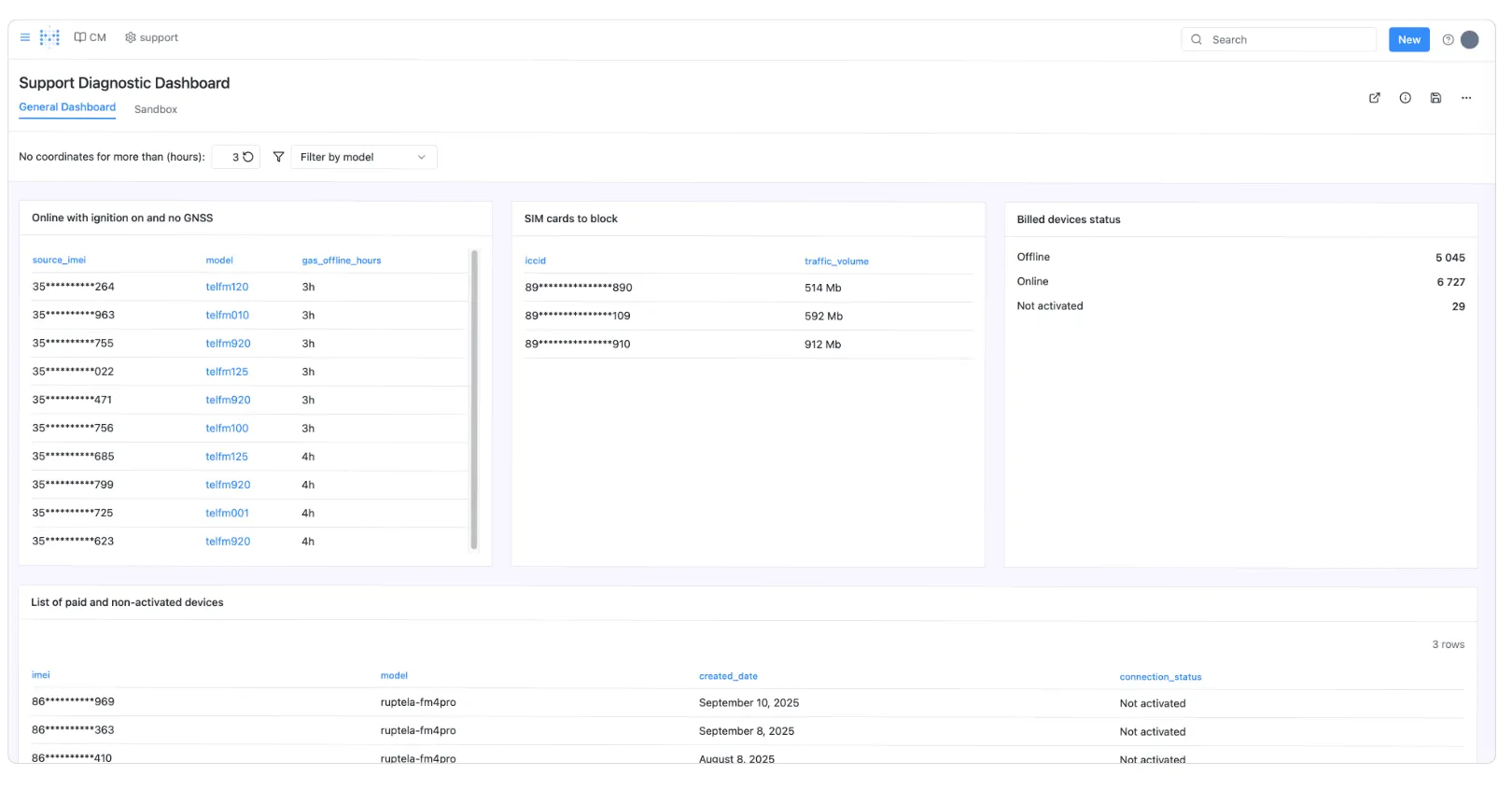
Below is the blueprint they used — a step-by-step guide using Navixy DataHub and API that any partner can follow. We've removed the proprietary details and company names, but kept everything you need to build your own proactive monitoring system. Follow this blueprint, adapt it to your specific use cases, and you'll have your own early-warning system up and running.
Connect to the DataHub. Obtain database credentials (host, port, username, password) from Navixy support and create a new Postgres connection in Metabase. Use the Bronze layer tables (e.g., telematics_data.tracking_points, business_data.devices, business_data.sim_cards) to query live telematics data and device metadata.
Devices online with ignition but no coordinates. Use a SQL query that fetches the most recent record (DISTINCT ON (device_id)) from telematics_data.tracking_points, join to the sensor_readings table for ignition status (through virtual ignition sensor) and filter where ignition is ON and latitude/longitude are null or older than a defined interval. Provide a filter in Metabase for the threshold (default 3 hours). Early detection here often indicates a frozen GNSS module or misconfigured ignition sensor.
Devices added but never connected or awaiting replacement. Query business_data.devices to find trackers whose activation_time is null or whose last connection timestamp in tracking_points is null. Join to the subscription table to determine whether the device is actively billed. Flag devices in “awaiting replacement” status but still listed as active.
SIM‑card anomalies. Join the business_data.sim_cards table with business_data.devices and filter where the expected SIM state (e.g., unlocked) differs from the current state recorded in the SIM card metadata. Provide quick links for support staff to manually unblock SIMs via the operator’s portal.
Sensor and CAN‑bus irregularities. Use tracker/readings/list or the sensor readings table to monitor fuel levels, battery voltage, temperature and OBD/CAN error codes. Define acceptable ranges and alert when values fall outside those ranges. Virtual sensors can be used to translate analog values into states like “Fuel sensor disconnected.”
Additional metrics. Leverage counters to track engine hours or mileage across devices. Combine this data with service schedules to alert customers when preventive maintenance is due. Consider adding geofence violation reports from Navixy’s data pipeline, which compute vehicle entries and exits from zones using PostGIS operations.
Alerts and workflows. Metabase allows setting up email or Slack notifications. Configure the dashboard to send an alert when a new anomaly appears (e.g., a device has been online without GPS data for more than three hours. This prompts the support team to reach out to the customer, reboot the device remotely or schedule a firmware update.
Best practices for support teams using Navixy DataHub
The partner used this dashboard to identify a firmware issue that caused a certain model of trackers to freeze their GNSS module after passing through areas with signal interference. Once discovered, they rolled out a firmware update and proactively informed customers, preventing hundreds of potential support calls. They also simplified control over tracker activation and SIM management, cutting the number of support tickets related to tracker failures by roughly 5%. Other benefits included reduced billing disputes, faster device replacements and better coordination between sales, support and engineering teams.
Building a proactive support dashboard does not require a large engineering team. Here are a few tips to get started:
Start with a clear list of failure modes. List the technical issues that most often lead to customer complaints: missing GPS coordinates, devices never connected, fuel sensor malfunctions, CAN errors, temperature alerts, etc. Each issue should map to a specific data point available via the DataHub or API.
Use virtual sensors to simplify logic. Translating raw analog values into on/off states makes queries easier and reduces the risk of misinterpretation.
Choose the right BI tool. For teams without a dedicated data engineer, Metabase is a good starting point thanks to its zero‑cost licence and minimal setup. If you require advanced analytics, consider Power BI or Superset, but plan for additional infrastructure.
Document your queries. Maintain a library of SQL snippets for detecting common anomalies. Navixy’s SQL recipe book and DataHub documentation contain examples for real‑time dashboards.
Review and iterate. After deploying the dashboard, measure its impact on ticket volume and customer satisfaction. Adjust thresholds and add new alerts based on feedback from support engineers and customers.
Final word: turn telematics data into customer loyalty
Here's the thing about running a GPS tracking business: your customers don't care about your CAC-to-LTV ratios. They care that their trucks show up on the map, their sensors work, and their bills make sense. The partner we've described transformed their support from reactive firefighting to proactive problem-solving — catching that firmware bug before hundreds of customers noticed, fixing blocked SIM cards before the first confused call. With just a simple Metabase dashboard and a few SQL queries against Navixy's DataHub, their support team went from answering complaints to preventing them.
In a business where every month of retention directly impacts your bottom line, this isn't just about reducing tickets by 5% or streamlining workflows. It's about building trust by fixing problems customers didn't even know they had.
So ask yourself: Are you still waiting for the phone to ring with complaints, or are you ready to let your data start the conversation first? 👉Contact Navixy