Accurate Mileage counting based on GPS

AuthorDaniel N., CEO of Navixy

Good news for businesses with large fleets. From now on you don’t’ have to get into the vehicle every time you need to check the readings of the odometer. We have recently added up Odometer tool to our platform.
With our new Odometer tool you will be able to check the current mileage of your vehicles without leaving the office.
Two tasks successfully solved with Odometer tool.
- You can control and monitor each vehicle mileage with no need to rely on drivers’ commitment. Odometer readings are useful in various cases, e.g. auto sale, fleet maintenance, etc. Moreover, you can access Odometer readings 24/7 irrespective of the vehicle’s current location.
- Odometer is a constituent part of Maintenance application that is planned to be released very soon. The system will automatically remind you about the upcoming maintenance events and point to the most problematic equipment. We will highlight the new application more thoroughly in the upcoming articles.
The way it works
Let’s answer the very first question you may come up with. Odometer is a virtual indicator (telltale device) which readings are based on the data received from your GPS tracking device. In other words, you will actually see not the readings from your dashboard but its approximate value synchronized with the travelled distance. That is why before starting using this tool you have to set up initial value.
Of course, such method is unable to guarantee a 100% accuracy, however if you run into some inaccuracies you are able to configure an automatic values adjustment by setting up a correction percent.
The mileage readings can be displayed in kilometers or miles depending on the default settings of your platform.
Adding up Odometer tool
You can add up Odometer tool and set up its initial value by two ways:
Adding up and configuring Odometer widget in the additional information panel.
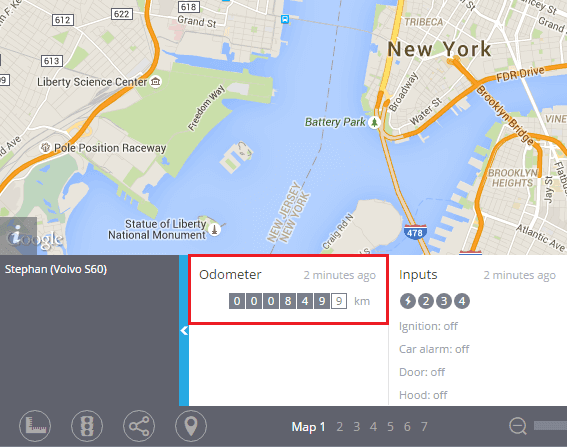
Using the Odometer portlet in the Devices application.
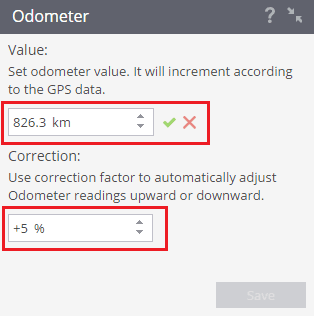
After taking these simple steps the Odometer tool will be immediately turned on.
Enjoy using it for your business needs and do not forget to share this new useful Navixy feature with your colleagues and partners.
On this page