Seven shades of idling and the way to beat them all

AuthorRoman S, Product owner, Navixy integrations

A heavy-duty truck idling for one hour burns close to three liters of diesel while covering exactly zero kilometers. Multiply that by 1,800 hours annually, the median for long-haul trucks according to recent research based on millions of fleet vehicles, and you're looking at $7,000 to $9,000 in fuel costs for loads that never moved. The American Trucking Associations estimates another $2,000 per year in accelerated maintenance costs, with idling causing engine wear equivalent to 64,000 miles from standing still.
Now, the sad reality is that most of this waste shows up in reports days or weeks after the money is already gone. Another approach businesses are now considering is addressing idling the moment it happens. Sounds quite logical, but as usual, there’s no one-size-fits-all solution. Why? The term idling is pretty vague, as different industries may use it to describe different events. So, how do you address these multiple shades of idling? Let’s take a closer look below.
What idling actually costs beyond fuel
The cost of excessive idling extends well past the fuel gauge. Fuel typically represents 25-35% of total cost of ownership for commercial vehicles, but idling adds 15-20% more to maintenance budgets through mechanisms that rarely appear in monthly reports.
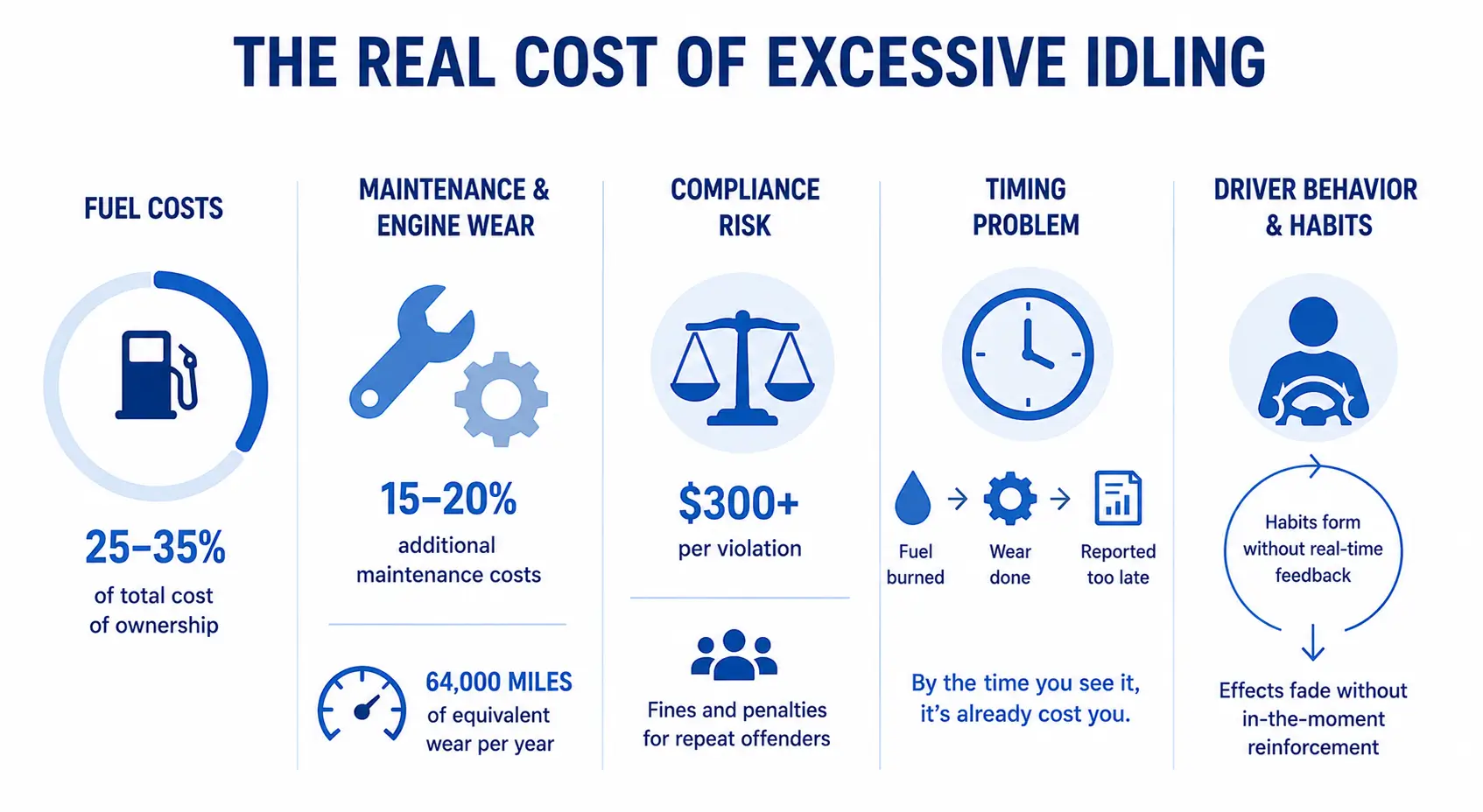
Engine wear accumulates even when wheels don't turn. Combustion byproducts build up faster at low RPMs. Cylinder walls, bearings, and turbochargers all degrade. The often-cited figure of 64,000 miles of equivalent wear per year of excessive idling isn't just marketing hyperbole. It's the arithmetic of parts that fail earlier than they should.
Then there's compliance exposure. Jurisdictions from California to the EU enforce anti-idling regulations with fines ranging from $300 per violation to ongoing penalties for repeat offenders. And the timing problem compounds everything: by the time you see an idling event in a weekly report, the fuel is burned, the engine wear is done, and the driver has no memory of why they sat running for 20 minutes at a loading dock last Tuesday.
Driver behavior isn't malicious. Engines stay running because the cab is cold, because the phone is charging, because waiting for a gate to open feels like "just a minute." Habits form quickly when there's no real-time feedback, and they're remarkably persistent. Coaching sessions help, but research on behavior change shows that the effect decays within weeks without reinforcement in the moment.
What counts as excessive idling depends on who's asking
A 10-minute idle at a distribution center might indicate a problem worth investigating. The same 10 minutes at a construction site where a concrete mixer is running hydraulics is completely normal. This is where generic idling reports fail: they treat all stationary-with-engine-on events identically, regardless of operational context.
Long-haul trucking typically applies a five-minute threshold as the industry standard. But sleeper berths complicate the picture. Drivers resting between shifts need climate control, and regulations in some states exempt certified auxiliary power units that can provide it without running the main engine.
Last-mile delivery operates differently. Frequent stops make any extended idle suspicious. A van sitting for 15 minutes at a single residential stop raises questions. The threshold here might be three minutes or less, because operational patterns involve constant movement between addresses.
Construction and heavy equipment inverts the logic entirely. Excavators, cranes, and mixers run their engines to power hydraulics and PTOs. Idle detection for these vehicles needs to distinguish between engine-on-but-not-working versus engine-on-and-operating-equipment. Speed alone tells you nothing; you need to correlate with PTO engagement or auxiliary outputs.
Cold chain and refrigerated transport splits into two idle categories. The reefer unit on a trailer must run to maintain temperature. That's not idling. But the cab engine running while the driver waits for dock assignment is. These need separate treatment in any monitoring system.
Field service vehicles present their own pattern. Technicians often work from the cab, running diagnostics or completing paperwork with the air conditioning on. Some of this is reasonable comfort; some is addressable with better practices. The threshold depends on climate and role.
Transit and passenger transport faces regulatory exemptions for HVAC that serves passengers, not just drivers. Idling policies for buses must account for passenger comfort requirements that don't apply to freight.
Emergency and utility vehicles generally operate outside normal idling rules. Police cruisers running systems on scene, utility trucks powering equipment during outages, these are operational requirements, not waste.
The point isn't that seven is a magic number. It's that any organization treating idling as a single metric across all vehicle types is missing the operational reality. Smart platforms let you define idling on your terms, with configurable thresholds per vehicle group.
The challenge is not only defining those rules, but applying them consistently across different vehicle groups, dispatch teams, regions, and customer environments. Without standardized logic, idling policies often become subjective, making enforcement and operational response difficult to scale.
Why traditional idling reports miss the point
Traditional fleet idling management still relies heavily on historical reports. Daily and weekly summaries may show how much idle time accumulated across the fleet, but they rarely help operators prevent it at the moment. By the time a fleet manager reviews a 200-vehicle report, the fuel is already burned, the wear is already done, and the reason behind the idle event is already forgotten.
The problem becomes even more complicated across mixed fleet operations. As we have already seen, one company may define excessive idling as 10 minutes with ignition on and speed at zero, while another may use a 15-minute threshold, combine speed with PTO status, or apply different rules depending on vehicle type and installed sensors. A reefer truck waiting at a loading dock, a utility vehicle powering equipment on site, and a last-mile delivery van parked outside a customer address all require different logic. Static reports rarely adapt well to that level of operational variation.
Coaching helps, but timing matters. A conversation on Friday about an idling event from Tuesday rarely changes what happens next week. Drivers respond more consistently when feedback arrives while the engine is still running, not after the habit has already repeated itself dozens of times.
So, the fundamental limitation is architectural. Traditional systems observe and report but don't intervene. Delayed response turns idling into a silent operational cost that only becomes visible after the invoice arrives.
What if the system could react in real time?
How to reduce excessive idling in real time
Well, excessive idling is one of the few operational problems fleets can address almost immediately with the right combination of real-time monitoring and automated response. However, before automating anything, they first need to understand whether they actually have an idling problem, how much it costs, where it occurs, and what should count as excessive within their specific operation. In other words, they first need to understand which shade of idling they’re dealing with. Only then can that response be automated.
Automating idling response. IoT Logic in use
Speaking of real-time response, fleets can automate far more than simple idling alerts. The system can automatically detect when a vehicle becomes stationary with the ignition still on, track how long that condition persists, escalate the event once a threshold is exceeded, notify dispatchers or drivers, and log the event for reporting or compliance purposes.
Take a simple delivery fleet scenario. A vehicle stops at a loading dock with the engine still running. At first, nothing happens. Short idle periods are often operationally normal. But if the vehicle remains stationary beyond the configured threshold, for example, 10 minutes, the workflow automatically flags the event and triggers the configured response.
It’s worth noting that this idling scenario is just one example. In practice, fleets can define their own conditions, thresholds, escalation rules, and response logic depending on how idling is interpreted within their operation.
Let's look in more detail at how IoT Logic handles this.
IoT Logic is an event-driven automation platform that processes telematics data in real time and reacts when predefined conditions are met.
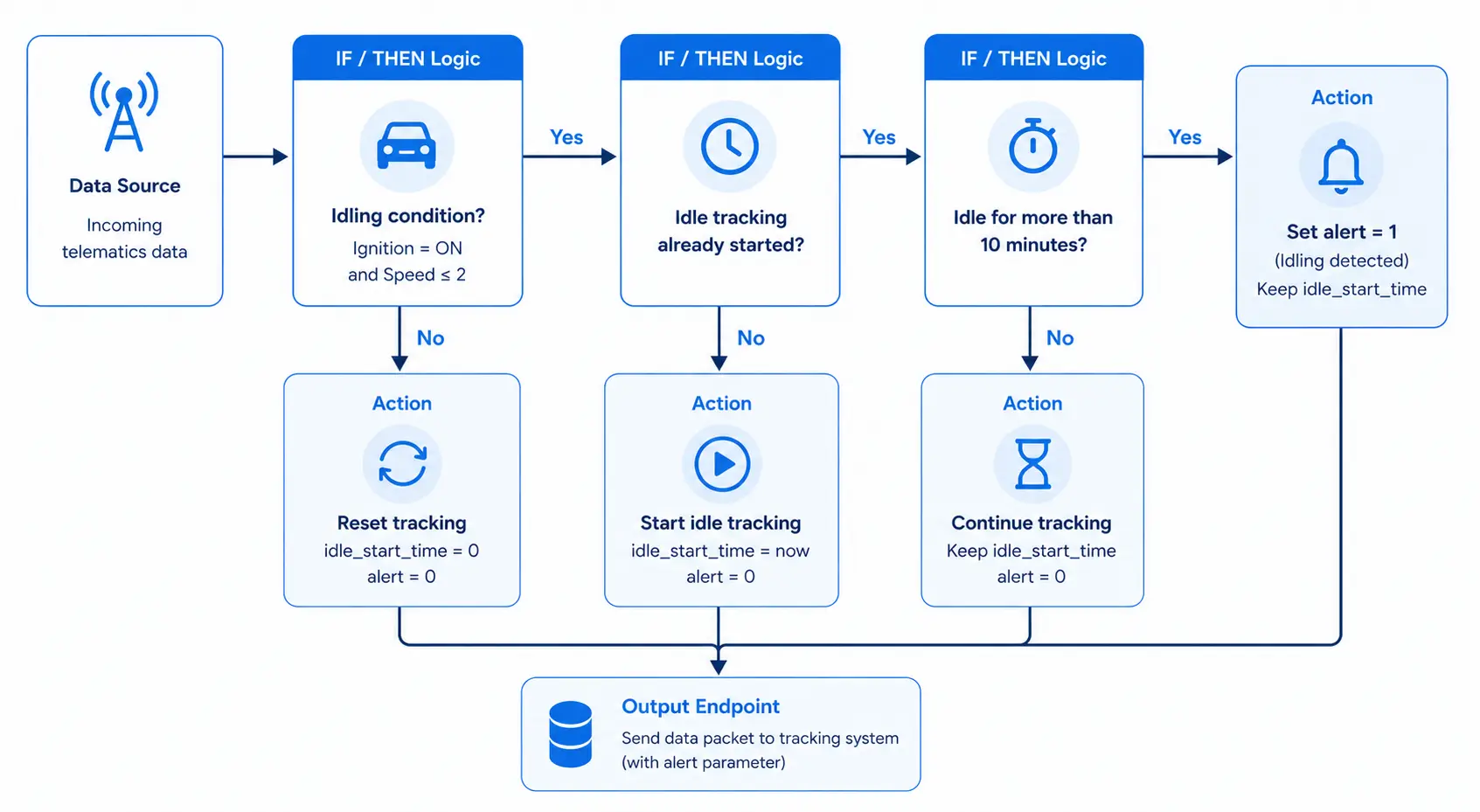
Every time a new data packet arrives from the vehicle, the workflow checks two things: whether the ignition is on and whether the vehicle speed remains close to zero. Once both conditions are met, the system starts tracking how long the vehicle stays in that state.
If movement resumes before the threshold is exceeded, the workflow resets automatically. If the idle period continues too long, the event gets escalated. From there, the system can send an in-cab alert, notify dispatchers, push data into external systems through webhooks, or automatically log the event for compliance tracking.
The workflow itself does not need to be built from scratch. IoT Logic already includes a pre-configured Idling Detection Template that serves as a starting point for building custom operational logic. Operators can connect their own data source, adjust thresholds, replace conditions, add escalation steps, or extend the workflow with additional actions depending on their fleet requirements.
How the same automation logic scales into broader operational workflows.
What makes the template especially practical is that the same workflow pattern can be extended far beyond excessive idling. Since the logic is duration-based, fleets can reuse it for virtually any condition that needs to be monitored over time.
For example, a fleet may:
- notify drivers after prolonged idling,
- escalate the event to dispatch if the condition continues,
- monitor doors left open too long,
- track auxiliary equipment running beyond allowed durations,
- trigger alerts when sensors remain active longer than expected.
The underlying logic stays the same: detect a condition, track how long it persists, and trigger a response once operational thresholds are exceeded.
Standardizing how fleets respond to excessive idling
One of the biggest operational challenges with excessive idling is consistency. Different vehicle groups, dispatch teams, and customer environments often lead to different interpretations of what should trigger intervention and when.
Automation makes those operational rules repeatable. Once thresholds, escalation paths, and response logic are configured, the same workflow can be applied consistently across vehicles, regions, or customer accounts without relying on manual supervision.
For telematics service providers, this also changes deployment economics. Instead of building separate monitoring setups for every customer, teams can reuse and adapt existing workflow templates based on operational requirements. A delivery fleet, utility contractor, or refrigerated transport operator may all use different thresholds, while relying on the same underlying automation structure.
Over time, that consistency helps fleets reduce avoidable fuel waste, standardize operational response, and spend less time manually reviewing idling events after the fact.
If this approach could work for your fleet, try the Idling Detection Template in IoT Logic and test the workflow against your own operational conditions. And if you have questions about thresholds, integrations, or more advanced automation scenarios, book a demo and we'll walk through them together.