> For the complete documentation index, see [llms.txt](https://navixy.com/docs/llms.txt). Markdown versions of documentation pages are available by appending `.md` to page URLs; this page is available as [Markdown](https://navixy.com/docs/user/id/guide/devices-and-settings/vehicle-sensors/specialized-sensors-by-manufacturer/teltonika-sensors/ble-beacons-teltonika.md).
# Beacon BLE (Teltonika)
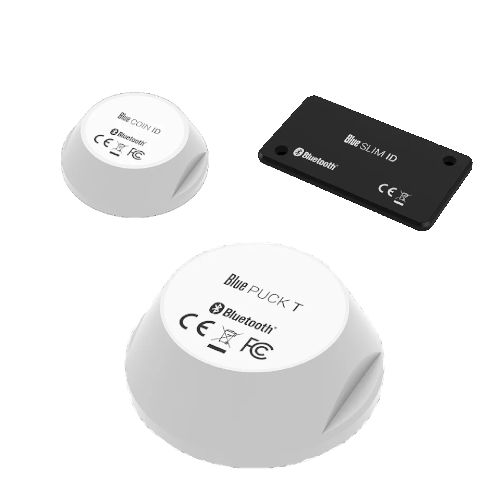
Beacon BLE Teltonika adalah perangkat serbaguna yang dapat mengumpulkan data suhu, status magnetik, dan mengirimkan pengenal mereka dalam jarak jauh, mencapai hingga 200 meter di area terbuka.
Beacon ini menggunakan **Bluetooth Low Energy** teknologi (BLE 4.0+), yang dikenal karena efisiensi energinya, sehingga memungkinkan perangkat ini beroperasi dalam jangka waktu lama dengan baterai internalnya—hingga 2 tahun untuk model SLIM, hingga 5 tahun untuk model COIN, dan hingga 19 tahun untuk model PUCK.
Beacon ditempatkan dalam casing dengan peringkat IP68, yang memberikan perlindungan kuat terhadap debu dan air.
## Model beacon yang didukung
* **Blue COIN MAG**: beacon magnetik kecil
* **Blue PUCK MAG**: beacon magnetik besar
* **Blue COIN ID**: beacon ID kecil
* **Blue PUCK ID**: beacon ID besar
* **Blue SLIM ID**: beacon seukuran kartu untuk identifikasi karyawan
* **Blue COIN T**: beacon suhu kecil
* **Blue PUCK T**: beacon suhu besar
### Sensor suhu
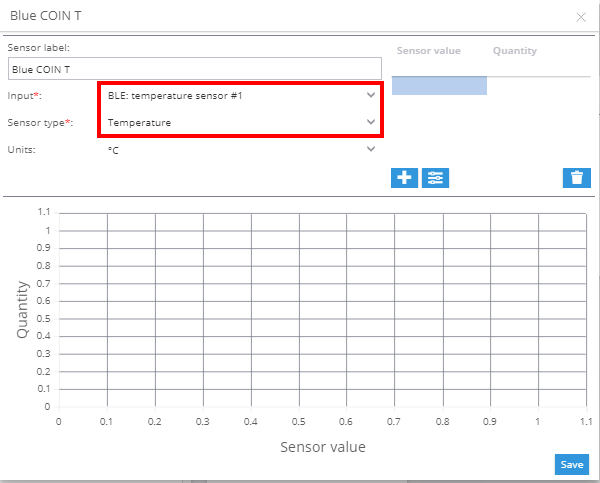
Untuk menambahkan sensor suhu:
1. Buka bagian sensor pengukuran di tab input.
2. Pilih **BLE: Temperature** sebagai jenis input.
3. Pilih **Suhu** sebagai jenis sensor.
### Sensor magnetik
Sensor magnetik menampilkan statusnya di **Pembacaan sensor** blok [Widget Objek](/docs/user/id/guide/tracking/objects-list/object-widget.md). Widget ini memungkinkan Anda memantau apakah sensor saat ini aktif atau tidak.
### Sensor identifikasi pengemudi
Sensor identifikasi berfungsi serupa dengan iButton dan RFID, tetapi tanpa memerlukan pembaca fisik. Ketika sensor berada dalam jangkauan tracker, identifikatornya akan ditampilkan secara otomatis.
**Lihat juga:**
* [Menetapkan kunci ID pengemudi di profil Pengemudi](/docs/user/id/guide/fleet-management/drivers.md)
* [Identifikasi pengemudi (Aturan dan notifikasi)](/docs/user/id/guide/events-and-notifications/scheduling-and-dispatching/driver-identification.md)
---
# Agent Instructions
This documentation is published with GitBook. GitBook is the documentation platform designed so that both humans and AI agents can read, navigate, and reason over technical content effectively. Learn more at gitbook.com.
## Querying This Documentation
If you need additional information that is not directly available in this page, you can query the documentation dynamically by asking a question.
Perform an HTTP GET request on the current page URL with the `ask` query parameter, and the optional `goal` query parameter:
```
GET https://navixy.com/docs/user/id/guide/devices-and-settings/vehicle-sensors/specialized-sensors-by-manufacturer/teltonika-sensors/ble-beacons-teltonika.md?ask=&goal=
```
`ask` is the immediate question: it should be specific, self-contained, and written in natural language.
`goal` is optional and describes the broader end goal you are ultimately trying to accomplish on behalf of the user. GitBook uses it to tailor the answer towards what is most useful for that goal.
The response will contain a direct answer to the question and relevant excerpts and sources from the documentation.
Use this mechanism when the answer is not explicitly present in the current page, you need clarification or additional context, or you want to retrieve related documentation sections.