> For the complete documentation index, see [llms.txt](https://navixy.com/docs/llms.txt). Markdown versions of documentation pages are available by appending `.md` to page URLs; this page is available as [Markdown](https://navixy.com/docs/user/guide/devices-and-settings/connectivity/data-forwarding.md).

# Data forwarding

Forward a live copy of GPS and telematics data from Navixy to a third-party server, using one of 29 supported protocols for compliance, enterprise integration, or data consolidation.

The **Data forwarding** block sends a live copy of a device's GPS and telematics data to a server outside Navixy. This page explains how forwarding behaves, what you need to configure it, and which protocols Navixy supports. It is for fleet operators who must deliver data to a regulator, a customer, or another software system.

Data forwarding is also called data retransmission, and a single forwarding configuration is called a retranslator.

Forwarding requires a subscription plan that includes it. The number of retranslators you can create is also limited by your plan.

## How data forwarding works

Navixy forwards each message as it arrives from the device. A retranslator isn't a scheduled export: every incoming message is converted to the target protocol's format and sent immediately, so the rate at which data reaches the destination follows the reporting interval of the GPS device.

Three protocols behave differently, and their pages state so:

* **Unigis** sends at most one message per minute per device. Urgent events are sent immediately regardless.
* **Wisetrack** collects messages and sends them in batches once a minute.
* **Navixy Web Service** doesn't send anything. Navixy hosts an endpoint that the receiving system queries for data.

Each protocol also filters which messages it sends. Most protocols skip a message without a valid position, and some forward alarm events even without a position. The page for each protocol lists what it sends and what it skips.

{% hint style="warning" %}
Data forwarding covers live data only. Navixy holds a small number of recent messages while a destination is briefly unreachable, but it doesn't resend history once that buffer fills. If the destination server stays offline, the data recorded during the outage never reaches it, and there's no way to request it afterwards. Data already in Navixy isn't affected: only the copy sent to the destination is lost.

For compliance reporting, treat the destination server's availability as your responsibility, and reconcile against Navixy reports.
{% endhint %}

### Device identification

The receiving system usually identifies a vehicle by its own identifier rather than by the Navixy device id. The **External ID** field stores that value, and Navixy sends it in place of the device id.

Each protocol accepts External ID in a fixed format, and Navixy rejects a value that doesn't match. Some protocols use a plain license plate, others use several fields joined by a pipe character. The page for each protocol gives the format it accepts. When you leave External ID empty, Navixy sends the device id instead.

## When to use data forwarding

Data forwarding serves three needs:

* **Government regulation compliance.** Some countries require vehicles to report location and speed to a state server in a mandated protocol format.
* **Enterprise integration.** Large retail and logistics customers often require suppliers to deliver GPS and telematics data into the customer's own system as a contractual condition.
* **Data consolidation.** Software built from components by several vendors needs data normalized into one format, or copied between two Navixy servers.

## Supported protocols

Navixy supports the following 29 protocols, listed under the name the receiving party uses. Where the **Protocol** dropdown in Navixy spells that name differently, the row says which option to select.

The **Transport** column tells you what the receiving server must accept. The **Credentials** column tells you which fields Navixy requires before it saves the retranslator.

| Protocol                                                                                                                                       | Purpose                | Transport          | Credentials        | External ID                                          |
| ---------------------------------------------------------------------------------------------------------------------------------------------- | ---------------------- | ------------------ | ------------------ | ---------------------------------------------------- |
| Altotrack Chep Mexico (select **AltotrackChepMexico**)                                                                                         | Enterprise integration | SOAP over HTTP     | None               | Up to 40 uppercase letters and digits                |
| ArmCargo                                                                                                                                       | Enterprise integration | TCP                | None               | License plate, `AB123CD` or `ABC123`                 |
| AVL Control                                                                                                                                    | Data consolidation     | HTTP               | Login and password | Not used                                             |
| BCDOS                                                                                                                                          | Enterprise integration | SOAP over HTTP     | None               | Up to 8 digits                                       |
| Blac Solutions                                                                                                                                 | Enterprise integration | HTTP               | Login and password | Not used                                             |
| CargoOnline                                                                                                                                    | Enterprise integration | HTTP               | None               | Not used                                             |
| EGTS                                                                                                                                           | Government compliance  | TCP                | None               | Up to 15 digits                                      |
| Granit3                                                                                                                                        | Data consolidation     | TCP                | None               | Up to 5 digits                                       |
| Granit3 Scout                                                                                                                                  | Data consolidation     | TCP                | None               | Up to 5 digits                                       |
| [ILSP](/docs/user/guide/devices-and-settings/connectivity/data-forwarding/ilsp.md)                                                             | Enterprise integration | HTTP               | Login and password | `customerId\|licensePlate\|transportLineId`          |
| Lacak.io                                                                                                                                       | Data consolidation     | HTTP               | None               | Up to 15 digits                                      |
| Localizar-t                                                                                                                                    | Enterprise integration | HTTP               | Login and password | Not used                                             |
| [Maquinaria Amarilla](/docs/user/guide/devices-and-settings/connectivity/data-forwarding/maquinaria-amarilla.md) (select **Yellow Machinery**) | Government compliance  | SOAP over HTTP     | Login and password | Up to 20 uppercase letters and digits                |
| [Navixy Web Service](/docs/user/guide/devices-and-settings/connectivity/data-forwarding/navixy-ws.md)                                          | Data consolidation     | Inbound SOAP query | Login and password | Not used                                             |
| Olympstroy (select **Olimpstroy**)                                                                                                             | Government compliance  | HTTP               | None               | Not used                                             |
| OSINERGMIN (select **Osinergmin**)                                                                                                             | Government compliance  | HTTP               | Password           | Not used                                             |
| ReC Solutions (select **REC SOLUTIONS**)                                                                                                       | Enterprise integration | SOAP over HTTP     | Login and password | Up to 40 uppercase letters and digits                |
| [Recurso Confiable](/docs/user/guide/devices-and-settings/connectivity/data-forwarding/recurso-confiable.md)                                   | Enterprise integration | HTTP               | Login and password | `licensePlate\|shipmentId\|customerId\|customerName` |
| Recurso Confiable (Walmart)                                                                                                                    | Enterprise integration | HTTP               | Login and password | `licensePlate\|shipmentId\|customerId\|customerName` |
| SA-RM                                                                                                                                          | Data consolidation     | HTTP               | Login              | Not used                                             |
| SafetyNet                                                                                                                                      | Enterprise integration | TCP                | None               | Not used                                             |
| [SimpliRoute](/docs/user/guide/devices-and-settings/connectivity/data-forwarding/simpliroute.md) (select **Simple Route**)                     | Enterprise integration | HTTP               | None               | Not used                                             |
| [Startrack](/docs/user/guide/devices-and-settings/connectivity/data-forwarding/startrack.md)                                                   | Data consolidation     | SOAP over HTTP     | None               | Not used                                             |
| TraceReports                                                                                                                                   | Enterprise integration | TCP                | None               | Digits                                               |
| Transnavigation                                                                                                                                | Data consolidation     | TCP                | Password           | Digits                                               |
| [Unigis](/docs/user/guide/devices-and-settings/connectivity/data-forwarding/unigis.md) (select **UNIGIS**)                                     | Enterprise integration | HTTP               | Login and password | License plate                                        |
| [Wialon IPS](/docs/user/guide/devices-and-settings/connectivity/data-forwarding/wialon-ips.md)                                                 | Data consolidation     | TCP                | None               | Not used                                             |
| Wirtrack                                                                                                                                       | Enterprise integration | TCP                | None               | Not used                                             |
| Wisetrack                                                                                                                                      | Data consolidation     | HTTP               | None               | License plate, 5 to 8 characters                     |

{% hint style="info" %}
A protocol with no dedicated page above is configured the same way as the others: create the retranslator, enter the address, port, and credentials that the receiving party gives you, then link it to your devices. Contact the receiving party for the address and credentials, and Navixy support if the protocol needs values you don't have.
{% endhint %}

## Managing retranslators

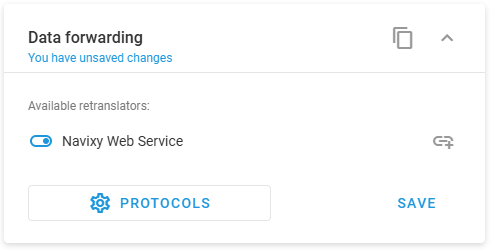
Open **Devices and settings**, select a device, then find the **Data forwarding** block. It lists the retranslators available in the account, with a toggle for each one.

<div align="left"><figure><img src="https://2096203889-files.gitbook.io/~/files/v0/b/gitbook-x-prod.appspot.com/o/spaces%2F446mKak1zDrGv70ahuYZ%2Fuploads%2Fgit-blob-a5252a55e908f4fa8650dd67e60f8eccf1ee6bf5%2Fimage.png?alt=media" alt="The Data forwarding block listing one available retranslator with its toggle switched on, above the Protocols and Save buttons"><figcaption><p>The Data forwarding block for a single device</p></figcaption></figure></div>

From here you can:

* Switch on a retranslator to forward this device's data through it, then click **Save**.
* Set the External ID that Navixy sends for this device, using the link icon at the right of the retranslator row.
* Switch a retranslator off to stop forwarding this device's data.
* Click <img src="https://2096203889-files.gitbook.io/~/files/v0/b/gitbook-x-prod.appspot.com/o/spaces%2F446mKak1zDrGv70ahuYZ%2Fuploads%2Fgit-blob-48e3a839b9ae0bbf9f3bb2a548dd3d6ba6a2093c%2Fimage.png?alt=media" alt="Protocols" data-size="line"> to create, edit, or delete retranslator configurations.

Clicking **Protocols** opens the **Retranslation protocols** dialog, which lists every configuration in the account. Click **+** to add one, or select a row to edit it.
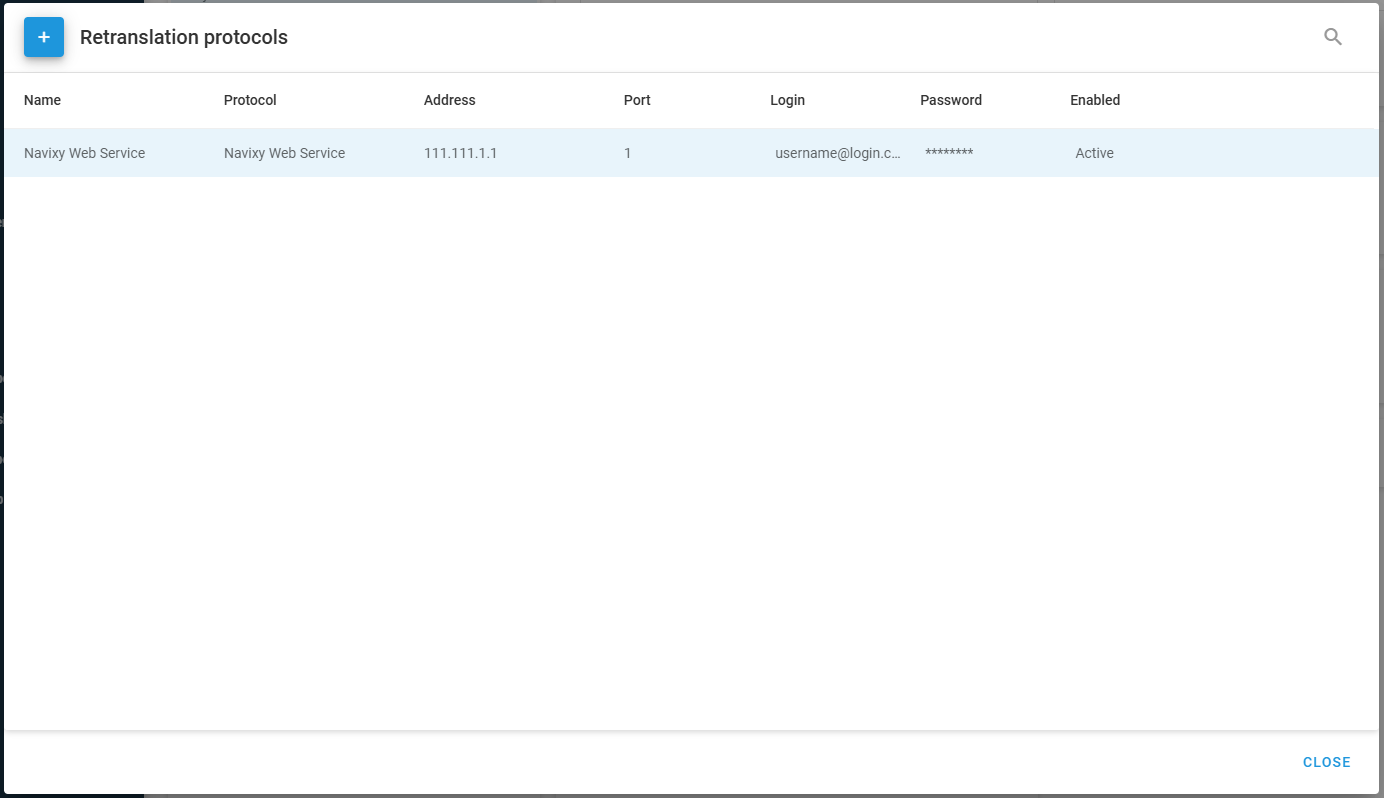
<figure><img src="https://2096203889-files.gitbook.io/~/files/v0/b/gitbook-x-prod.appspot.com/o/spaces%2F446mKak1zDrGv70ahuYZ%2Fuploads%2Fgit-blob-77e6be619c8496273e9cdcae0fe47605a1b80e8a%2Fimage.png?alt=media" alt="The Retranslation protocols dialog listing one configuration with its name, protocol, address, port, login, and Active status"><figcaption><p>The Retranslation protocols dialog, where configurations are created and edited</p></figcaption></figure>

A retranslator configuration holds these settings:

| Setting                    | Purpose                                                                                                   |
| -------------------------- | --------------------------------------------------------------------------------------------------------- |
| **Name**                   | A label that identifies this retranslator in the device settings.                                         |
| **Protocol**               | The protocol the data is converted to. Pick the name shown in the [protocol table](#supported-protocols). |
| **Address** and **Port**   | Where the data is sent. The receiving party provides both.                                                |
| **Login** and **Password** | Credentials for the receiving server, when the protocol requires them.                                    |
| **Enabled**                | Whether the retranslator sends data. A disabled retranslator sends nothing.                               |

A retranslator configuration belongs to the account, not to one device. Once you create it, you can link it to any device in the account by switching the toggle in that device's **Data forwarding** block. Editing a configuration changes it for every device linked to it.


---

# Agent Instructions
This documentation is published with GitBook. GitBook is the documentation platform designed so that both humans and AI agents can read, navigate, and reason over technical content effectively. Learn more at gitbook.com.

## Querying This Documentation
If you need additional information that is not directly available in this page, you can query the documentation dynamically by asking a question.

Perform an HTTP GET request on the current page URL with the `ask` query parameter, and the optional `goal` query parameter:

```
GET https://navixy.com/docs/user/guide/devices-and-settings/connectivity/data-forwarding.md?ask=<question>&goal=<endgoal>
```

`ask` is the immediate question: it should be specific, self-contained, and written in natural language.
`goal` is optional and describes the broader end goal you are ultimately trying to accomplish on behalf of the user. GitBook uses it to tailor the answer towards what is most useful for that goal.

The response will contain a direct answer to the question and relevant excerpts and sources from the documentation.

Use this mechanism when the answer is not explicitly present in the current page, you need clarification or additional context, or you want to retrieve related documentation sections.
