> For the complete documentation index, see [llms.txt](https://navixy.com/docs/llms.txt). Markdown versions of documentation pages are available by appending `.md` to page URLs; this page is available as [Markdown](https://navixy.com/docs/expert-center/id/faq-and-troubleshooting/iot-logic/how-to-connect-telegram-with-navixy-iot-logic.md).
# Cara menghubungkan Telegram dengan Navixy IoT Logic
Integrasikan bot Telegram dengan Navixy IoT Logic untuk mengirim notifikasi otomatis. Siapkan bot, konfigurasikan ID obrolan, dan sambungkan Webhook.
Ini adalah panduan singkat tentang langkah-langkah yang dapat diikuti untuk membuat koneksi antara IoT Logic dan Telegram.
1. Buat bot dan dapatkan token Anda
* Di Telegram, buka Obrolan dengan @BotFather.
* Jalankan perintah /newbot.
* Ikuti petunjuk dan salin token bot yang disediakan (bentuknya seperti: 123456:ABC-...).
2. Dapatkan Obrolan\_id yang ingin Anda kirimi pesan
Cara umum untuk melakukannya:
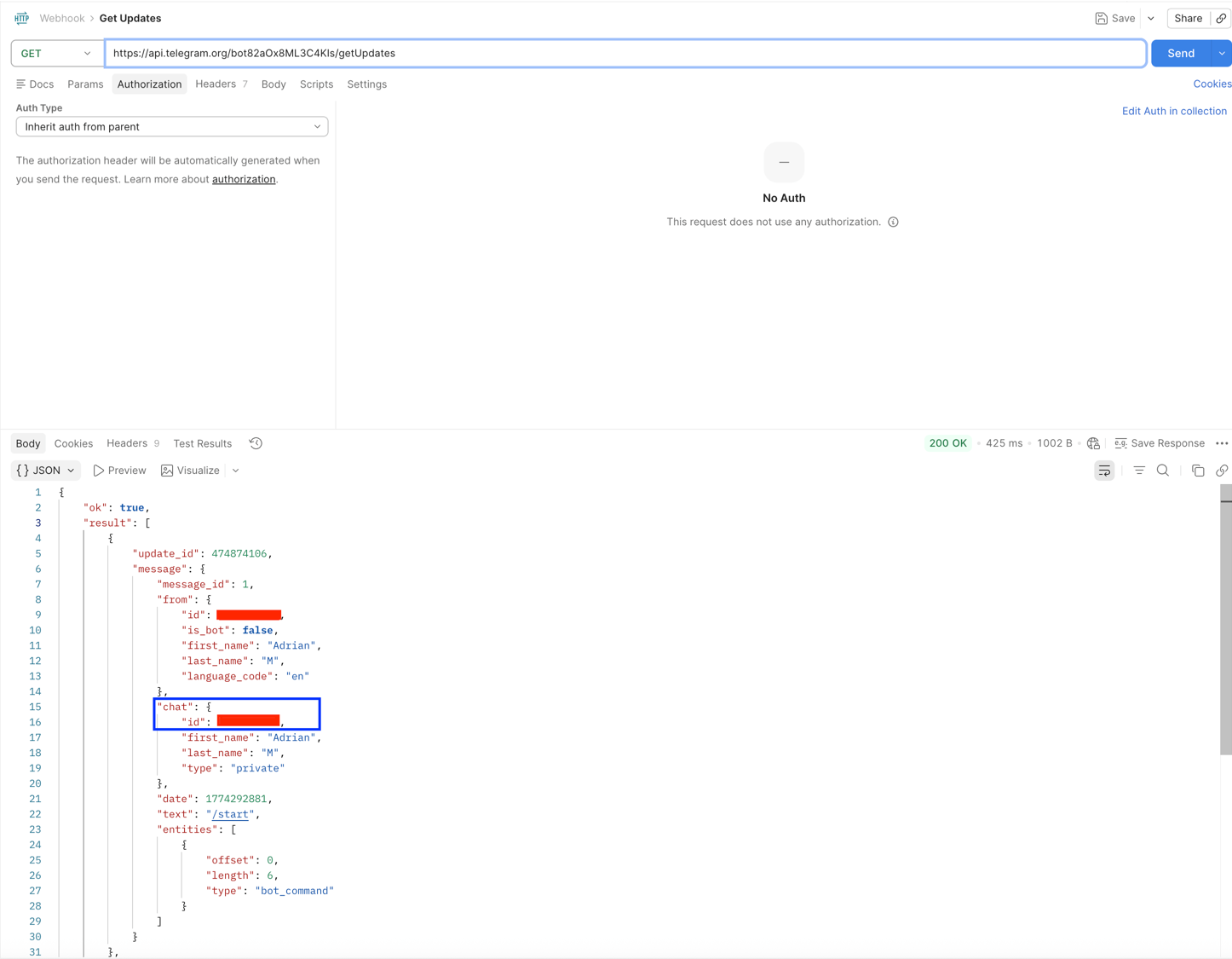
* Kirim pesan ke bot Anda (atau tambahkan bot ke Kelompok dan kirim pesan di sana).
* Kemudian panggil metode getUpdates dari Telegram API.
* Jika itu adalah Kelompok, chat\_id biasanya berupa angka negatif.
* Pastikan bot telah menerima setidaknya satu pesan agar muncul di getUpdates.
3. Kirim pesan (panggilan REST)
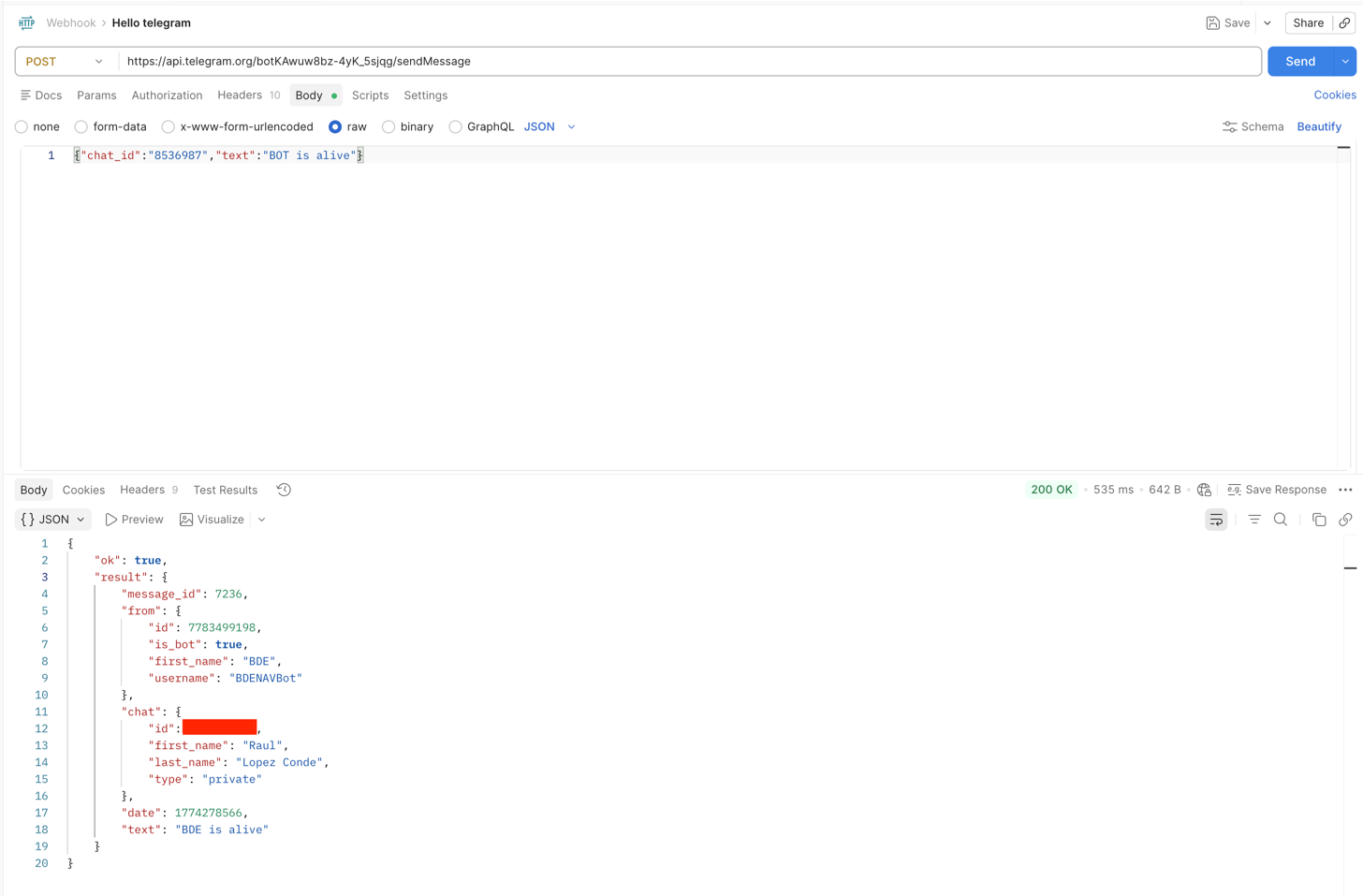
* Gunakan metode sendMessage dari Telegram API.
* Dalam isi permintaan, sertakan chat\_id dan teks pesan.
* Permintaan harus dikirim dalam format JSON dengan header Content-Type: application/json.
4. Buat aliran IoT di Navixy
* Setelah aliran dibuat, sambungkan node Webhook di bagian tempat Anda ingin mengirim data.
* Ikuti struktur yang sama seperti panggilan API. Di kolom URL, Tempatkan endpoint permintaan:
\/sendMessage
* Di bagian Header:
* Kunci: Content-Type
* Nilai: application/json
* Terakhir, di dalam badan permintaan, sertakan parameter telemetri yang ingin Anda kirim, dan pastikan untuk menyertakan chat\_id lagi, misalnya:
{
"obrolan\_id": X,
"teks": "Perangkat 12563254, lintang: {{latitude}}, bujur: {{longitude}}, satelit: {{satellites}}, kecepatan: {{speed}}"
}
 
Dengan langkah-langkah ini, bot Anda akan dapat menerima Pesan dengan sukses, termasuk data telemetri otomatis dari Navixy.
---
# Agent Instructions
This documentation is published with GitBook. GitBook is the documentation platform designed so that both humans and AI agents can read, navigate, and reason over technical content effectively. Learn more at gitbook.com.
## Querying This Documentation
If you need additional information that is not directly available in this page, you can query the documentation by asking a question.
Perform an HTTP GET request on the following URL with the `ask` and `goal` query parameters:
```
GET https://navixy.com/docs/expert-center/id/faq-and-troubleshooting/iot-logic/how-to-connect-telegram-with-navixy-iot-logic.md?ask=&goal=
```
`ask` is the immediate question: it should be specific, self-contained, and written in natural language.
`goal` is what the user is ultimately trying to achieve, the reason they need the answer. Sharing it helps GitBook give you a better, more relevant answer. A goal is most helpful when it describes the outcome the user wants rather than restating the question. For example, with `ask=how do I create an API token`, a goal like `automate deployments from our CI pipeline` lets GitBook tailor the answer to that use case.
The response will contain a direct answer to the question and relevant excerpts and sources from the documentation.
Use this mechanism when the answer is not explicitly present in the current page, you need clarification or additional context, or you want to retrieve related documentation sections.