> For the complete documentation index, see [llms.txt](https://navixy.com/docs/llms.txt). Markdown versions of documentation pages are available by appending `.md` to page URLs; this page is available as [Markdown](https://navixy.com/docs/analytics/dashboard-studio.md).
# Dashboard Studio
Build interactive fleet dashboards and reports from SQL queries without external BI tools. Self-service analytics with drag-and-drop visualization
**IoT Query** gives you direct access to your data. [**Dashboard Studio**](https://navixy.com/en/iot-query/dashboardstudio) transforms that access into visual answers through custom dashboards without requiring external business intelligence platforms. Build visualizations that answer your fleet questions directly, with no separate BI tools, no waiting for custom reports, no data exports to spreadsheets.
## What Dashboard Studio offers
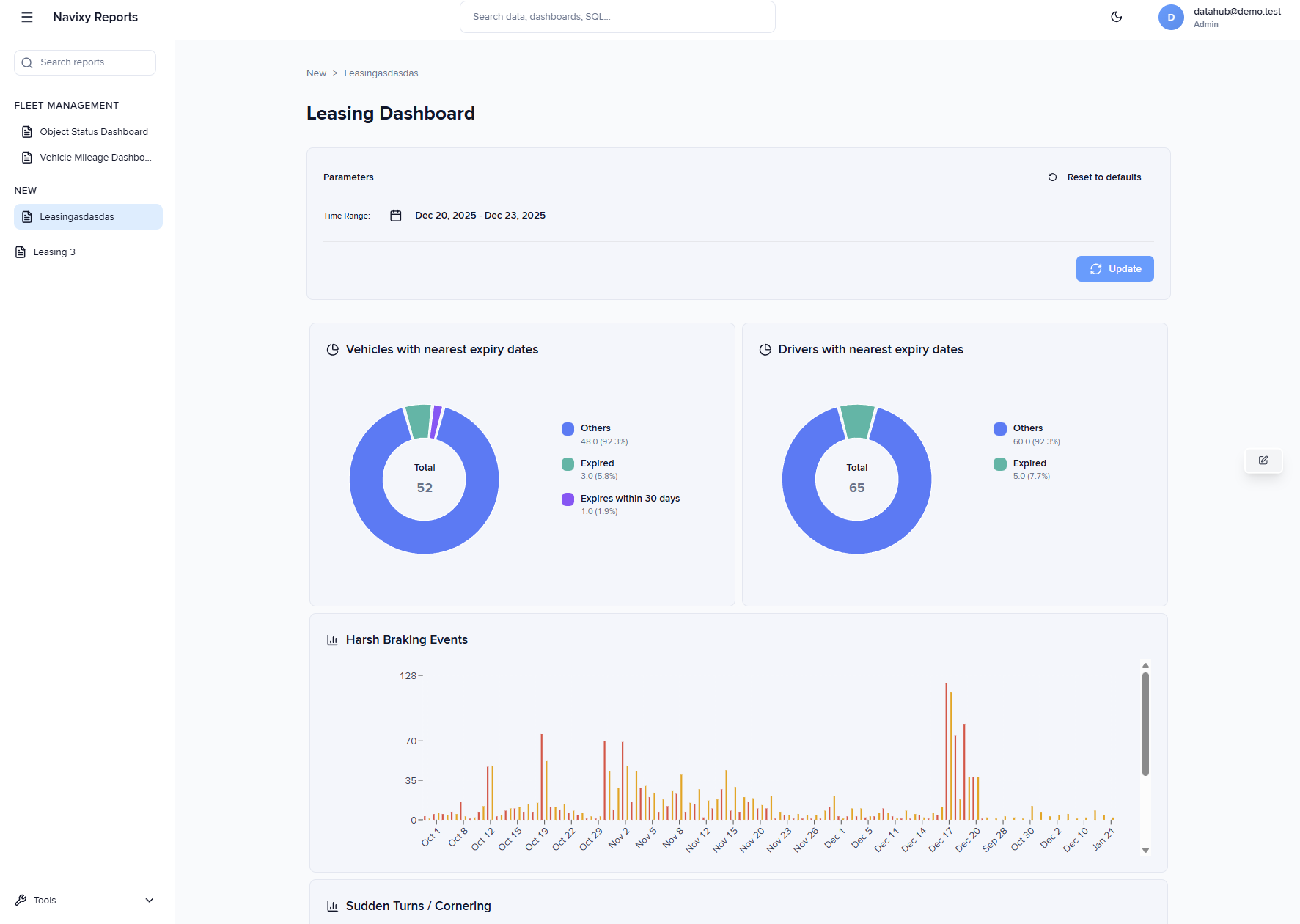
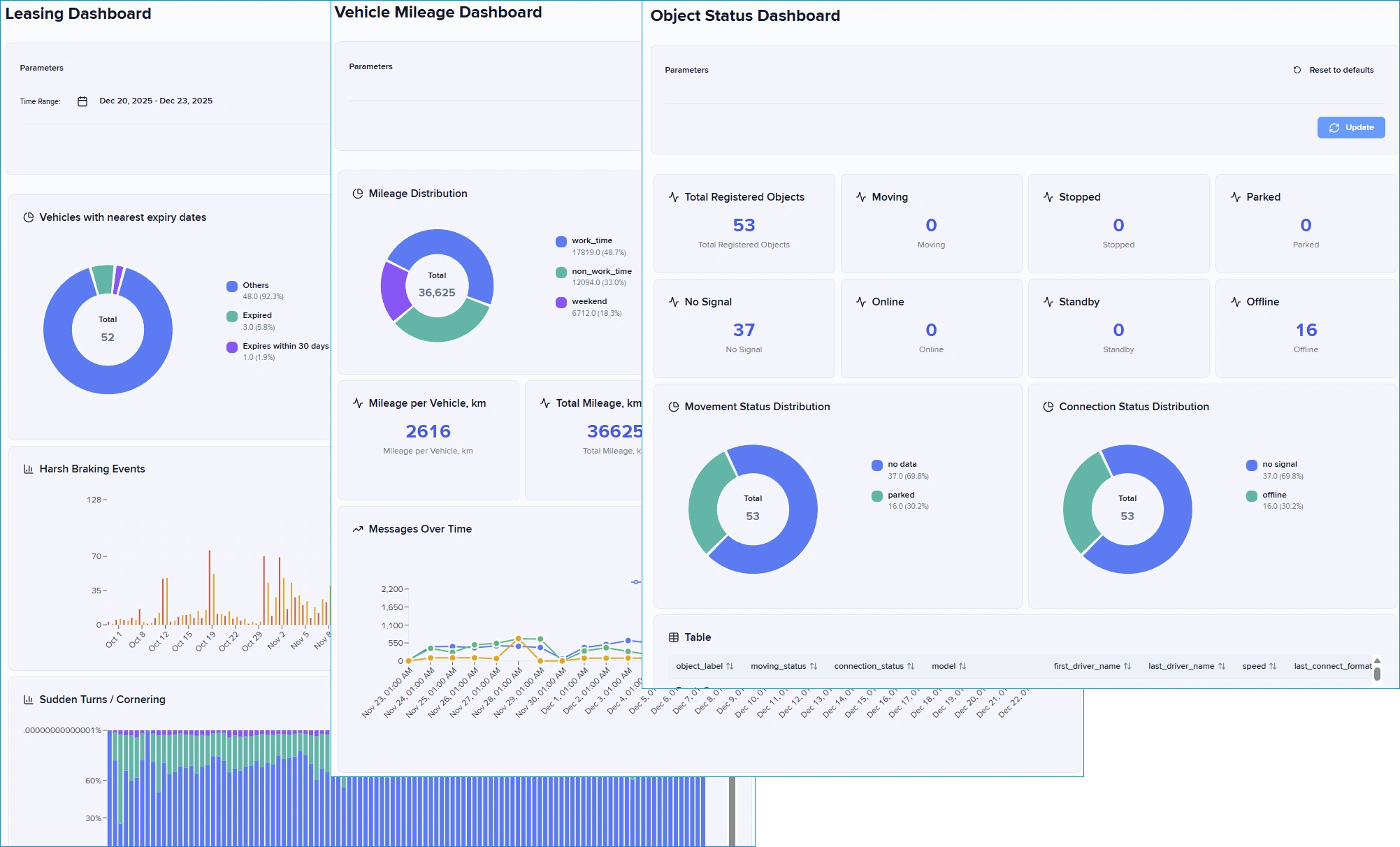
Dashboard Studio extends your [**IoT Query**](https://navixy.com/en/iot-query/) access with an advanced analytics layer, delivering fleet-optimized visualizations through a web-based interface. You execute SQL queries against your **IoT Query** database across **Raw data**, **Transformation**, and **Insight** layers, and Dashboard Studio renders results as interactive dashboards. The dashboards update automatically as new telemetry data arrives, providing current views of fleet operations without manual data exports.
The visual editor separates dashboard design from SQL knowledge. Advanced users write queries once against the structured data model you already access through SQL clients, while dashboard viewers interact with visualizations without touching code. You arrange panels through drag-and-drop, configure visualizations through form-based interfaces, and organize completed dashboards into logical menu structures.
Dashboard Studio also provides [Reports](/docs/analytics/dashboard-studio/creating-reports.md): a format that generates a data table, chart, and location map from a single SQL query, with export to HTML, Excel, and PDF.
## What are the key benefits?
Dashboard Studio addresses common analytics challenges faced by fleet operations. The platform combines direct database access with visual simplicity, creating an analytics environment that serves both technical and operational users.
* **Self-service analytics:** Build and modify dashboards with minimal SQL knowledge using LLMs and examples from our [Recipe Book](/docs/analytics/example-queries.md)
* **Fleet-optimized visualizations:** Six chart types designed for telematics and operational workflows
* **Integrated with your data architecture:** Query across Raw data, Transformation, and Insight layers based on your analysis needs, from detailed exploration to pre-aggregated metrics
* **No external BI investment:** Analytics layer that uses your existing IoT Query access without a separate BI platform infrastructure
## Core capabilities
Dashboard Studio provides six visualization types designed for fleet analytics workflows:
| Visualization | Purpose | Key configuration options |
| --------------- | ------------------------------------------------------------------- | ------------------------------------------------------------------- |
| **Bar charts** | Categorical comparisons and time-series trends | Orientation (vertical/horizontal), stacking, grouping, sorting |
| **Pie charts** | Proportional distributions and category breakdowns | Donut style, legend position, colors, labels |
| **Tables** | Detailed data views with full result sets | Column configuration, pagination, sorting |
| **Stat tiles** | Single metric displays for KPIs | Number formatting, units, thresholds, color indicators |
| **Text panels** | Explanatory content, instructions, or section headers | Markdown, HTML, or plain text formatting, no SQL query |
| **Maps** | Geographic location of data points, plotted from coordinate columns | Auto-detected or manually selected coordinate columns, zoom and pan |
Imported dashboards can also contain additional panel types, such as time series charts, that render correctly but can't be added from the panel gallery.
The dashboard editor lets you position panels by dragging them into place. Panels snap to a grid automatically, keeping everything aligned. Group related panels into rows that you can collapse when you need to focus on other parts of your dashboard. Each panel runs its own SQL query against your IoT Query database.
Organize your dashboards into folders and subfolders in the sidebar menu. Group them by team, by topic, or by how often you use them. Rearrange everything by dragging items up and down the list.
## Who is it for
Dashboard Studio addresses the gap between basic reporting and full business intelligence platform investment, providing self-service analytics that scale with team expertise.
* **Data analysts** will find Dashboard Studio effective for creating custom reports that answer business questions without building a separate BI infrastructure. Transform your **IoT Query** SQL access into shareable visual dashboards or reports that update automatically.
* **Operations analysts** can use Dashboard Studio to build dashboards that track indicators across routes, vehicles, and drivers. Create reusable dashboards that update automatically, replacing manual Excel exports and one-off data requests.
* **Fleet managers** get immediate answers about fleet operations through self-service access to visualizations built on your telemetry data, without waiting for scheduled reports or data analyst availability.
## What you need to get started
Dashboard Studio requires active **IoT Query** access to function. The application queries your IoT Query database directly, using the same schemas, tables, and layered architecture you access through SQL clients or other analytics tools.
Contact your service provider to request IoT Query activation if you don't have access yet. The [Getting started with IoT Query](/docs/analytics/iot-query.md) guide explains connection requirements and describes available data schemas across the Raw data, Transformation, and Insight layers.
### How to access Dashboard Studio
Dashboard Studio operates as a standalone web application that connects to your IoT Query database. Choose between a self-hosted deployment for complete infrastructure control or a Navixy-hosted deployment for integrated platform access.
Both deployment options connect to the same IoT Query database and support identical dashboard functionality.
#### Navixy-hosted
Navixy-hosted deployment embeds Dashboard Studio into your Navixy cabinet through [User Applications](/docs/user/guide/account/user-applications.md). Authentication uses the active Navixy session, so you don’t need a separate login.
To begin using the Navixy Dashboard Studio:
{% stepper %}
{% step %}
**Verify prerequisites**
Ensure that IoT Query is enabled in your environment.
{% endstep %}
{% step %}
**Add Dashboard Studio as a User Application**
1. In Navixy, go to **Account settings ->** [**User Applications**](/docs/user/guide/account/user-applications.md) and create a new application.
2. Set the application **URL** to .
3. Add a descriptive name to your new app.
4. Enable the **session key** authentication parameter.
5. Save.
{% hint style="info" %}
Dashboard Studio requires IoT Query access to be functional. Enable IoT Query before you add the application, because the app has nothing to query without it.
{% endhint %}
{% endstep %}
{% step %}
**Use Dashboard Studio**
Open the application from the main Navixy sidebar create their own analytics through the visual constructor or [SQL queries](/docs/analytics/example-queries.md).
{% endstep %}
{% endstepper %}
Visit the [Dashboard Studio marketplace page](https://marketplace.navixy.com/shop/dashboard-studio/) for access instructions and activation details.
{% hint style="info" %}
If you need help enabling IoT Query, embedding the dashboard, or configuring curated analytics, our team can support you throughout the setup. Please [contact us](mailto:iotquery@navixy.com) to assist you with the setup process.
{% endhint %}
#### Open-source
An open-source (self-hosted) approach gives you complete control over the analytics environment. Deploy Dashboard Studio within your own infrastructure, customize authentication integration, and tailor the interface to your operational workflows. This option suits organizations with specific security requirements or custom integration needs.
For details about open-source usage of Dashboard Studio, see [Open-source Studio](/docs/analytics/dashboard-studio/open-source-studio.md).\
The application source code and deployment documentation are available through the project repository at .
{% hint style="info" %}
Use Navixy's [App Connect](/docs/navixy-api/user-api/resources/commons/user/applications/app-connect.md) for user authentication.
{% endhint %}
## Next steps
[Creating dashboards](/docs/analytics/dashboard-studio/creating-dashboards.md) - Understand the dashboard editor interface and panel configuration workflow. Learn how to add panels, configure visualizations, and arrange dashboard layouts.
[Building dashboards with AI](/docs/analytics/dashboard-studio/creating-dashboards/ai-dashboards.md) - Describe what you want to monitor in plain language and let the assistant generate the panels and SQL. The result opens on a canvas and runs against your own data before you save it.
[Creating reports](/docs/analytics/dashboard-studio/creating-reports.md): Learn how to build a report from a single SQL query with coordinated data table, chart, and location map views. Export results to HTML, Excel, or PDF.
[Writing SQL queries](/docs/analytics/dashboard-studio/writing-sql-queries.md) - Review query patterns that work effectively with Dashboard Studio visualizations. Learn query requirements for each visualization type and common data transformations.
[**Built-in dashboards**](/docs/analytics/dashboard-studio/built-in-dashboards.md) - Browse the 14 ready-made dashboards that ship with Dashboard Studio and import them directly into your instance.
[**SQL Recipe Book**](/docs/analytics/example-queries.md) - Explore comprehensive query examples covering frequent fleet analytics tasks, including trips, geofences, events, and vehicle metrics.
---
# Agent Instructions
This documentation is published with GitBook. GitBook is the documentation platform designed so that both humans and AI agents can read, navigate, and reason over technical content effectively. Learn more at gitbook.com.
## Querying This Documentation
If you need additional information that is not directly available in this page, you can query the documentation by asking a question.
Perform an HTTP GET request on the following URL with the `ask` and `goal` query parameters:
```
GET https://navixy.com/docs/analytics/dashboard-studio.md?ask=&goal=
```
`ask` is the immediate question: it should be specific, self-contained, and written in natural language.
`goal` is what the user is ultimately trying to achieve, the reason they need the answer. Sharing it helps GitBook give you a better, more relevant answer. A goal is most helpful when it describes the outcome the user wants rather than restating the question. For example, with `ask=how do I create an API token`, a goal like `automate deployments from our CI pipeline` lets GitBook tailor the answer to that use case.
The response will contain a direct answer to the question and relevant excerpts and sources from the documentation.
Use this mechanism when the answer is not explicitly present in the current page, you need clarification or additional context, or you want to retrieve related documentation sections.