> For the complete documentation index, see [llms.txt](https://navixy.com/docs/llms.txt). Markdown versions of documentation pages are available by appending `.md` to page URLs; this page is available as [Markdown](https://navixy.com/docs/admin/settings/user-defaults.md).
# User defaults
Set default profile settings for new users, including time zone, date/time formats, units, menu preset, and whether device IMEIs are shown
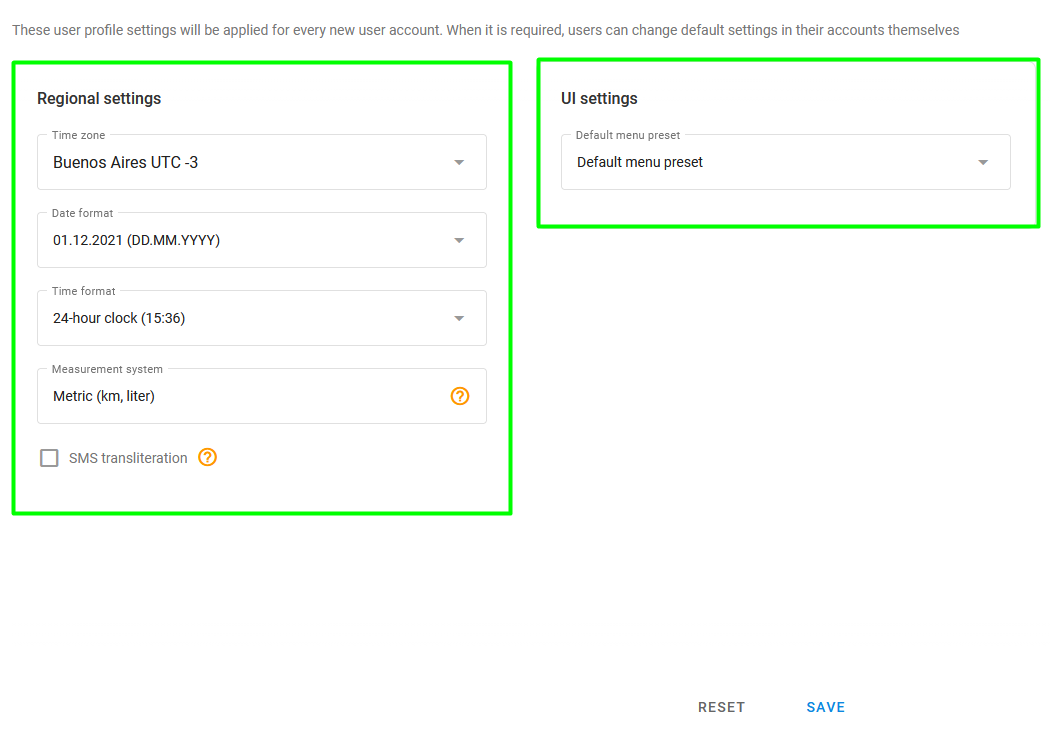
The **User defaults** page contains user profile settings applied to every new user account. Later, users can change their account settings. It consists of two sections: **Regional settings** and **UI settings**.
User defaults page
## Regional settings
You can set the default time zone, date / time format, and measurement system, as well as enable SMS transliteration. These settings are used when your users log in to the system for the first time.
To ensure your workspace aligns with local standards or personal preference, you can choose from one of seven date formats:
* Default (DD/MM/YYYY): The standard numerical format using forward slashes.
* DD.MM.YYYY: A numerical format using dots as separators (e.g., 01.12.2021).
* DD/MM/YYYY': A variation of the standard numerical format.
* MM-DD-YYYY: The month-first numerical format common in North America, using hyphens.
* YYYY-MM-DD: The ISO standard format, ideal for sorting and technical clarity.
* DD MMM YYYY: An alphanumeric format using an abbreviated month (e.g., 1 Dec 2021).
* DD MMMM YYYY: A full alphanumeric format showing the month in its entirety (e.g., 1 December 2021).
The following time formats are available:
* Default
* 12-hour clock
* 24-hour clock
You may choose from the following measurement systems:
* Metric (km, liter)
* Metric + gallons US (km, gallon)
* Imperial (mile, gallon)
* US (mile, gallon)
* Nautical (nautimal mile, knot)
## UI settings
Here you can choose a default menu preset created using the menu editor. The preset list appears only when the menu editor is enabled for your platform. For more information about creating presets, see [Menu editor](/docs/admin/settings/custom-menu-editor.md).
Select **Hide device IMEI** to stop the platform from showing device IMEIs to your users. The IMEI then no longer appears in:
* The **Model** and **Device** widgets of the object information panel, and the **Device ID** mini-widget in the object list.
* The header of the device settings page.
* The lists for choosing and filtering objects, such as the object list of a report.
Raw data files are also named after the object's platform ID instead of its IMEI.
Unlike the other settings on this page, this one is not limited to new accounts. It applies to every user who does not have the opposite value selected in their own user form, including users created before you changed it. A sub-user follows the setting of their master account.
{% hint style="info" %}
The IMEI is hidden from view, not blocked. Users can still find an object by typing its IMEI in the search field, and they still enter the IMEI themselves when they activate a device or connect a mobile tracker. Reports and other files that the server generates keep showing it.
{% endhint %}
---
# Agent Instructions
This documentation is published with GitBook. GitBook is the documentation platform designed so that both humans and AI agents can read, navigate, and reason over technical content effectively. Learn more at gitbook.com.
## Querying This Documentation
If you need additional information that is not directly available in this page, you can query the documentation by asking a question.
Perform an HTTP GET request on the following URL with the `ask` and `goal` query parameters:
```
GET https://navixy.com/docs/admin/settings/user-defaults.md?ask=&goal=
```
`ask` is the immediate question: it should be specific, self-contained, and written in natural language.
`goal` is what the user is ultimately trying to achieve, the reason they need the answer. Sharing it helps GitBook give you a better, more relevant answer. A goal is most helpful when it describes the outcome the user wants rather than restating the question. For example, with `ask=how do I create an API token`, a goal like `automate deployments from our CI pipeline` lets GitBook tailor the answer to that use case.
The response will contain a direct answer to the question and relevant excerpts and sources from the documentation.
Use this mechanism when the answer is not explicitly present in the current page, you need clarification or additional context, or you want to retrieve related documentation sections.