> For the complete documentation index, see [llms.txt](https://navixy.com/docs/llms.txt). Markdown versions of documentation pages are available by appending `.md` to page URLs; this page is available as [Markdown](https://navixy.com/docs/admin/settings/service-preferences/regional-settings.md).
# Regional settings
Set the default UI language for all new user accounts and choose the service currency used across the Navixy platform
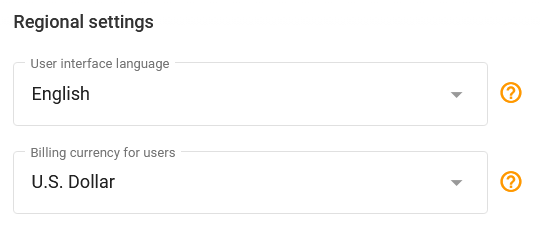
Navixy allows you to choose regional preferences for your service: language and currency. You may set them up in the **Regional settings** block of the **Service preferences** page.
{% hint style="info" %}
Changing UI language sets it as the default language for all new user accounts. Users can also change their preferred language in their [account profile](/docs/user/guide/account/profile.md).
{% endhint %}
Regional settings
## User interface language
Navixy is dedicated to global accessibility, currently supporting dozens of languages with more being added regularly. Navixy platform’s versatility is enhanced by contributions from a community of translators. If the language you need isn’t yet supported, you're encouraged to [add a new language and help expand Navixy's multilingual capabilities](https://www.navixy.com/docs/navixy-api/general/contribute/translation).
**Current list of supported languages:**
Supported languages
1. Albanian
2. Arabic
3. Bosnian
4. Bulgarian
5. Croatian
6. Danish
7. Dutch
8. English (United States)
9. French
10. Georgian
11. German
12. Greek
13. Hungarian
14. Indonesian
15. Italian
16. Kazakh
17. Korean
18. Lithuanian
19. Macedonian
20. Mongolian
21. Persian (Farsi)
22. Polish
23. Portuguese
24. Portuguese (Brazil)
25. Romanian
26. Russian
27. Serbian
28. Sinhala
29. Spanish
30. Tamil
31. Thai
32. Turkish
33. Ukrainian
---
# Agent Instructions
This documentation is published with GitBook. GitBook is the documentation platform designed so that both humans and AI agents can read, navigate, and reason over technical content effectively. Learn more at gitbook.com.
## Querying This Documentation
If you need additional information that is not directly available in this page, you can query the documentation dynamically by asking a question.
Perform an HTTP GET request on the current page URL with the `ask` query parameter, and the optional `goal` query parameter:
```
GET https://navixy.com/docs/admin/settings/service-preferences/regional-settings.md?ask=&goal=
```
`ask` is the immediate question: it should be specific, self-contained, and written in natural language.
`goal` is optional and describes the broader end goal you are ultimately trying to accomplish on behalf of the user. GitBook uses it to tailor the answer towards what is most useful for that goal.
The response will contain a direct answer to the question and relevant excerpts and sources from the documentation.
Use this mechanism when the answer is not explicitly present in the current page, you need clarification or additional context, or you want to retrieve related documentation sections.