> For the complete documentation index, see [llms.txt](https://navixy.com/docs/llms.txt). Markdown versions of documentation pages are available by appending `.md` to page URLs; this page is available as [Markdown](https://navixy.com/docs/admin/settings/messaging-gateways/sms-gateway.md).
# SMS gateway
Connect an SMS provider to Navixy to send M2M device commands, activation messages, and user SMS notifications through the SMS gateway
The **SMS gateway** is a messaging gateway that enables your platform to send and receive SMS messages within Navixy.
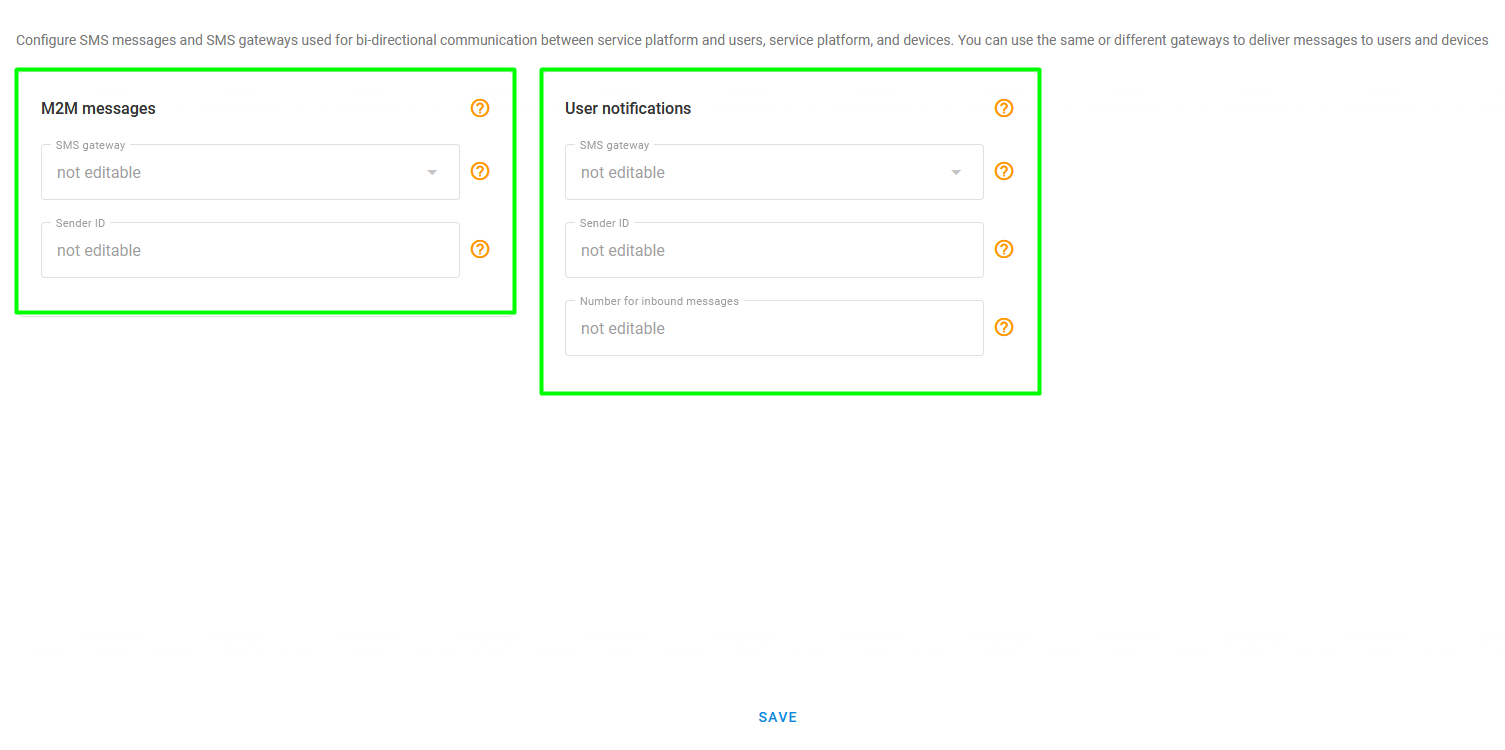
SMS gateway page
The page consists of two sections:
* **M2M messages:** This SMS gateway is used to send commands and receive responses from IoT devices. It enables fully automatic device activation on the Navixy platform and acts as an alternative way to communicate with the device when the main communication over IP isn't possible, such as in roaming areas.
* **User notifications:** By integrating your SMS service provider with Navixy, you can send SMS alerts and notifications to your users when certain events occur, such as when a device goes offline or when a geofence is breached.
### Types of SMS gateways
Navixy can integrate with three types of SMS gateways:
1. **Popular global service providers**\
Navixy is integrated with several popular global service providers through their APIs, including [Twilio](https://www.twilio.com/), [Vonage](https://www.vonage.com/) (formerly Nexmo), [Webex](https://app.webexinteract.com/) (formerly Textlocal), [Infobip](https://www.infobip.com/), [Tyntec](https://www.tyntec.com/), and others. These service providers offer worldwide coverage, though some may have a stronger presence in certain regions to provide better connectivity and pricing. When selecting a messaging provider, Navixy recommends considering these providers first.
2. **SMS centers that work with the common SMPP protocol**\
Navixy can work with any SMS center that uses the SMPP protocol. SMPP is used by a number of SMS centers worldwide. If your preferred service supports SMPP v3.4, Navixy can easily integrate with it.
3. **Hardware gateway devices**\
Navixy also supports hardware VoIP devices such as Yeastar (formerly Neogate) devices, specifically the TG series. These devices can be used to send and receive SMS messages. This option isn't recommended, but can be used for smaller instances.
### Recommendations for using SMS gateways with IoT devices (M2M)
Navixy recommends purchasing a dedicated phone number to use as Sender ID for sending commands and receiving device responses. This is preferable to using a shared number as it can help ensure successful message delivery and command execution.
Keep in mind that certain IoT devices may require special characters or binary commands in their SMS commands. To ensure the successful execution of commands, confirm that your SMS gateway supports these characters and message types. If not, commands may be altered during transmission and executed improperly.
Some known issues include:
* Teltonika and Ruptela devices start with two space symbols, which are used to delimit the device login and password (empty by default). Some SMS services may ignore these symbols as insignificant, which can cause issues with automatic activation. If you use trackers from these manufacturers, Navixy recommends checking with your SMS service's support team to ensure that they don't remove these space characters from the beginning of messages.
* Some global MVNOs provide SIM cards for IoT devices without a phone number assigned to them. Instead, these SIM cards are identified by their ICCID or some other number that identifies the SIM card within the network. As a result, communication with devices that use these SIM cards must be performed via the API provided by the MVNO.
### How to connect Navixy to SMS gateways
To connect your preferred messaging gateway to Navixy, provide the necessary credentials to the Navixy support team. This includes details such as gateway name, API URL, username, password, and any other relevant parameters required by your chosen gateway provider.
Below you will find examples of required credentials for the most common choices. For any SMS gateway, you must also provide the Sender ID, if supported. Once you have gathered this information, send it to the Navixy support team at to get assistance with setting up the integration and ensure that everything is working smoothly.
SMPP
* IP address of the SMPP server
* Port
* Login (system id)
* Password
Twilio
* ACCOUNT\_SID
* AUTH\_TOKEN
or
* API\_SID
* API\_SECRET
Yeastar (ex-Neogate)
* IP address of the device
* Port
* Login
* Password
* GSM span identifier
Tyntec
* URL
* Login
* Password
Webex (ex-Textlocal)
* Login
* API key
---
# Agent Instructions
This documentation is published with GitBook. GitBook is the documentation platform designed so that both humans and AI agents can read, navigate, and reason over technical content effectively. Learn more at gitbook.com.
## Querying This Documentation
If you need additional information that is not directly available in this page, you can query the documentation dynamically by asking a question.
Perform an HTTP GET request on the current page URL with the `ask` query parameter, and the optional `goal` query parameter:
```
GET https://navixy.com/docs/admin/settings/messaging-gateways/sms-gateway.md?ask=&goal=
```
`ask` is the immediate question: it should be specific, self-contained, and written in natural language.
`goal` is optional and describes the broader end goal you are ultimately trying to accomplish on behalf of the user. GitBook uses it to tailor the answer towards what is most useful for that goal.
The response will contain a direct answer to the question and relevant excerpts and sources from the documentation.
Use this mechanism when the answer is not explicitly present in the current page, you need clarification or additional context, or you want to retrieve related documentation sections.