> For the complete documentation index, see [llms.txt](https://navixy.com/docs/llms.txt). Markdown versions of documentation pages are available by appending `.md` to page URLs; this page is available as [Markdown](https://navixy.com/docs/admin/ru/devices.md).
# Трекеры
Управляйте GPS-трекерами в Панели администратора: ищите, фильтруйте и просматривайте сведения по каждому устройству. Редактируйте, клонируйте, удаляйте или меняйте тарифные планы из списка трекеров.
Этот **Трекеры** Страница Панели администратора предоставляет исчерпывающую информацию о настройке GPS-устройств с особым акцентом на конфигурировании устройств для оптимальной работы. Независимо от того, настраиваете ли вы новые трекеры или управляете существующими, Панель администратора предоставляет вам необходимые инструменты для эффективной работы с конфигурациями устройств.
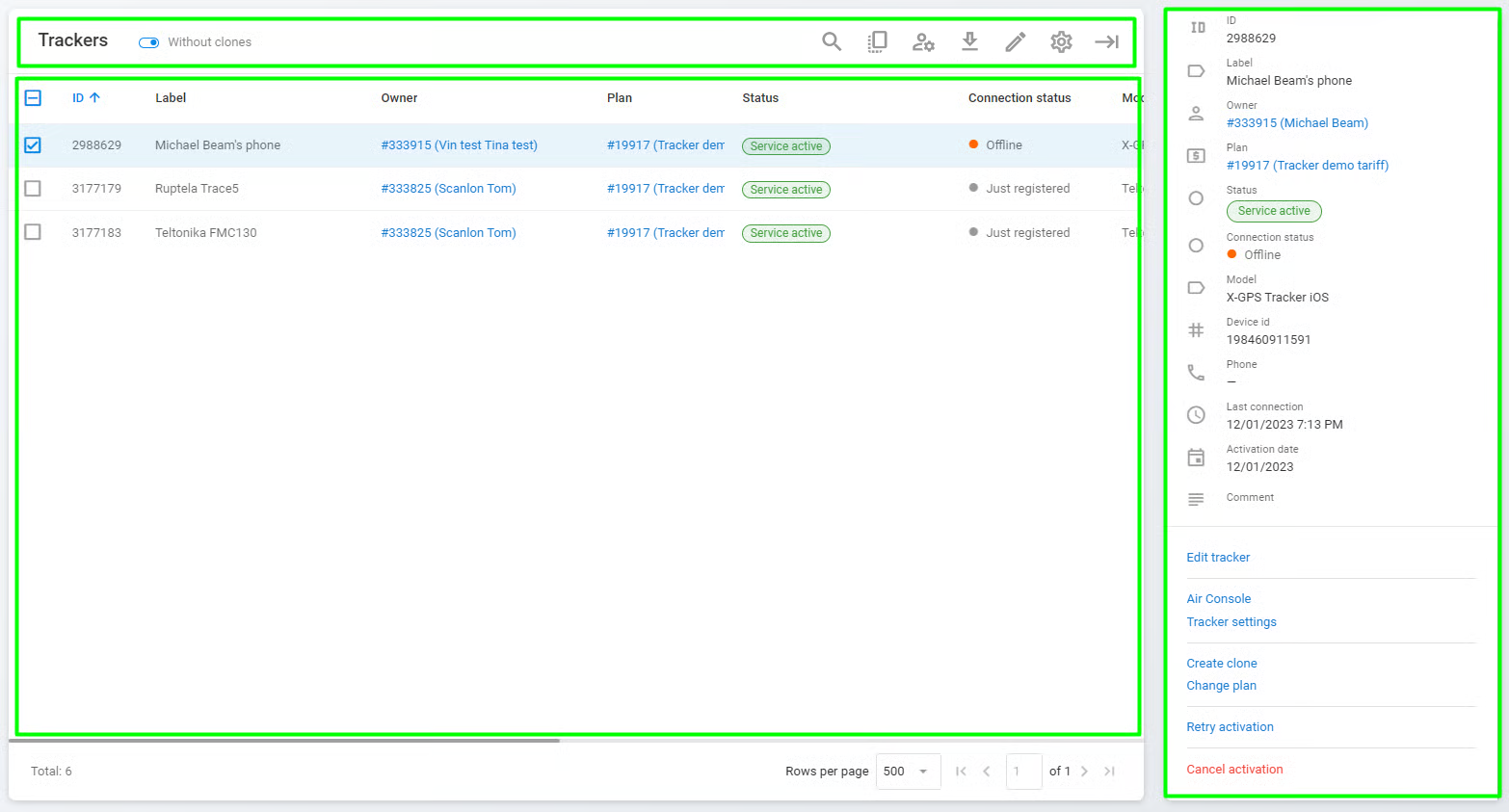
Страница трекеров
Страница состоит из трех основных разделов:
* **Панель инструментов трекера:** Панель инструментов, используемая для удобного поиска, редактирования, удаления, экспорта или клонирования трекера, а также для изменения его владельца.
* **Список трекеров:** Список всех GPS-устройств, которые в данный момент зарегистрированы в экземпляре Navixy. Каждый трекер идентифицируется по своему ID, названию, статусу, модели, ID устройства, номеру телефона и дате активации.
* **Сведения о трекере:** Информация о выбранном трекере со списком связанных действий. См. [Сведения о трекере и операции](/docs/admin/ru/devices/basic-operations.md#tracker-details) для получения дополнительной информации.
---
# Agent Instructions
This documentation is published with GitBook. GitBook is the documentation platform designed so that both humans and AI agents can read, navigate, and reason over technical content effectively. Learn more at gitbook.com.
## Querying This Documentation
If you need additional information that is not directly available in this page, you can query the documentation by asking a question.
Perform an HTTP GET request on the following URL with the `ask` and `goal` query parameters:
```
GET https://navixy.com/docs/admin/ru/devices.md?ask=&goal=
```
`ask` is the immediate question: it should be specific, self-contained, and written in natural language.
`goal` is what the user is ultimately trying to achieve, the reason they need the answer. Sharing it helps GitBook give you a better, more relevant answer. A goal is most helpful when it describes the outcome the user wants rather than restating the question. For example, with `ask=how do I create an API token`, a goal like `automate deployments from our CI pipeline` lets GitBook tailor the answer to that use case.
The response will contain a direct answer to the question and relevant excerpts and sources from the documentation.
Use this mechanism when the answer is not explicitly present in the current page, you need clarification or additional context, or you want to retrieve related documentation sections.