> For the complete documentation index, see [llms.txt](https://navixy.com/docs/llms.txt). Markdown versions of documentation pages are available by appending `.md` to page URLs; this page is available as [Markdown](https://navixy.com/docs/admin/id/devices.md).
# Pelacak
Kelola pelacak GPS di Admin Panel: cari, filter, dan lihat detail setiap perangkat. Edit, klon, hapus, atau ubah paket harga dari daftar pelacak.
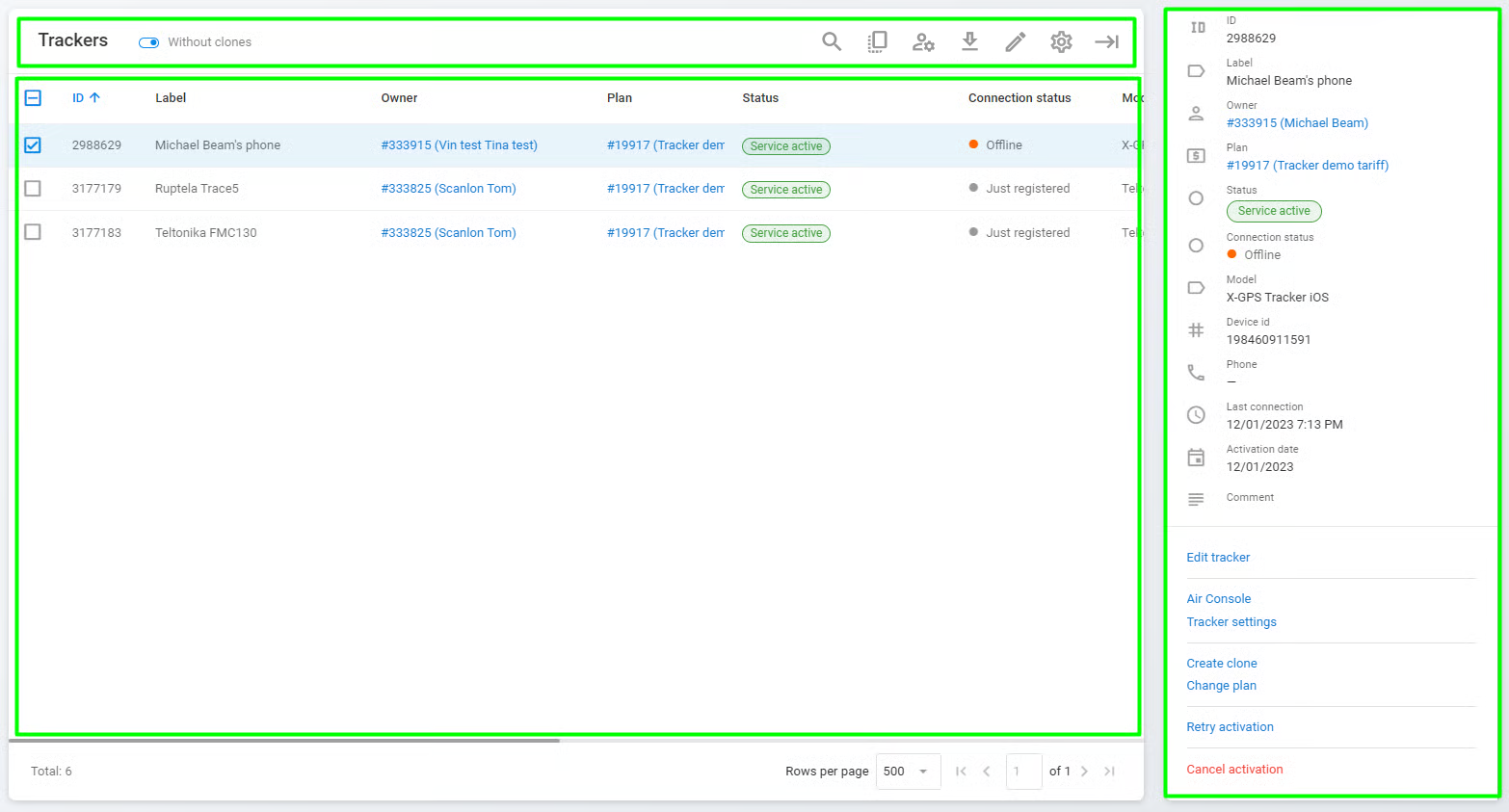
Itu **Pelacak** Halaman panel Admin menyediakan informasi lengkap tentang penyiapan perangkat GPS dengan fokus khusus pada pengonfigurasian perangkat agar performanya optimal. Baik saat menyiapkan pelacak baru maupun mengelola yang sudah ada, panel Admin membekali Anda dengan alat yang diperlukan untuk menangani konfigurasi perangkat secara efisien.
Halaman pelacak
Halaman ini terdiri dari tiga bagian utama:
* **Bilah alat pelacak:** Bilah alat yang digunakan untuk dengan mudah menemukan, mengedit, menghapus, mengekspor, atau menggandakan pelacak, atau mengubah pemiliknya.
* **Daftar pelacak:** Daftar semua perangkat GPS yang saat ini terdaftar di instans Navixy. Setiap pelacak diidentifikasi oleh ID, judul, status, model, ID perangkat, nomor telepon, dan tanggal aktivasi.
* **Detail pelacak:** Informasi tentang pelacak yang dipilih beserta daftar tindakan terkait. Lihat [Detail dan operasi pelacak](/docs/admin/id/devices/basic-operations.md#tracker-details) untuk informasi selengkapnya.
---
# Agent Instructions
This documentation is published with GitBook. GitBook is the documentation platform designed so that both humans and AI agents can read, navigate, and reason over technical content effectively. Learn more at gitbook.com.
## Querying This Documentation
If you need additional information that is not directly available in this page, you can query the documentation by asking a question.
Perform an HTTP GET request on the following URL with the `ask` and `goal` query parameters:
```
GET https://navixy.com/docs/admin/id/devices.md?ask=&goal=
```
`ask` is the immediate question: it should be specific, self-contained, and written in natural language.
`goal` is what the user is ultimately trying to achieve, the reason they need the answer. Sharing it helps GitBook give you a better, more relevant answer. A goal is most helpful when it describes the outcome the user wants rather than restating the question. For example, with `ask=how do I create an API token`, a goal like `automate deployments from our CI pipeline` lets GitBook tailor the answer to that use case.
The response will contain a direct answer to the question and relevant excerpts and sources from the documentation.
Use this mechanism when the answer is not explicitly present in the current page, you need clarification or additional context, or you want to retrieve related documentation sections.