> For the complete documentation index, see [llms.txt](https://navixy.com/docs/llms.txt). Markdown versions of documentation pages are available by appending `.md` to page URLs; this page is available as [Markdown](https://navixy.com/docs/admin/es/settings/service-preferences/regional-settings.md).
# Configuración regional
Establezca el idioma predeterminado de la interfaz para todas las nuevas cuentas de usuario y elija la moneda del servicio usada en toda la plataforma Navixy
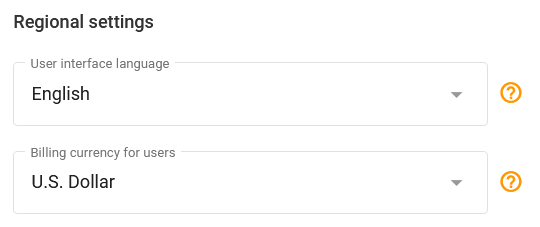
Navixy le permite elegir las preferencias regionales para su servicio: idioma y moneda. Puede configurarlas en el **configuración regional** de la **preferencias del servicio** página.
{% hint style="info" %}
Cambiar el idioma de la interfaz de usuario lo establece como el idioma predeterminado para todas las cuentas de usuario nuevas. Los usuarios también pueden cambiar su idioma preferido en su [perfil de la cuenta](/docs/user/es/guide/account/profile.md).
{% endhint %}
configuración regional
## idioma de la interfaz de usuario
Navixy está dedicada a la accesibilidad global y actualmente admite docenas de idiomas, y se agregan más de manera regular. La versatilidad de la plataforma Navixy se ve reforzada por las contribuciones de una comunidad de traductores. Si el idioma que necesita todavía no es compatible, se le anima a [agregar un nuevo idioma y ayudar a ampliar las capacidades multilingües de Navixy](https://www.navixy.com/docs/navixy-api).
**Lista actual de idiomas compatibles:**
Idiomas compatibles
1. Albanés
2. Árabe
3. Bosnio
4. Búlgaro
5. Croata
6. Danés
7. Neerlandés
8. Inglés (Estados Unidos)
9. Francés
10. Georgiano
11. Alemán
12. Griego
13. Húngaro
14. Indonesio
15. Italiano
16. Kazajo
17. Coreano
18. Lituano
19. Macedonio
20. Mongol
21. Persa (farsi)
22. Polaco
23. Portugués
24. Portugués (Brasil)
25. Rumano
26. Ruso
27. Serbio
28. Cingalés
29. Español
30. Tamil
31. Tailandés
32. Turco
33. Ucraniano
---
# Agent Instructions
This documentation is published with GitBook. GitBook is the documentation platform designed so that both humans and AI agents can read, navigate, and reason over technical content effectively. Learn more at gitbook.com.
## Querying This Documentation
If you need additional information that is not directly available in this page, you can query the documentation by asking a question.
Perform an HTTP GET request on the following URL with the `ask` and `goal` query parameters:
```
GET https://navixy.com/docs/admin/es/settings/service-preferences/regional-settings.md?ask=&goal=
```
`ask` is the immediate question: it should be specific, self-contained, and written in natural language.
`goal` is what the user is ultimately trying to achieve, the reason they need the answer. Sharing it helps GitBook give you a better, more relevant answer. A goal is most helpful when it describes the outcome the user wants rather than restating the question. For example, with `ask=how do I create an API token`, a goal like `automate deployments from our CI pipeline` lets GitBook tailor the answer to that use case.
The response will contain a direct answer to the question and relevant excerpts and sources from the documentation.
Use this mechanism when the answer is not explicitly present in the current page, you need clarification or additional context, or you want to retrieve related documentation sections.